







Gym CRM: Why Enterprise Fitness Clubs Need a Shared Customer System
Having a gym CRM is barely enough anymore. For an enterprise fitness club network, the real test is whether it gives every location full visibility into each prospect and member. It should give clear answers to:
- Where the lead or member came from
- Who owns the relationship
- What happened last
- What should happen next
Without those answers, leads can disappear, and renewal opportunities can go unnoticed. These gaps become even harder to control as multi-location gym operations expand.
If your current gym CRM cannot answer those questions, bad news: you don’t have a shared customer system, but rather an expensive contact list. This guide shows you how to use it for lead routing, follow-up, renewals, attribution, and customer data governance across every location.
What Does a Gym CRM Do For a Fitness Club Network?
A fitness club CRM does a different job for different people. Based on roles:
- A sales rep uses it to follow up with a lead
- A club manager uses it to check whether those follow-ups happened
- A regional leader uses it to see where prospects are dropping out across locations
- At enterprise scale, it must give the entire network a reliable view of the customer
That view starts with one governed record. “Governed” means every location follows shared rules for ownership, required fields, permissions, updates, and duplicate handling. Each profile should show:
- Contact details and communication consent
- Lead source and preferred club
- Previous calls, messages, tours, and trials
- Membership and engagement status
- Current owner and lifecycle stage
- The next action and its deadline
Gym CRM Benefit #1: One relationship across the full lifecycle
A customer relationship rarely stays with one person or team. It moves through a sequence:
Inquiry → Tour or trial → Conversion → Onboarding → Engagement → Renewal → Cancellation → Win-back
The CRM should be able to preserve the context as that relationship moves through the member lifecycle.
For example, in case of an injury, a note should be available to the onboarding team. A missed orientation should prompt the right club to intervene. A change in attendance should inform renewal or retention activity before the member disengages completely.
So, the main value here is not tracking every single move. But whether the next team can continue the relationship without asking the member the same questions.
Gym CRM Benefit #2: One customer, several teams
Marketing might launch one campaign across the whole network. Local teams still have to turn that interest into visits and memberships. Sales teams have to manage conversations and trials while club staff handles onboarding and day-to-day service.
The CRM connects all four, so nothing gets lost between them. Regional leaders, on the other hand, look for patterns across locations.
For example, let’s suppose a lead responds to a national campaign, selects one club, books a trial at another, and later joins near their workplace.
Without a shared history, each location sees only one fragment of the journey. With the right system, every authorized team sees the same person, the same interactions, and the same next step.
Check out: Gym Marketing Strategies That Work
Gym CRM Benefit #3: Network control without removing local judgment
Overall, enterprise-level CRM does not mean forcing every club to operate identically. It means standardizing the parts that must be consistent, such as:
- What counts as a lead?
- Who owns it?
- Who’s allowed to see what?
- How it all rolls up into consolidated reporting?
Everything else, like class schedules, local promotions, or how a team talks to its members, stays up to the club. You get real control across the network and can compare every location fairly, while each one still runs like its own local business.
The Cost of Running Gyms Without a Shared CRM
The cost of a fragmented customer system rarely appears as one obvious line item. It shows up in dozens of small failures: a lead waits too long for a response, two clubs contact the same person, an onboarding note disappears, or a renewal opportunity passes without an owner.
Individually, each failure looks manageable. Across an enterprise network, they become a pattern.
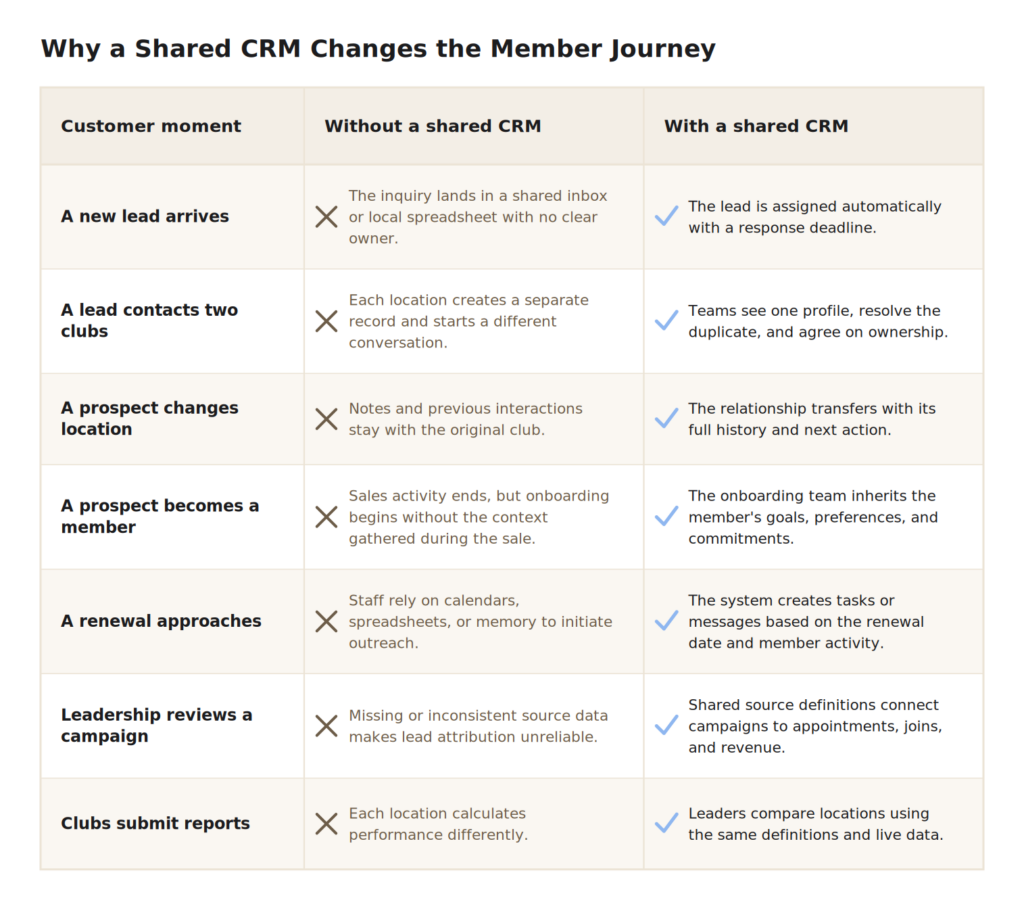
Members feel these gaps first. They get the same message twice, explain their goals to a new person at every location, or hear from a sales team after they’ve already joined.
A gym CRM can’t fix a broken process by itself. But it does make ownership, handoffs, and missed actions visible, so the gaps above stop hiding inside local tools.
Check Out: Gym Lead Management: How to Capture & Convert More Leads
Lead Management Across Locations: 4 Key Tasks
Good lead management across locations comes down to four things: route every lead to the right team, track it through defined stages, handle transfers and duplicates without losing history, and measure the results by location. Skip one, and the other three don’t hold up.
#1. Route by the best next action, not by default.
Assignment should instead reflect the prospect’s preferred club, product interest, location capacity, language, or a central-versus-local sales model.
Every record should then show:
- One current owner
- One response deadline
- One next action
- One escalation rule if nothing happens
#2. Track it through a shared gym sales funnel:
New → Assigned → Contacted → Trial booked → Attended → Joined or lost
Each stage has to describe something that actually happened. “Contacted” should mean a genuine outreach attempt was logged. “Attended” should mean the prospect showed up, not merely that a booking existed.
#3. Handle transfers and duplicates without losing the thread.
Preserve the original source, conversation history, and previous owner. Otherwise, cross-club inquiries, shared households, and returning prospects distort lead attribution and force teams to restart conversations.
#4. Measure it by location.
Response time, contact rate, show rate, conversion, and pipeline aging tell you whether the fitness lead management problem is routing, follow-up, attendance, sales performance, or leads being left untouched.
Automated Follow-Up and Renewal Workflows
Automation keeps work moving and records up to date, especially across multiple locations. Your CRM should react to real events, not follow a random email schedule. Those events should trigger the right message, task, or escalation:
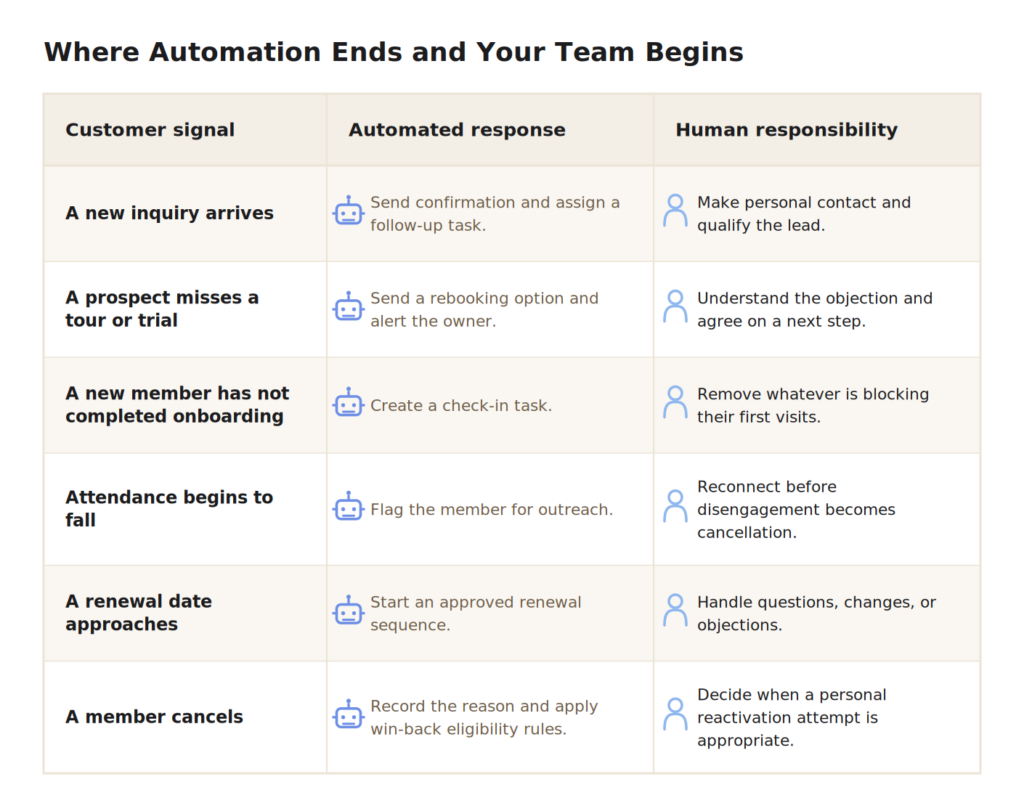
When building a workflow in your CRM, set four simple rules:
- Trigger: What starts the workflow?
- Action: What message or task should follow?
- Stop: What event should end or pause it?
- Owner: Who steps in when a person needs to respond?
For example, a new inquiry can start a follow-up sequence. Booking a trial should stop that sequence and begin the trial reminders. If the prospect replies, the automated messages should pause, and a staff task should be created. An opt-out should stop communication completely.
This makes gym member engagement more relevant because messages respond to what someone actually does. If automation continues after a person books, replies, or opts out, it creates more work instead of saving time.
Consolidated Reporting and Attribution
Reporting starts with definitions. Every location should agree on what qualifies as a lead, appointment, show, join, active member, renewal, cancellation, and win-back.
Wherever possible, those events should be confirmed by system activity. A “show,” for example, should require attendance rather than a booked appointment. A “join” should reflect the agreed membership and payment event.
Once those definitions are fixed, the gym CRM should help leaders answer three questions:
- Where did the result come from? Connect the original source and campaign to trials, memberships, renewals, and revenue. Reliable lead attribution is also the foundation for measuring gym marketing ROI.
- Where does progress stop? Compare response time, stage conversion, pipeline aging, onboarding completion, renewal, and win-back performance.
- Where does performance vary? Move from the network view to region, location, team, campaign, and individual customer records.
Remember that useful reporting should end with a decision. A low conversion rate might point to weak lead quality, slow follow-up, poor trial attendance, or an underperforming sales process. Leadership must have the right problem to solve, not just the numbers.
Think: change staffing, redirect budget, repair a workflow, or revise a forecast. If a dashboard cannot support one of those actions, it is not management information. It is decoration.
| 10 Fitness, 13 locations, Little Rock, AR “With automated reports, what used to take an hour and a half every day is now accomplished in seconds. We have built a navigation system to steer our ship exactly where we want it to. – Andrew Cheffins, CEO Want the same results at every location? TALK TO US |
Read More: The Reporting Wake-Up Call Every Gym Owner Needs
Gym CRM vs. Gym Management Software vs. Marketing Automation
These 3 systems increasingly overlap, which makes feature-by-feature comparisons less useful. The clearer question is: Which system owns each part of the customer journey?
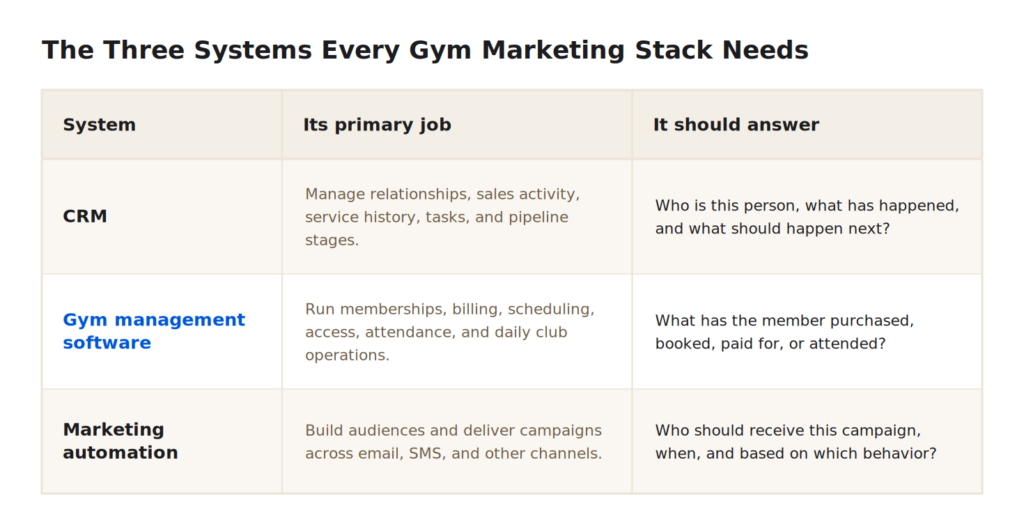
The boundaries matter most when an event crosses systems. A prospect books a trial, attends, joins, misses several weeks, approaches renewal, and then cancels. The business should not lose context each time the journey moves from marketing to sales, club operations, or retention.
Quick comparison: One platform or a connected stack?
Choose an integrated platform if you want:
- One customer record across the journey
- Fewer handoffs and duplicate records
- Simpler reporting, training, and support
- Less integration work
Choose a connected stack if you need:
- Specialist tools for specific jobs
- More control over each part of the system
- The freedom to replace one tool at a time
- Features an all-in-one platform cannot provide
The trade-off is complexity. A connected stack requires reliable CRM integrations, clear data ownership, and a way of matching the same customer across systems. It may also cost more once setup, maintenance, training, and support are added to the license price.
The quick decision: choose one platform for simplicity and consistency. Choose a connected stack when specialist features are worth the extra work required to keep the tools aligned.
How to Evaluate a Gym CRM for Enterprise Fit: Top 5 Evaluation Criteria
A feature checklist makes almost every CRM for the fitness industry look capable. You need to test it before buying.
Ask each vendor to demonstrate the same difficult scenario: a lead responds to a national campaign, changes clubs, attends a trial, joins, becomes inactive, and approaches renewal.
Use that demonstration to test five things:
- Journey: Does the customer keep one record as teams, stages, and locations change?
- Control: Can the network set routing, permissions, required fields, and shared definitions without removing useful local flexibility?
- Data: How does the system handle migration, duplicates, integrations, exports, and failed data transfers?
- Adoption: Can sales, front-desk, management, and regional teams complete their real tasks easily?
- Cost: What will migration, configuration, training, support, administration, and integration maintenance add to the license price?
These questions should shape your software shortlist before CRM implementation begins. Lastly, there is no single best CRM for gyms on the market. The right choice depends on your workflows, team structure, budget, and other business needs.
A 5-Phase CRM Implementation Roadmap
Before setting up the CRM, agree on how leads and members will move between teams and locations, who owns each stage, and what data staff must record.
- Agree on the process
Define each stage of the customer journey, who owns it, what staff must record, and how quickly they should respond. Agree on customer data governance, including who can view, edit, and own customer information.
- Clean and prepare the data
List every system that contains customer data. Remove duplicates, decide where each piece of data will go, and set rules for matching records to the same person. Test the move with a small sample first.
- Test it in one location
Choose a typical location with real operational challenges. Test the most important workflows—such as lead routing, follow-up, and reporting—before adding more.
- Roll it out by role
Train each team only on the tasks they need to complete. Support local leaders, track whether staff is using the system, and keep staff-management practices consistent across locations.
- Review and improve
Check response time, conversion, renewals, completed tasks, data quality, and staff feedback regularly. Change one part of the process at a time so you can see whether it worked.
The goal is to give every location a clear way to use the gym CRM, not leave each club to figure it out alone.
FAQs
1. What is a gym CRM?
A gym CRM is a shared system for recording prospect and member interactions, assigning lead and deal ownership, managing next actions for your team, and tracking progress across the customer lifecycle.
2. What is the difference between a gym CRM and gym management software?
A gym CRM manages the sales and communication process by tracking leads, conversations, follow-ups, and next actions. Gym management software handles the membership itself, including payments, bookings, check-ins, and facility access. In simple terms, the CRM tells staff what they need to do next, while gym management software records what the member bought, booked, paid for, or attended.
3. How does CRM improve gym lead conversion?
A good gym CRM gives every lead an owner, response deadline, next action, and visible pipeline stage. Managers can identify where leads stall and intervene before interest disappears.
4. Can a gym CRM support multiple locations?
Yes, if it supports cross-location routing, transfers, permissions, shared definitions, duplicate handling, and network-wide reporting with location-level detail.
5. What should enterprise fitness CRM software include?
An enterprise-level fitness CRM software should provide governed customer records, lifecycle workflows, routing, role-based permissions, automation, reporting, attribution, integrations, audit history, and reliable data export.
6. How do you implement CRM across a fitness club network?
For successful CRM implementation, begin with shared processes and data rules, prepare and test the data, pilot essential workflows, train by role, roll out in phases, and optimize against agreed performance measures.
Build A Single Customer System Across Every Location
Enterprise fitness clubs do not need another database. They need a system that connects every lead, member, team, and location without losing ownership or context along the way. The right gym CRM software makes that possible, giving local teams the information to act while giving network leaders the control to measure, improve, and scale.
ABC Fitness turns that visibility into a repeatable growth process: capture the lead, assign the next action, keep teams aligned, and continue the relationship after the sale.
Watch the FreshfHIIT growth playbook to see how leads become loyal members, then contact ABC Fitness for pricing to discuss what your network needs. Reach out today!