







Product Updates
Track the evolution of our platform. Filter by release type, product, or timeline to find exactly what you’re looking for.

ABC Insights for Glofox
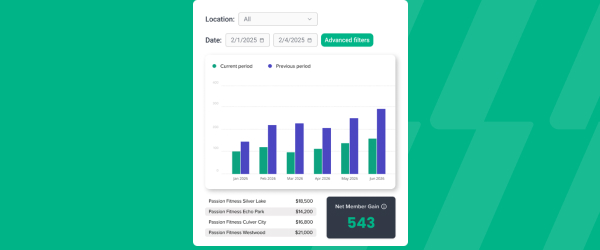
ABC’s flagship reporting product, ABC Insights, is now available to Glofox customers. Owners running multiple locations can use its centralized dashboards to compare performance across every studio or gym in one place. That makes it easier to spot what’s working and what isn’t, rather than piecing together numbers location by location. For multi-site operators, it… <a class="more-link" href="https://abcfitness.com/?post_type=release_update&p=28797">Continue reading <span class="screen-reader-text">ABC Insights for Glofox</span></a>
ABC Insights for Glofox
ABC’s flagship reporting product, ABC Insights, is now available to Glofox customers. Owners running multiple locations can use its centralized dashboards to compare performance across every studio or gym in one place. That makes it easier to spot what’s working and what isn’t, rather than piecing together numbers location by location. For multi-site operators, it turns scattered performance data into a single, clear view for making smarter business decisions.

Short Term Passes
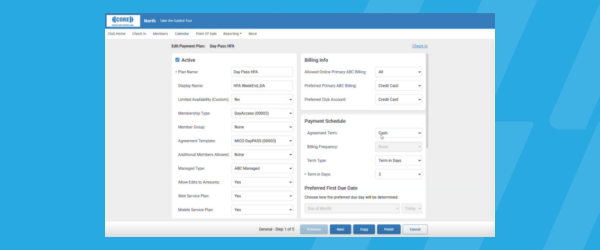
Clubs can now sell flexible access passes for 1 to 30 days, capturing revenue from travelers and short-term visitors with no long-term commitment, and opening a path to convert them into long-term members.
Short Term Passes
Clubs can now sell flexible access passes for 1 to 30 days, capturing revenue from travelers and short-term visitors with no long-term commitment, and opening a path to convert them into long-term members.

AI Workout Builder (Beta)
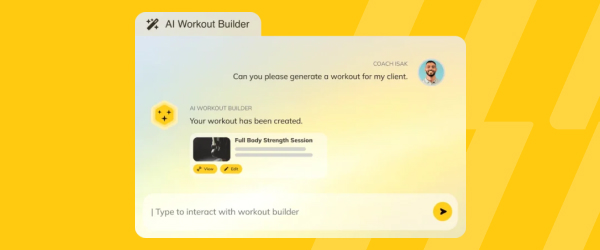
Spend more time coaching and less time programming. AI Workout Builder gets you a personalized, ready-to-assign workout in minutes—built from your client’s real goals, history, and progress. Just type a prompt and it’s built right inside Trainerize.
AI Workout Builder (Beta)
Spend more time coaching and less time programming. AI Workout Builder gets you a personalized, ready-to-assign workout in minutes—built from your client’s real goals, history, and progress. Just type a prompt and it’s built right inside Trainerize.
Flexible Meal Plans: Add Individual Foods Directly to Meals with Food Search
Coaches and clients can now add individual foods and ingredients directly to Flexible Meal Plans on web and mobile, without needing to create a recipe first. With food search powered by the MyNetDiary library, it’s easier to build precise meal plans, track nutrition and manage meals with less effort. Users can view calories, macros and… <a class="more-link" href="https://abcfitness.com/?post_type=release_update&p=30817">Continue reading <span class="screen-reader-text">Flexible Meal Plans: Add Individual Foods Directly to Meals with Food Search</span></a>
Flexible Meal Plans: Add Individual Foods Directly to Meals with Food Search
Coaches and clients can now add individual foods and ingredients directly to Flexible Meal Plans on web and mobile, without needing to create a recipe first. With food search powered by the MyNetDiary library, it’s easier to build precise meal plans, track nutrition and manage meals with less effort. Users can view calories, macros and verified food indicators before adding items, while meal and daily nutrition totals update automatically. Clients can also log all foods and recipes in a meal slot at once with the new Log Meal option.
Available with the Advanced Nutrition Coaching add-on and on Studio Plans.

Guest Waiver App: Collect Marketing Permissions – New Settings
This release supports clubs that wish to treat collection of marketing consent differently for SMS versus Email in the Guest Waiver app. Previously, a single “Request Marketing Permission” setting controlled collection of marketing consent for both channels. This release splits that into independent Email and SMS controls. For more information, please see our Help Center… <a class="more-link" href="https://abcfitness.com/?post_type=release_update&p=30693">Continue reading <span class="screen-reader-text">Guest Waiver App: Collect Marketing Permissions – New Settings</span></a>
Guest Waiver App: Collect Marketing Permissions – New Settings
This release supports clubs that wish to treat collection of marketing consent differently for SMS versus Email in the Guest Waiver app. Previously, a single “Request Marketing Permission” setting controlled collection of marketing consent for both channels. This release splits that into independent Email and SMS controls.
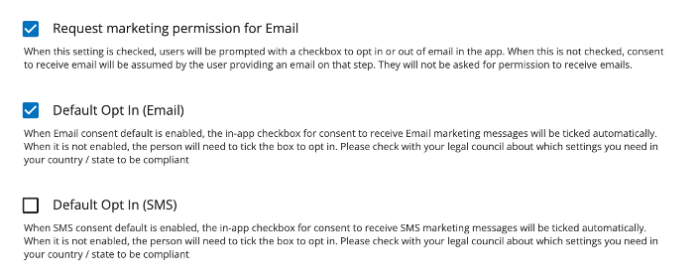
For more information, please see our Help Center article: Collecting Marketing Permission on the Guest Waiver App
Exercise In-Progress: Keep Workouts Moving, Even When Clients Navigate Away
Clients can now navigate away from an active workout in the mobile app to check nutrition, log a habit, reply to a message or update a setting, then jump right back in without losing their workout progress. This makes it easier to manage everyday tasks while training, creating a smoother and more flexible workout experience.
Exercise In-Progress: Keep Workouts Moving, Even When Clients Navigate Away
Coach Command Centre: A New Overview Page to Help Coaches Take Action Faster
The revamped Overview page helps coaches quickly identify key client signals and turn them into actionable next steps. With a more focused, customizable command center built around the tools coaches use most, it’s easier to prioritize clients who need attention, streamline daily workflows and get value from the product faster. This release also lays the… <a class="more-link" href="https://abcfitness.com/?post_type=release_update&p=30825">Continue reading <span class="screen-reader-text">Coach Command Centre: A New Overview Page to Help Coaches Take Action Faster</span></a>
Coach Command Centre: A New Overview Page to Help Coaches Take Action Faster
The revamped Overview page helps coaches quickly identify key client signals and turn them into actionable next steps. With a more focused, customizable command center built around the tools coaches use most, it’s easier to prioritize clients who need attention, streamline daily workflows and get value from the product faster. This release also lays the foundation for future improvements that help coaches better support their clients, improve trial conversion and strengthen paid user retention.
Insights: One Canonical “Active Member” Count
Active member counts are aligning across the State of the Business, Member Analysis, Daily Snapshot dashboards and the All Members report, by using one single Active Member definition, also aligned with M&O. Prospects, deleted records, and duplicates no longer be included. What you’ll notice: Daily Snapshot: Minor shift to match others State of the Business:… <a class="more-link" href="https://abcfitness.com/?post_type=release_update&p=30708">Continue reading <span class="screen-reader-text">Insights: One Canonical “Active Member” Count</span></a>
Insights: One Canonical “Active Member” Count
Active member counts are aligning across the State of the Business, Member Analysis, Daily Snapshot dashboards and the All Members report, by using one single Active Member definition, also aligned with M&O. Prospects, deleted records, and duplicates no longer be included.
What you’ll notice:
- Daily Snapshot: Minor shift to match others
- State of the Business: Reconciles with Daily Snapshot
- Member Analysis: Biggest change — defaults to Active only (inactive statuses available under Advanced Filters)
- All Members report: Same definition as the dashboards; counts moves closer to M&O
Worth knowing:
- No changes are made to your actual member base, only to how records are counted and filtered
- Historical counts are recalculated, so a one-time shift is expected
- You may continue to use filters to view inactive members and other member statuses as needed
Member App Redesign (Early Access)
A modern member app makes finding, booking, and getting to class feel effortless, with a new Home screen, simpler navigation, and smarter search.
Member App Redesign (Early Access)
The Member App Redesign gives members a modern app that makes finding, booking, and getting to class feel effortless.
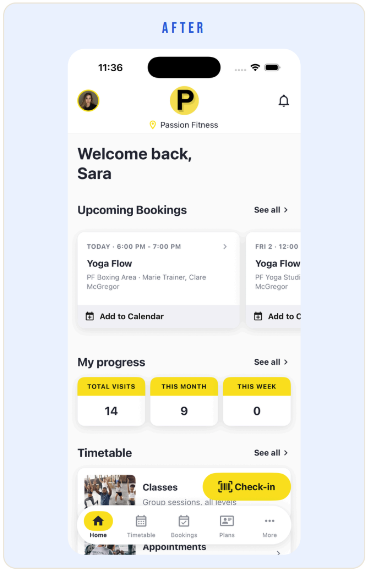
A new Home screen puts upcoming bookings, progress, barcode check-in, and schedule shortcuts on the first screen, so the things members use most are always one tap away.
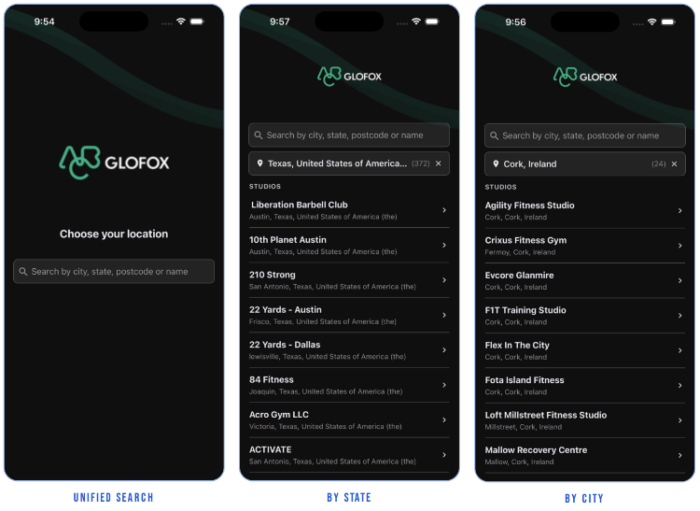
Navigation is simpler throughout, and location search now works by name, city, state, or postcode, which makes it easier for members to find the right studio or gym.
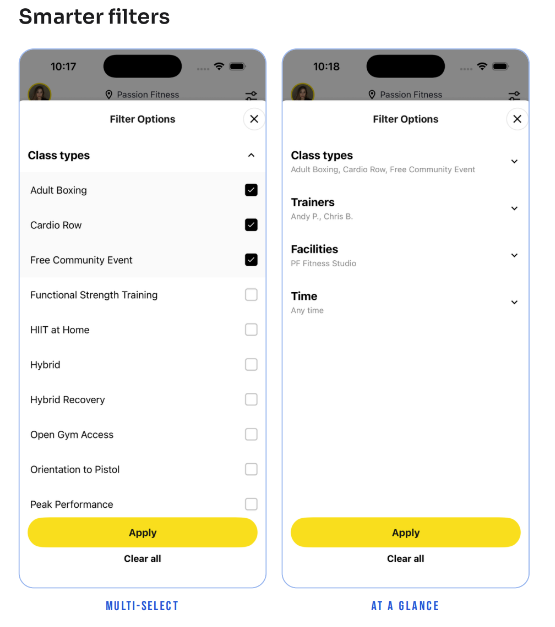
Multi-select schedule filters help members narrow the timetable to the classes they want, and a dedicated Credits purchase path makes buying credits clearer.
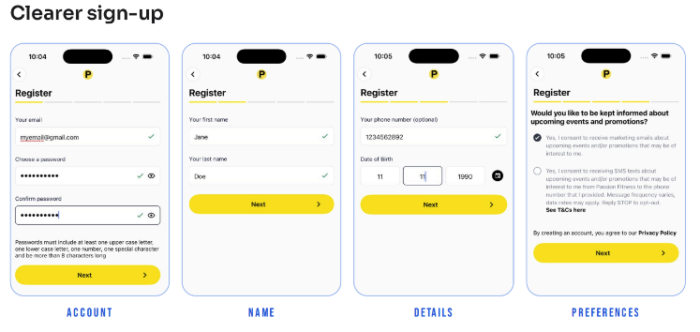
Sign-up is clearer too, with a progress bar and a confirm password step.
The redesign is in early access and available on request, with full release details coming soon.
Removal of Discounts on Active Memberships
Stay in control of every discount you offer, right up to the last payment, by removing a discount from an active membership at any time.
Removal of Discounts on Active Memberships
Removal of Discounts on Active Memberships keeps you in control of every discount you offer, right up to the last payment.
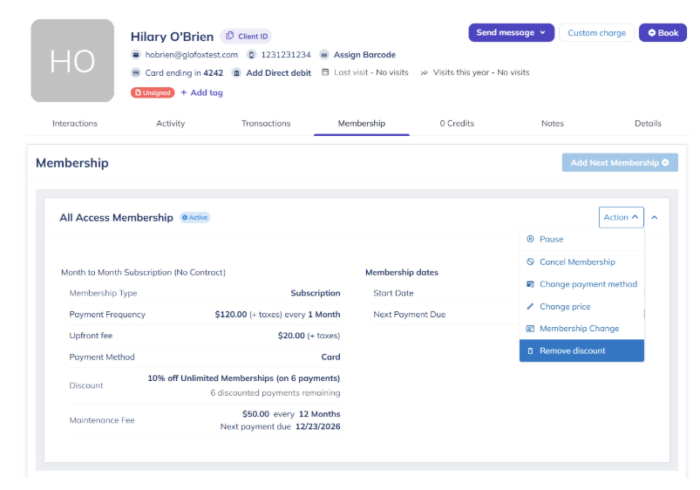
Staff can now remove a discount from an active membership in the Membership tab under Actions, which ends the remaining discounted payments right away. That means a discount applied in error, or one that no longer fits the member’s circumstances, can be corrected without cancelling and recreating the membership. Each removal is logged in the membership history with the date, time, and staff member, giving you a clear audit trail of who changed what and when.
The result is tighter control over recurring revenue and full visibility of every discount change.
E-Agreements Reporting Update
Know which members and leads need follow-up first. Five new columns on the downloadable E-Agreements report add visit and lead context.
E-Agreements Reporting Update
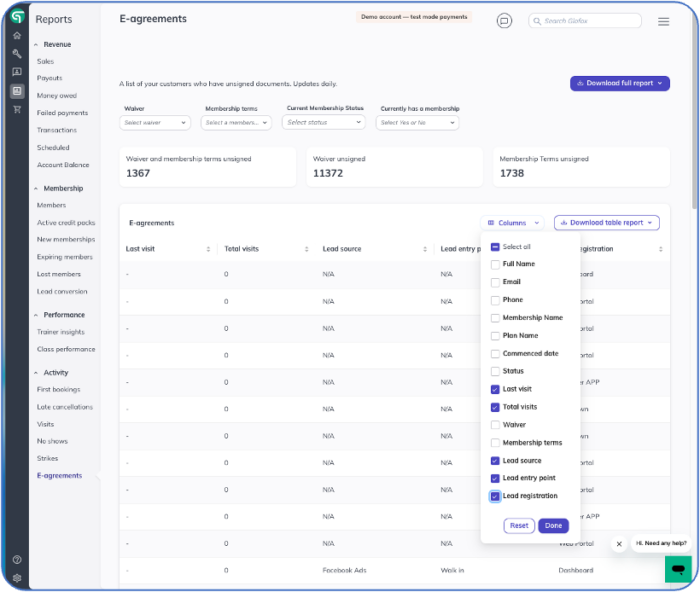
E-Agreements Reporting Update adds five new columns to the downloadable E-Agreements report:
- Last Visit,
- Total Visits,
- Lead Source,
- Lead Entry Point,
- Lead Registration.
The update was driven by customer feedback and closes gaps customers specifically flagged in the report. With visit and lead context sitting beside agreement data, teams can more easily identify who needs follow-up first. Staff no longer need to cross reference a second report to understand how engaged a member is or where a lead came from.
The result is less operational friction and more flexible reporting from a single export.
Glofox and Kisi Single App Door Access
One app gets members through the door. Members unlock Kisi doors directly from the Glofox app, with no separate Kisi app to install or troubleshoot.
Glofox and Kisi Single App Door Access
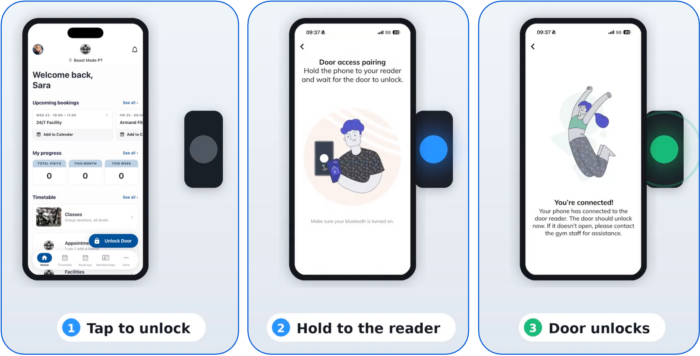
Glofox and Kisi Single App Door Access lets members unlock Kisi doors directly from the Glofox app.
Members no longer need a separate Kisi app to open studio doors, so everything they need happens inside Glofox. With one less app for members to install, log into, and troubleshoot, studios and gyms can expect fewer access-related support tickets. The feature is now expanding to more Kisi customers after a successful pilot with early adopters.
The result is a smoother arrival for members and less access support work for staff.
ABC AI Agents Updates
Give members faster, more natural conversations and staff less friction, with updates across the ABC AI Agents Chatbot, Contacts and Inbox, Phone and Voice, and Connected Apps.
ABC AI Agents Updates
ABC AI Agents Updates bring improvements across four areas of ABC AI Agents.
In the Chatbot, conversations now appear in the Inbox immediately and persist across browser tabs, built on a new architecture that lays the groundwork for future features, including live handoff to staff.
Contacts and Inbox have a redesigned Contacts list and Contact Details experience, with major performance improvements for faster conversation search and filtering.
For Phone and Voice, configurable Pre-Connect Messages move required disclosures out of the AI’s greeting, giving callers a shorter, more natural start to the call.
Connected Apps has a refreshed experience that makes integrations easier to find, connect, and manage.
Restrict Cart Price Editing
Protect retail margin at the point of sale. Admins choose which roles can edit cart or retail prices at checkout.
Restrict Cart Price Editing
Restrict Cart Price Editing gives admins control over who can edit cart or retail prices at checkout.
Previously, front line staff could discount cart or retail prices at checkout without approval. A new permission, configurable by Glofox support, lets you choose which roles can edit price at checkout, so discount authority stays with the right people. Fewer unauthorized discounts means retail and cart revenue tracks closer to list price.
The result is less revenue leakage and clearer accountability for pricing decisions at the front desk.
Contact Glofox customer success to enable for your business.
Restrict Next Payment Date Edits
Close a billing loophole and protect recurring revenue. Admins choose which roles can edit a membership's Next Payment Date.
Restrict Next Payment Date Edits
Restrict Next Payment Date Edits gives admins control over who can edit a membership’s Next Payment Date.
Previously, front line roles could push out a member’s Next Payment Date with no oversight, which created a billing gap. A new role permission, configurable by Glofox support, lets you choose which roles can make this change. The permission can be as open or as tight as each studio needs, so operators can match it to how their team works.
This protects revenue integrity by reducing the chance of missed or delayed charges caused by an unintended date change.
Contact Glofox customer success to enable.
Pro App: Filter Events by Trainer
Find any trainer's schedule in seconds at the front desk. Admins and staff can filter the Pro App calendar by trainer across classes, appointments, and availability.
Pro App: Filter Events by Trainer
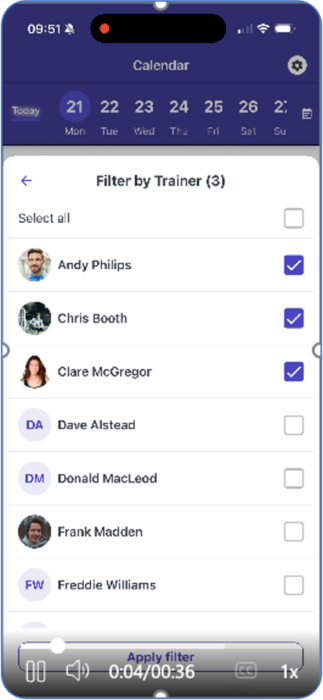
Pro App: Filter Events by Trainer lets admins and staff filter the Pro App calendar by trainer.
The filter works across the whole calendar, covering classes, appointments, and availability, not just one view. Front desk staff can pull up one trainer’s schedule instantly instead of scanning the full calendar, which speeds up everyday tasks like answering a member’s question or finding an open slot. This is especially useful for studios and gyms with larger teams, where a full calendar view can be crowded.
The result is a faster front desk workflow and less time spent searching during busy shifts.
Money Owed Report Updates
Recover failed payments faster by knowing who to contact first. Three new columns on the Money Owed report show failure history, recent visits, and payment methods on file.
Money Owed Report Updates
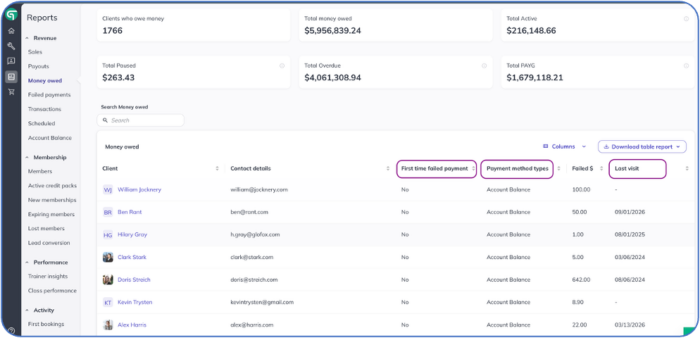
Money Owed Report Updates add three new columns to the Money Owed report, found under Reports, Money Owed.
- First Time Failed Payment shows at a glance which members are failing a payment for the first time versus a repeat failure.
- Last Visit lets staff cross reference payment issues with recent visits, so outreach can be prioritized for members who are still engaged.
- Payment Methods Used shows which payment methods are on file for each member, making it faster to diagnose and resolve the failure.
Together, the new columns help teams focus recovery efforts where they are most likely to succeed, without opening each member’s profile.
Introducing New Goals to Challenges: Step, Hydration, and Referral Goals
Make challenges more engaging by giving clients more ways to earn points. You can now reward clients for reaching daily step goals, meeting daily water goals and referring a friend. Combine different scoring rules to create challenges that encourage healthy habits, boost participation and keep clients motivated. Client Referral Goals, Available with the Business Add-On*
Introducing New Goals to Challenges: Step, Hydration, and Referral Goals
Make challenges more engaging by giving clients more ways to earn points. You can now reward clients for reaching daily step goals, meeting daily water goals and referring a friend. Combine different scoring rules to create challenges that encourage healthy habits, boost participation and keep clients motivated.
Client Referral Goals, Available with the Business Add-On*
Business Umbrella Page: Find Your Tools in One Centralized Hub
The new Business Add-On Umbrella Page brings your business tools together in one convenient place. Easily access Stripe, Trial Products, Prospect Booking, Client Referrals, Announcements, Video Coaching and the Business Dashboard from a centralized hub, making it simpler to find and manage the tools you need to run and grow your business.The new Business Add-On… <a class="more-link" href="https://abcfitness.com/?post_type=release_update&p=30841">Continue reading <span class="screen-reader-text">Business Umbrella Page: Find Your Tools in One Centralized Hub</span></a>
Business Umbrella Page: Find Your Tools in One Centralized Hub
The new Business Add-On Umbrella Page brings your business tools together in one convenient place. Easily access Stripe, Trial Products, Prospect Booking, Client Referrals, Announcements, Video Coaching and the Business Dashboard from a centralized hub, making it simpler to find and manage the tools you need to run and grow your business.The new Business Add-On Umbrella Page brings tools like Stripe, Trial Products, Prospect Booking, Client Referrals, Announcements, Video Coaching, and the Business Dashboard into one centralized hub.
Availible with the Business Add-On.
Daily Step Goals: Help Clients Build More Active Habits
Daily Step Goals give clients a clear daily target to work toward and make it easier to build consistent activity habits. Clients can track their progress using synced wearable data or manually enter their steps in the mobile app, helping them stay accountable and motivated to move more every day.
Daily Step Goals: Help Clients Build More Active Habits
Daily Step Goals give clients a clear daily target to work toward and make it easier to build consistent activity habits. Clients can track their progress using synced wearable data or manually enter their steps in the mobile app, helping them stay accountable and motivated to move more every day.
Insights Dashboard Update: Get a More Complete View of Client Progress
The Insights Dashboard now gives you a clearer picture of client progress with new check-in form responses, Body Fat %, Fat Mass, Lean Mass and weekly averages. Updated Progress Photo Comparisons also make it easier to track visual changes over time, helping coaches better understand client progress and make more informed coaching decisions across web… <a class="more-link" href="https://abcfitness.com/?post_type=release_update&p=30835">Continue reading <span class="screen-reader-text">Insights Dashboard Update: Get a More Complete View of Client Progress</span></a>
Insights Dashboard Update: Get a More Complete View of Client Progress
Together, these updates mean less switching between screens and a more complete picture of client progress at a glance.
Booking Link Settings
Customize how appointments booked through Booking Link are scheduled.
Booking Link Settings
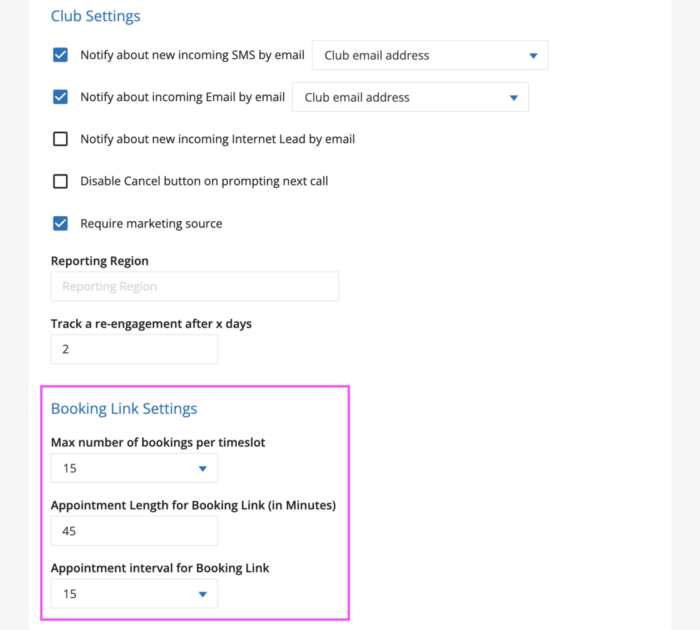
The Booking Link Settings section in Company Settings lets you control how appointments booked through the Online Scheduler are configured, including the following customization options:
- How many bookings can be made per timeslot
- The default length of booked appointments
- The time intervals on which appointments can be booked
Thesesettings are accessible to users with the Club Manager or Regional Manager role. These can be configured within your GymSales Company Settings on the General Settings tab.
Open your Company Settings and on the General Settings tab, look for the section titled Booking Link Settings.
Good to know
The Appointment Length and Appointment Interval settings only affect your Online Scheduler link settings. They don’t change your GymSales Calendar settings (Default appointment length and Time step in minutes), found under Company Settings > General Settings > Working Time.
If you want to change how Appointments behave on your internal GymSales Calendar view, use those settings instead.
Late Cancellation Override via Class List
Give staff a fast way to make things right for a fair exception by waiving a late cancel fee and returning the credit in a single step.
Late Cancellation Override via Class List
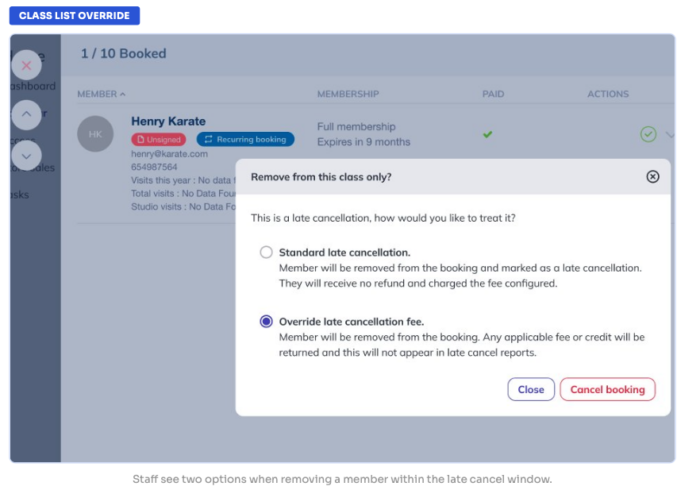
Late Cancellation Override via Class List gives staff a fast way to make things right without punishing members for a fair exception.
Admins can now waive a late cancel fee and return the credit directly from the class list in a single step, so a genuine exception is handled in the moment at the front desk. If the decision comes later, the same override can be applied from the Pending Fees report. Overrides never appear in the Late Cancellations report, so your late cancellation data stays clean and reflects only the cancellations you chose to enforce.
The result is a quicker, more consistent way to handle exceptions while keeping your policy and your reporting intact.
No Show and Late Cancel: Unlimited Memberships
Stop losing revenue when unlimited members skip class without consequence by applying no-show and late cancel fees to unlimited members only.
No Show and Late Cancel: Unlimited Memberships
No Show and Late Cancel: Unlimited Memberships helps you stop losing revenue when unlimited members skip class without consequence.
Credit-based and pay-per-visit members already lose a credit or pay a fee when they no-show or late cancel, but at many studios unlimited members have nothing at stake when they miss a class they booked.
You can now configure no-show and late cancel fees to apply only to unlimited members, so every member has a reason to turn up or cancel in time. The result is fairer accountability across membership types and better protection for class capacity, without adding fees for members who already give up a credit.
Multi-Location Campaigns
Run brand-wide campaigns on your own schedule. HQ can schedule a campaign ahead of time, then edit or delete it any time before it sends.
Multi-Location Campaigns
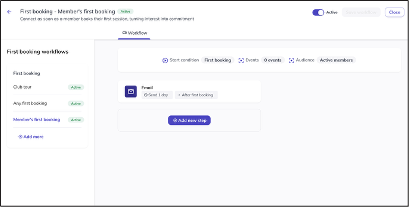
Multi-Location Campaigns can now be scheduled, edited, and deleted directly from the Dashboard by customers with an HQ configured.
When creating a campaign, users can set a future date and time for it to send, and the campaign then appears in the Scheduled tab. Any time before send, HQ can change the audience, schedule, subject, body, sender, and reply settings, or delete the campaign entirely. Changes cascade down to every targeted branch, so locations stay consistent without anyone rebuilding the campaign.
This gives multi-location operators a dependable way to plan communications in advance and correct them before they reach members.
First No Show Workflow
Catch a drifting member before one missed class becomes a pattern, with an automated follow-up sent the first time a member misses a class.
First No Show Workflow
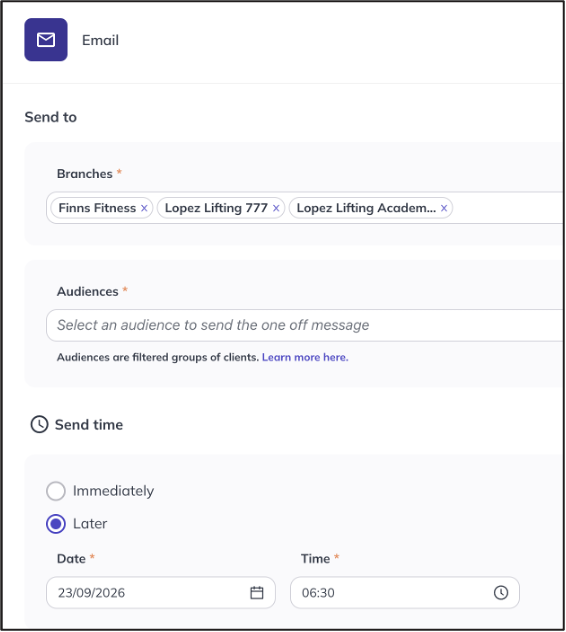
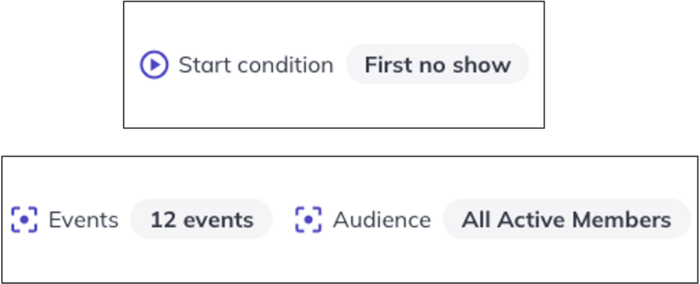
The First No Show Workflow automatically follows up the first time a member misses a class.
A first missed class is often the earliest sign a member is starting to drift, so this is the point where re-engagement is still simple. The workflow supports email, SMS, push notifications, and staff tasks, so studios and gyms can meet members on the channel they are most likely to respond to.
It pairs with the First Booking and First Attendance workflows, which lets operators build a complete engagement journey from a member’s first class through every class after.
The result is earlier, more consistent outreach to members at risk of lapsing, with no manual tracking of absences by staff. Requires Elite or XLerate.
Preferred Health Data Source: Give Clients More Control Over Their Health Data
Clients who connect multiple wearables or health apps can now choose a preferred data source for each data type directly from the mobile app. This helps reduce conflicting readings and keeps activity data more consistent, giving clients and coaches a clearer picture of health and activity progress.
Preferred Health Data Source: Give Clients More Control Over Their Health Data
Clients who connect multiple wearables or health apps can now choose a preferred data source for each data type directly from the mobile app. This helps reduce conflicting readings and keeps activity data more consistent, giving clients and coaches a clearer picture of health and activity progress.