






Gym Access Control for Multi-Location Operators: How to Choose and Roll Out
TL;DR: Choose gym access control by how well it enforces your membership rules at every club. Then prove it in a pilot at a club with older hardware or unstaffed hours first. Test billing changes, offline doors, and local exceptions in every demo. Expand to the next wave only when the right member gets in and the wrong one is denied.
Most gym access control projects look fine on install day. The trouble shows up later: the door lets in people it shouldn’t, keeps out people it should let in, and your staff end up sorting it out at the front desk.
The hardware works. What breaks is the link between the door and your membership rules.
So choose a system by how well it enforces those rules at every site, then prove it in a pilot before you roll it out. This guide covers hardware fit, billing tests, local exceptions, cost, and rollout. It starts with how your membership software connects to the door, because that link decides most of what follows.
What Gym Access Control Must Do Across Multiple Locations
Gym access control answers one question every time someone reaches a door: should this person get in here, right now? Your rules hold the answer. The card, fob, or phone only asks the question. The reader and lock carry out what your rules say.
That’s simple at one club. It gets harder with every site you add, which is why multi-location gym access is where weak systems tend to fail. If membership status and access permissions don’t match at every club, cross-location access breaks the first time a member trains somewhere new.
Every entry runs through four steps. The member shows a credential, the system checks your rules, the lock opens, and the entry is logged. The step to ask about is the check. Does it run on site, from a saved copy of your member list, or online?
Your answer to that question decides two things you’ll care about later. It decides whether doors keep working when the internet drops, and how fast a cancelled member loses access.
Access control for health clubs only holds up when someone on your team owns each of those decisions. The demo scorecard below shows who should own what.
Read More: Best Gym Management Software for Multi-Location Gyms in 2026
Audit Existing Hardware Before Choosing Credentials
Before you pick a credential, check whether your existing readers, controllers, and scanners work with the new system, site by site.
Start with an inventory for every site:
- Doors and locks: Type and condition.
- Readers and controllers: Models and firmware.
- Credential format: What members use today.
- Internet and power: What each door depends on.
- Landlord limits: What you can and cannot change.
- Support owner: Who installs and fixes each part.
Then mark each site as reuse, replace, or provider must validate.
Never assume all radio-frequency identification (RFID) or QR readers are interchangeable. Door readers, controllers, and electronic locks from different makers can differ in ways that break a swap.
Next, weigh the credential types. Every option has trade-offs:
| Mobile, RFID, PIN, and biometrics compared for multi-location gyms | ||||
| Credential | Convenience | Sharing risk | Backup if it fails | Setup effort |
| Mobile and secure QR | Easy: phone in hand | Low: harder to lend | Medium: PIN or staff help | High: 2D scanners and app |
| RFID cards and key fobs | Easy: tap and go | Medium: can be lent | Easy: staff reissue | Medium: matching reader |
| PIN | Medium: no device needed | High: easy to share | Easy: staff reset | Low: keypad per door |
| Biometrics | Easy: nothing to carry | Low: tied to the person | Hard: needs a second credential | High: privacy review |
Mobile credentials (an app or QR code on the member’s phone) and secure QR codes lead for a multi-location operator, with RFID cards and key fobs as the fallback. To let a friend in, a member has to hand over their own phone, not just a card they can spare. It still happens, just less often.
In most cases, you also don’t need fingerprint or face scans for 24/7 gym access control. They add privacy questions, so plan a review before you use them.
At ABC Fitness, we support secure QR codes on ABC ACS v2.6.0 or later. The setup also calls for compatible 2D scanners and a check of any third-party door system, so test every site on its own.
Three safety checks sit outside your membership rules, so hand them to your facilities team:
- Accessible entrances: every accessible entrance stays usable.
- Fast exit: people can always leave quickly in an emergency.
- Sign-off: a qualified installer and your local authority approve each site.
Ask what each door does when power or the internet connection drops, and how backup power works. Safe exit must work whether or not entry is allowed.
Test Membership and Billing Changes at the Door
A door that opens does not prove the system works. The right person, at the right place and time, must get in, and the wrong person must be denied. Spend your demo time testing exactly how your membership and billing rules change at the door.
#1 Start with the source of truth
Ask which system holds membership, payment status, and identity. Then ask how a change reaches every door, and how the system catches a missed update. Have your team run these tests, and ask for the evidence.
#2 Entry follows the policy you set, including grace periods
An active account is not the same as a paid invoice, so a late payment does not have to close the door. Two cases need extra care:
- Failed payment:
The most common cause is an expired or outdated card, not a member who wants to leave. An instant lockout would deny entry and hurt the member experience, so let your policy decide how to handle this case.
- Offline controller:
Some controllers check a saved member list instead of going online at each entry. Ask what happens to a newly revoked credential while a controller is offline, and what syncs on reconnect. That is where offline access and credential revocation get tested for real.
Your members need one identity that every door recognizes, but a point-of-sale link alone does not prove door authorization. For recovery steps after a failed card, see our guide to payment processing.
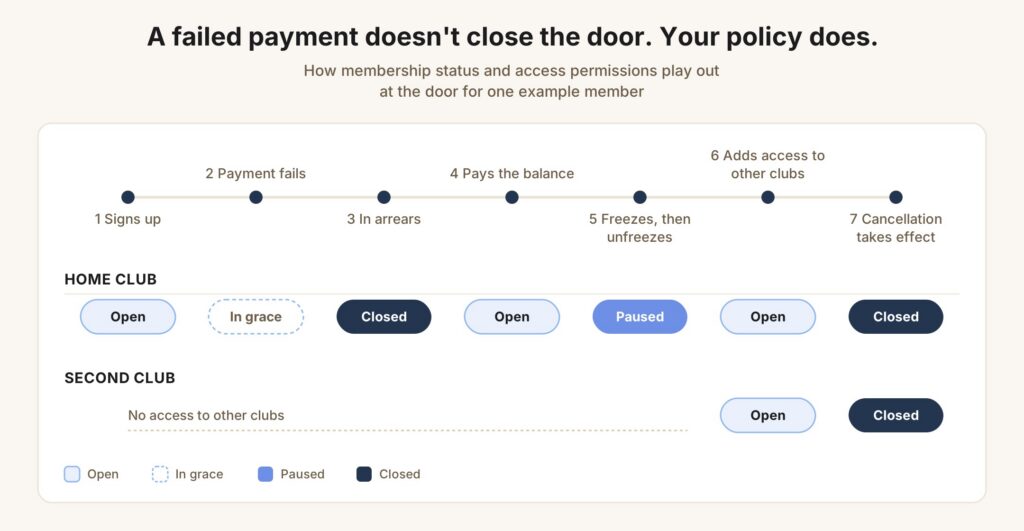
Ask the provider to run one test member through each change below, live, using your own rules. For each step, you should see the door result and the log entry that proves it.
| Gym access control tests by member event | ||
| Member event | At the door | Evidence to request |
| Signs up | Open at the home club only | Timestamped sign-up, then first allowed entry |
| Payment fails | In grace, still open | Grace rule in settings, allowed entry in the log |
| In arrears | Closed | Status change, then denied entry with a reason |
| Pays the balance | Open again | Paid invoice, then allowed entry |
| Freezes, then unfreezes | Paused, then open | Denied while frozen, allowed after |
| Adds access to other clubs | Open at the home club and a second club | Allowed entry at both clubs |
| Cancellation takes effect | Closed at both clubs | Allowed entry until the effective date, denied after |
Set One Policy Framework With Controlled Local Exceptions
The best practice is to set the rules once at HQ. Then list exactly what each club may need to change. Start with your membership tiers and access schedules, then add the rules that vary by site. Here is a four-row example:
| Policy matrix for multi-location gym access | |||
| Policy area | HQ sets | Club can change | Sign-off and record |
| Roaming rights | Which plans open which clubs | Nothing, unless a franchise agreement allows it | HQ only; entries logged at both clubs |
| Hours and zones | A default schedule for each plan | Local hours for staffed and unstaffed areas | Regional manager; change logged with date |
| Guest and contractor access | Named, time-limited passes | Day passes at that club | Club manager; pass shows host and end date |
| Temporary overrides | A logged reason for every one | One person, one door, a short window | Duty manager; ends on its own, reason logged |
For each change a club makes, name who approves it, when it ends, and where the log shows it.
A corporate chain and a franchise group need different lines. In a franchise, headquarters can set common membership rights while each owner controls local schedules. Decide who can grant entry to another owner’s club, and who investigates a denied-entry dispute.
A 24/7 gym access control setup has to work when nobody’s at the front desk. So decide three things up front: who’s on call after hours, how members get in if their phone or card fails, and what happens when a door is left propped open. Tailgating detection and anti-passback add a layer of safety, but they work best as part of that plan.
The same goes for overrides. When staff let someone in by hand, the system should record who did it, for how long, and why. That way you can trust the exceptions and review them later.
Overall, before you use entry counts for attendance, safety reviews, or retention outreach, ask the provider what the system actually counts.
Compare Total Cost and Ask for Proof in Every Demo
Give each team involved in the decision the same scorecard, and start with who owns each check. Agree who owns an incident when the software provider and the installer are different companies.
Mark each requirement pass, fail, or unresolved. A critical unresolved item blocks expansion, even if everything else passes.
Ask every provider for proof and give each check an owner. Mark each check as pass, fail, or unresolved. A critical check left unresolved may block expansion:
| Gym access control checks, proof, and owners | |||
| Check | Proof to ask for | Owner | Critical |
| Entry follows your membership and roaming rules | Your own member scenarios, run live | Operations | Yes |
| Updates reach every door, and misses get caught | A change made live, then the door result | Operations | Yes |
| Your doors work with the system | A test on your door list | IT and facilities | Yes |
| Doors stay safe when power or internet drops | An offline and power-loss test | IT and facilities | Yes |
| Staff can handle overrides and exceptions | A live override, plus a training plan | Regional teams | No |
| Full cost on the same scope | One portfolio quote, including both systems and exit terms | Finance | No |
Hardware is only one line of the price. Ask every provider for one portfolio quote on the same scope, and make sure it covers:
- Setup: Hardware, installation and cabling, credentials, integrations, and training
- Ongoing: Software, support, maintenance, and replacements
- Easy to miss: Running old and new systems side by side, and the cost of leaving the contract
Connected systems can work well too, so judge each option on evidence, not on whether it is native. For a wider platform comparison, read our guide to multi-location gym software.
Bring these same questions to us, and we will go through them with you.
ABC Ignite automates check-ins and access control. Our club-branded app adds secure automated access and billing alerts before check-in.
Read the Vent Fitness success story / Book a demo
Roll Out in Phases, With a Go/No-Go Gate at Each Stage
Installing the best system everywhere at once is the riskiest way to do this. You can roll out a gym door access system in stages instead. Each stage ends with a go or no-go gate, a checkpoint where you decide to move on or fix a problem first.
How long each phase takes depends on your clubs. Ask your provider for an estimate in days or weeks once they’ve seen your door list, how long hardware takes to arrive, and how many sites you have.
Use this order to plan your rollout, not as an ABC Fitness timeline.
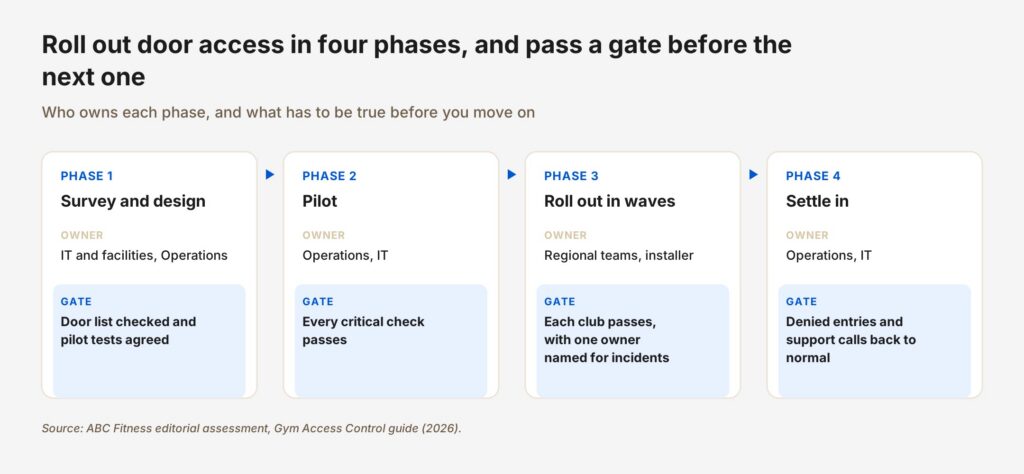
Here’s what happens inside each phase:
- Survey and design:
- IT, facilities, and Operations agree on the door list, how member records match to credentials, your roaming rules and grace periods, and who handles support.
- Finance gets the full scope for the portfolio quote.
- Pilot:
- Start at a hard site, because an easy site proves little. A club with older hardware or unstaffed hours will show problems a newer, staffed club would hide. Run the same member journey shown in the timeline above, then add scheduled entry, a lost credential, and an outage.
- Roll out in waves:
- Group clubs by hardware and readiness, train local staff, and tell members before their credentials change. Name who can pause the switch at each club. Keep one source of truth throughout, so the old and new systems never give different answers.
- Settle in:
- Track denied-entry reasons, missed updates, member support calls, and how fast eligible members get access back, club by club. Pull this from remote management and audit trails, and compare it with how your clubs ran before the switch.
If you need to switch back, the old setup should work as it did before, with every safety feature still on.
End every wave by checking more than whether the door opens. The right member gets in at the right club and time, and the wrong one is denied. Approved exceptions, restored access, and outage recovery all work. Then name who signs off before the next wave starts.
FAQs
1. What are the best gym door access control systems for multi-location operators?
The best access control for health clubs is the one that passes your tests. Look for entry tied to membership status, cross-location permissions, mobile or QR credentials, offline access, and audit logs. ABC Ignite connects to ABC’s own door access system, which reads secure QR codes, and to Kisi, which syncs door access with membership status across clubs and logs every door event. Ask to see offline access in your pilot, at a club with older hardware or unstaffed hours.
2. Can one membership give access to multiple gym locations?
No, not by default. For multi-location gym access, you set location rights for each plan, then test cross-location access at a second club before you rely on it. In a franchise, a club can only grant roaming if its agreement allows it.
3. Does a failed payment automatically stop gym access?
No, not on its own. An instant lockout has a member experience cost, so your policy decides, including any grace period and effective date. Ask each provider to demonstrate suspension and reinstatement using your rules, not a sample account.
4. Will gym access control work if the internet goes down?
Yes, if the controller has saved permissions. Gym access control needs a clear answer on new revocations while offline, backup power, and what syncs on reconnect. Treat safe exit as a separate question: people must be able to leave whether or not entry works.
5. Can we keep our existing gym door access system hardware?
Yes, but only after you check model, firmware, credential format, and integration compatibility at each site. A reader that works today does not prove it will work with a new gym door access system, so test it before you buy.
Bring Your Door List and Policy Scenarios to a Demo
Good gym access control meets one standard: the right person gets in at the right place and time, and the wrong person does not. Exceptions, restored access, and outages all follow your policy, and someone signs off before the next wave.
Bring your door inventory and your toughest policy scenarios to an ABC Ignite demo, and ask the team to walk through them with you.