








Product Updates
Track the evolution of our platform. Filter by release type, product, or timeline to find exactly what you’re looking for.

ABC Insights for Glofox
ABC’s flagship reporting product, ABC Insights, is now available to Glofox customers. Owners running multiple locations can use its centralized dashboards to compare performance across every studio or gym in one place. That makes it easier to spot what’s working and what isn’t, rather than piecing together numbers location by location. For multi-site operators, it… <a class="more-link" href="https://abcfitness.com/?post_type=release_update&p=28797">Continue reading <span class="screen-reader-text">ABC Insights for Glofox</span></a>
ABC Insights for Glofox
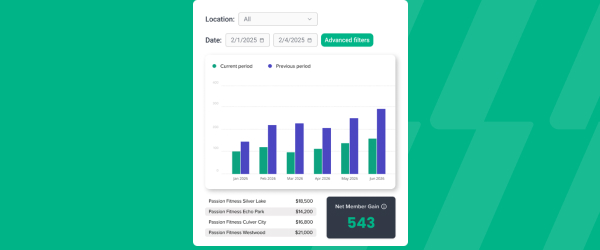
ABC’s flagship reporting product, ABC Insights, is now available to Glofox customers. Owners running multiple locations can use its centralized dashboards to compare performance across every studio or gym in one place. That makes it easier to spot what’s working and what isn’t, rather than piecing together numbers location by location. For multi-site operators, it turns scattered performance data into a single, clear view for making smarter business decisions.

Short Term Passes
Clubs can now sell flexible access passes for 1 to 30 days, capturing revenue from travelers and short-term visitors with no long-term commitment, and opening a path to convert them into long-term members.
Short Term Passes
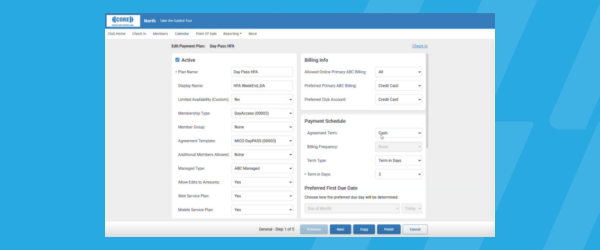
Clubs can now sell flexible access passes for 1 to 30 days, capturing revenue from travelers and short-term visitors with no long-term commitment, and opening a path to convert them into long-term members.

AI Workout Builder (Beta)
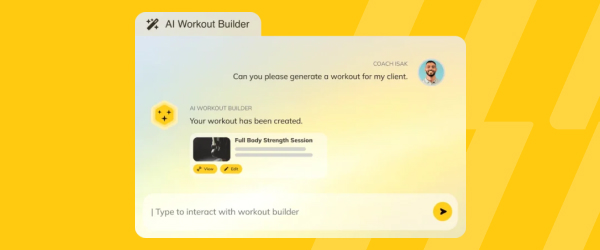
Spend more time coaching and less time programming. AI Workout Builder gets you a personalized, ready-to-assign workout in minutes—built from your client’s real goals, history, and progress. Just type a prompt and it’s built right inside Trainerize.
AI Workout Builder (Beta)
Spend more time coaching and less time programming. AI Workout Builder gets you a personalized, ready-to-assign workout in minutes—built from your client’s real goals, history, and progress. Just type a prompt and it’s built right inside Trainerize.
Insights (FDM): New Credit Card Updater Report
If you’re already using our Commerce billing system and the Financial Data Mart (FDM) reports, the new Credit Card Updater Report gives you visibility of which expired or reissued cards have been automatically updated, which are still pending, and which declined. This report makes it easier for you to keep payments flowing and chase only… <a class="more-link" href="https://abcfitness.com/?post_type=release_update&p=31292">Continue reading <span class="screen-reader-text">Insights (FDM): New Credit Card Updater Report</span></a>
Insights (FDM): New Credit Card Updater Report
If you’re already using our Commerce billing system and the Financial Data Mart (FDM) reports, the new Credit Card Updater Report gives you visibility of which expired or reissued cards have been automatically updated, which are still pending, and which declined.
This report makes it easier for you to keep payments flowing and chase only those that require human intervention.

People Tab Filters Update
We’re changing how filters work on the People tab to boost performance and speed of loading list results. Previously, Filters were added and queries were run dynamically on each new addition against the entire list of leads for a club/group, which sometimes made the segmentation process slow. Now you’ll apply filters all at once with… <a class="more-link" href="https://abcfitness.com/?post_type=release_update&p=31284">Continue reading <span class="screen-reader-text">People Tab Filters Update</span></a>
People Tab Filters Update
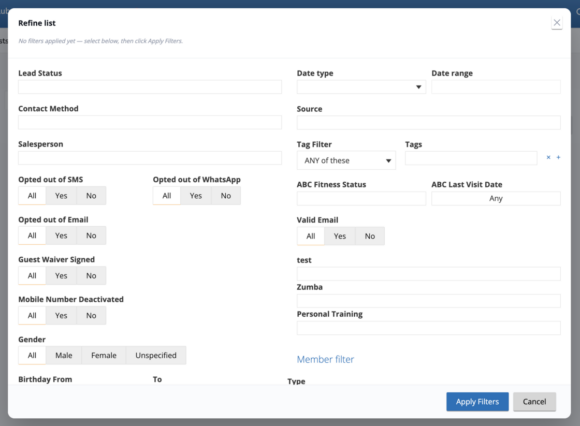
We’re changing how filters work on the People tab to boost performance and speed of loading list results.
Previously, Filters were added and queries were run dynamically on each new addition against the entire list of leads for a club/group, which sometimes made the segmentation process slow.
Now you’ll apply filters all at once with a single query, instead of one by one, which provides you with list results much faster than before, and helps you be more efficient when segmenting Bulk Message Campaigns.
Sales: People Tab Filters Update
We’re changing how filters work on the People tab to boost performance and speed of loading list results. Previously, Filters were added and queries were run dynamically on each new addition against the entire list of leads for a club/group, which sometimes made the segmentation process slow. Now you’ll apply filters all at once with… <a class="more-link" href="https://abcfitness.com/?post_type=release_update&p=31281">Continue reading <span class="screen-reader-text">Sales: People Tab Filters Update</span></a>
Sales: People Tab Filters Update
We’re changing how filters work on the People tab to boost performance and speed of loading list results.
Previously, Filters were added and queries were run dynamically on each new addition against the entire list of leads for a club/group, which sometimes made the segmentation process slow.
Now you’ll apply filters all at once with a single query, instead of one by one, which provides you with list results much faster than before, and helps you be more efficient when segmenting Bulk Message Campaigns.
New Lead Statuses
Leads slip away when follow-ups get lost, and it’s hard to act on a lead you can’t see clearly. With three new statuses, Warm, Not answered, and Not interested, operators can track every lead more precisely so no follow-up gets missed. The new statuses also capture common sales outcomes that the existing statuses miss. Warm,… <a class="more-link" href="https://abcfitness.com/?post_type=release_update&p=31008">Continue reading <span class="screen-reader-text">New Lead Statuses</span></a>
New Lead Statuses
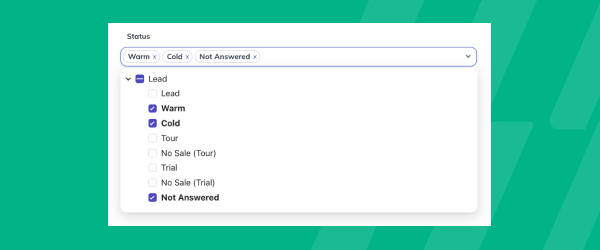
Leads slip away when follow-ups get lost, and it’s hard to act on a lead you can’t see clearly. With three new statuses, Warm, Not answered, and Not interested, operators can track every lead more precisely so no follow-up gets missed. The new statuses also capture common sales outcomes that the existing statuses miss.
Warm, Not answered, and Not interested are available on the customer record and in filters and Audiences, so gyms and studios can target the right leads with the right message. Reporting on the new statuses arrives in ABC Insights first, with the Glofox dashboard to follow.
Requires Lead Management, available on Boost and Elite plans.
AI Agents: Pre-Chat Forms
Pre-chat forms help gyms and studios know who they’re talking to before an AI Agent conversation begins. Visitors can share their name, email, and phone number at the start of the chat, and the submitted details appear alongside the conversation in the Inbox, so no lead gets lost in the transcript. Operators can configure a… <a class="more-link" href="https://abcfitness.com/?post_type=release_update&p=31191">Continue reading <span class="screen-reader-text">AI Agents: Pre-Chat Forms</span></a>
AI Agents: Pre-Chat Forms
Pre-chat forms help gyms and studios know who they’re talking to before an AI Agent conversation begins. Visitors can share their name, email, and phone number at the start of the chat, and the submitted details appear alongside the conversation in the Inbox, so no lead gets lost in the transcript.
Operators can configure a form once and assign it across multiple AI Agents, including through Bulk Edit, which saves time across locations. They can also choose when the form appears, whether at the start of every conversation or once per visitor, so it fits how they want to capture contact details.
AI Agents: New Knowledge Experience
The new Knowledge experience in ABC AI Agents makes it easier to see what your agent knows and where that information comes from. The redesigned view lets operators browse knowledge by set, by source, or across all items, and content history shows how that knowledge has changed over time, so every update is traceable. Keeping… <a class="more-link" href="https://abcfitness.com/?post_type=release_update&p=31189">Continue reading <span class="screen-reader-text">AI Agents: New Knowledge Experience</span></a>
AI Agents: New Knowledge Experience
The new Knowledge experience in ABC AI Agents makes it easier to see what your agent knows and where that information comes from. The redesigned view lets operators browse knowledge by set, by source, or across all items, and content history shows how that knowledge has changed over time, so every update is traceable.
Keeping website-based knowledge current no longer takes manual checks. Recurring website scraping refreshes that content automatically, and content locking protects anything you’ve refined by hand from being overwritten in future scrapes. Together, these updates help gyms and studios keep their AI Agent accurate and trusted by members.
Roaming Charges
Multi-location studio and gym operators can now charge roaming members at the location they attend. Roaming members can book courses and other bookings and buy store items at a non-home location through the member app. Staff can also handle custom charges, credit packs, store items, and account balance top-ups (supported only on Stripe) for roaming… <a class="more-link" href="https://abcfitness.com/?post_type=release_update&p=30985">Continue reading <span class="screen-reader-text">Roaming Charges</span></a>
Roaming Charges
Multi-location studio and gym operators can now charge roaming members at the location they attend. Roaming members can book courses and other bookings and buy store items at a non-home location through the member app. Staff can also handle custom charges, credit packs, store items, and account balance top-ups (supported only on Stripe) for roaming members from the dashboard. Charges go to the card on file at the member’s home location, which is copied over automatically the first time they roam, so there’s nothing new to collect at the front desk. Payment goes to the location where the purchase is made.
Staff and members can update the card at a roaming location without changing the card at home. Purchases work the same whether a member is at home or roaming, so the experience stays consistent for staff and members alike.
BLIK Recurring Payments
BLIK is one of the most widely used payment methods in Poland, and ABC Glofox now lets studios and gyms there collect recurring membership payments with it. Members can choose BLIK for recurring memberships as well as one-off purchases, which gives them a familiar way to renew and gives operators a steadier path to keeping… <a class="more-link" href="https://abcfitness.com/?post_type=release_update&p=31010">Continue reading <span class="screen-reader-text">BLIK Recurring Payments</span></a>
BLIK Recurring Payments
BLIK is one of the most widely used payment methods in Poland, and ABC Glofox now lets studios and gyms there collect recurring membership payments with it. Members can choose BLIK for recurring memberships as well as one-off purchases, which gives them a familiar way to renew and gives operators a steadier path to keeping recurring revenue on track.
BLIK appears at checkout in the member app and web portal when a studio or gym has recurring BLIK turned on. Each recurring payment is attached to the membership at purchase, and the membership’s Transactions tab shows every BLIK payment.
Note: BLIK must be selected at purchase, and cannot be added once a membership has started.
Your Reformer Integration
Turn the hours that reformers sit idle into a new revenue stream. The early-morning, midday, and late-evening slots that Pilates studios often leave empty can now carry on demand reformer sessions, booked inside Glofox. Operators set their own availability and pricing, then decide how to sell access: as a premium upgrade, an add-on, a drop-in,… <a class="more-link" href="https://abcfitness.com/?post_type=release_update&p=31193">Continue reading <span class="screen-reader-text">Your Reformer Integration</span></a>
Your Reformer Integration
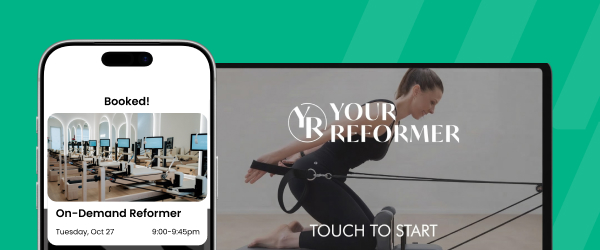
Turn the hours that reformers sit idle into a new revenue stream. The early-morning, midday, and late-evening slots that Pilates studios often leave empty can now carry on demand reformer sessions, booked inside Glofox. Operators set their own availability and pricing, then decide how to sell access: as a premium upgrade, an add-on, a drop-in, or a bundle. Operators can also open instructor-less studios, where reformer sessions run without an instructor on site. Reformer access can run alongside existing memberships, or it can be the only offering a studio sells.
Members book reformer sessions in advance or walk in, and access is activated through the Glofox app they already use, with no separate login or tool to manage.
Instant Triggers for the Trial & Member Workflows
Interest in a new trial or member is often highest early on, so the timing of each follow-up matters. With Instant Triggers, Trial and Member workflow steps can now send right away or after a delay of minutes or hours, matching the timing options already available in lead workflows. Gyms and studios can reach new… <a class="more-link" href="https://abcfitness.com/?post_type=release_update&p=31001">Continue reading <span class="screen-reader-text">Instant Triggers for the Trial & Member Workflows</span></a>
Instant Triggers for the Trial & Member Workflows
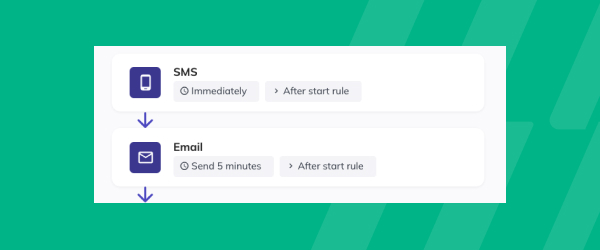
Interest in a new trial or member is often highest early on, so the timing of each follow-up matters. With Instant Triggers, Trial and Member workflow steps can now send right away or after a delay of minutes or hours, matching the timing options already available in lead workflows. Gyms and studios can reach new trials and members while their interest is high, with each message arriving when it is most relevant.
Every lead, trial, and member message can now follow timing that fits your sales process and member journey. Instant Triggers gives your gym or studio more control over when each message goes out, so new trials and members hear from you at the right moment.
Delete Workflow Subflows
Over time, old, duplicate, and test subflows can pile up in the list, making it harder to tell which messages are actually going out. Operators can now delete any subflow in a workflow that supports them, so the list shows only what is in use. Removing a subflow is cleaner and clearer than switching it… <a class="more-link" href="https://abcfitness.com/?post_type=release_update&p=31012">Continue reading <span class="screen-reader-text">Delete Workflow Subflows</span></a>
Delete Workflow Subflows
Over time, old, duplicate, and test subflows can pile up in the list, making it harder to tell which messages are actually going out. Operators can now delete any subflow in a workflow that supports them, so the list shows only what is in use. Removing a subflow is cleaner and clearer than switching it off and leaving it listed, which lowers the risk of the wrong message reaching members.
Each workflow allows up to 20 subflows, so deleting one you no longer need opens a slot for something new. Whether your studio or gym is refining a long-running automation or testing a new idea, your workflows stay focused on the messages that matter.
This feature is available to locations with the XLerate add-on or on the Elite plan.
Credits Left Workflow
Credits Left helps studios and gyms reach members before their balance runs out, so bookings keep flowing and fewer members slip into a gap between purchases. Operators can target a member’s total credits left, which includes all active service credit packs and manually added credits, or target the credits left in a specific plan. Each… <a class="more-link" href="https://abcfitness.com/?post_type=release_update&p=30993">Continue reading <span class="screen-reader-text">Credits Left Workflow</span></a>
Credits Left Workflow
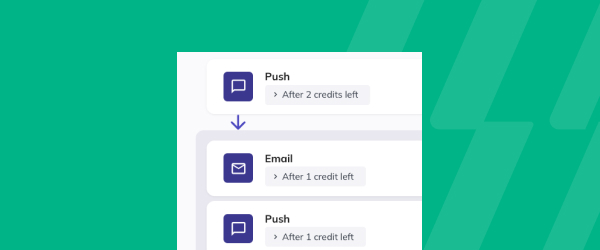
Credits Left helps studios and gyms reach members before their balance runs out, so bookings keep flowing and fewer members slip into a gap between purchases. Operators can target a member’s total credits left, which includes all active service credit packs and manually added credits, or target the credits left in a specific plan. Each workflow variant has its own audience and can be switched on or off independently, so you can run separate journeys for active members and active trials.
A preset sequence gives you a working starting point from day one: a push notification at 2 credits left, an email and push at 1 credit left, and an email and push at 0 credits left. Every step can be edited, retimed, or expanded to match your retention approach.
Available with the XLerate add-on and the Elite plan.
Days Since Last Visit Workflow
A growing gap between visits is often the first sign a member is drifting away, and the best time to reach out is before they’ve fully lost interest. Days Since Last Visit lets gyms and studios set up workflows that reach members, active trials, or leads based on how long it has been since their… <a class="more-link" href="https://abcfitness.com/?post_type=release_update&p=30995">Continue reading <span class="screen-reader-text">Days Since Last Visit Workflow</span></a>
Days Since Last Visit Workflow
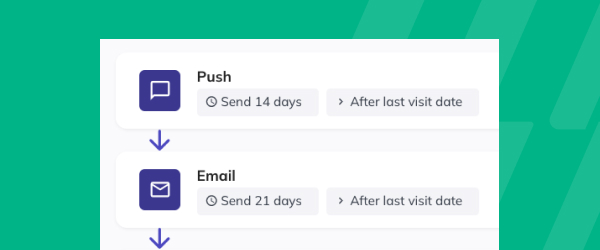
A growing gap between visits is often the first sign a member is drifting away, and the best time to reach out is before they’ve fully lost interest. Days Since Last Visit lets gyms and studios set up workflows that reach members, active trials, or leads based on how long it has been since their last visit. The preset sequence sends a push notification at 14 days, an email at 21 days, and a task for your staff at 30 days, and every step, timing, and message can be adjusted to fit your approach to retention.
Members who already have a future booking are excluded automatically, so no one receives a “we miss you” message while they’re already planning to return. Each workflow variant can be switched on or off independently, and the sequence works from day one. Available with the XLerate add-on or on the Elite plan.
Push Notification Campaigns
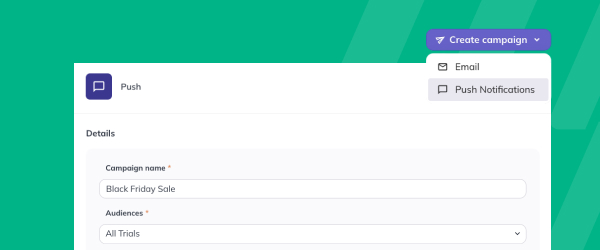
Push notifications now sit alongside email as a campaign channel, so operators and gyms can reach members with the same Audiences targeting and scheduling they already use for email. Audiences narrow each push to the members it is meant for, scheduling lets you plan class launches, promotions, and reminders ahead of time, and merge tags… <a class="more-link" href="https://abcfitness.com/?post_type=release_update&p=30999">Continue reading <span class="screen-reader-text">Push Notification Campaigns</span></a>
Push Notification Campaigns
Push notifications now sit alongside email as a campaign channel, so operators and gyms can reach members with the same Audiences targeting and scheduling they already use for email. Audiences narrow each push to the members it is meant for, scheduling lets you plan class launches, promotions, and reminders ahead of time, and merge tags such as a member’s first name make every message feel personal.
Push campaigns appear alongside email in your sent and scheduled campaigns, and a Channel column shows which channel each one used. The legacy push button has been retired, so push and email now follow one campaign workflow.
Edit Tasks on Profiles
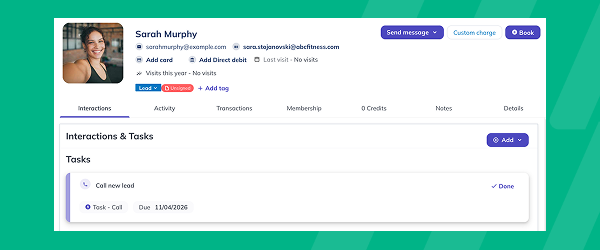
Follow-ups are only as good as the time it takes to act on them. Staff can now update any task directly from a customer’s profile, whether it’s a failed subscription payment, a renewal call, or a lead to chase. Changes happen where the member’s record already lives, so there’s no need to navigate to the… <a class="more-link" href="https://abcfitness.com/?post_type=release_update&p=31003">Continue reading <span class="screen-reader-text">Edit Tasks on Profiles</span></a>
Edit Tasks on Profiles
Follow-ups are only as good as the time it takes to act on them. Staff can now update any task directly from a customer’s profile, whether it’s a failed subscription payment, a renewal call, or a lead to chase. Changes happen where the member’s record already lives, so there’s no need to navigate to the Tasks page to make changes.
Available on Boost and Elite.
Set a Due Time for Tasks
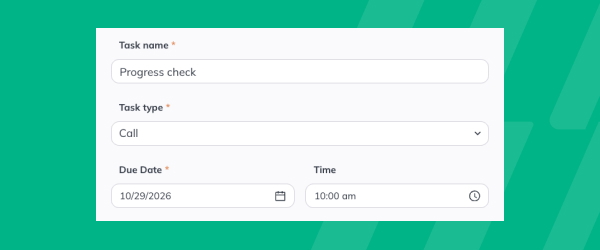
Time-sensitive follow-ups are easy to lose when they depend on memory. Studios and gyms can now set an exact due time on any task, whether it’s a same-day progress check or a call to a new lead. The time appears in the Tasks list and on the customer profile, so every follow-up has a clear… <a class="more-link" href="https://abcfitness.com/?post_type=release_update&p=31005">Continue reading <span class="screen-reader-text">Set a Due Time for Tasks</span></a>
Set a Due Time for Tasks
Time-sensitive follow-ups are easy to lose when they depend on memory. Studios and gyms can now set an exact due time on any task, whether it’s a same-day progress check or a call to a new lead. The time appears in the Tasks list and on the customer profile, so every follow-up has a clear moment to happen.
Staff can sort by due date and time and act on each follow-up at the right moment, without relying on memory to keep track.
Available on Boost and Elite plans.
Flexible Meal Plans: Add Individual Foods Directly to Meals with Food Search
Coaches and clients can now add individual foods and ingredients directly to Flexible Meal Plans on web and mobile, without needing to create a recipe first. With food search powered by the MyNetDiary library, it’s easier to build precise meal plans, track nutrition and manage meals with less effort. Users can view calories, macros and… <a class="more-link" href="https://abcfitness.com/?post_type=release_update&p=30817">Continue reading <span class="screen-reader-text">Flexible Meal Plans: Add Individual Foods Directly to Meals with Food Search</span></a>
Flexible Meal Plans: Add Individual Foods Directly to Meals with Food Search
Coaches and clients can now add individual foods and ingredients directly to Flexible Meal Plans on web and mobile, without needing to create a recipe first. With food search powered by the MyNetDiary library, it’s easier to build precise meal plans, track nutrition and manage meals with less effort. Users can view calories, macros and verified food indicators before adding items, while meal and daily nutrition totals update automatically. Clients can also log all foods and recipes in a meal slot at once with the new Log Meal option.
Available with the Advanced Nutrition Coaching add-on and on Studio Plans.
Sales: Guest Waiver App – New Settings to Collect Marketing Permissions
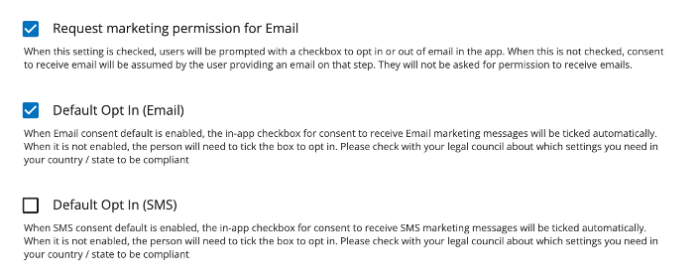
This release supports clubs that wish to treat collection of marketing consent differently for SMS versus Email in the Guest Waiver app. Previously, a single “Request Marketing Permission” setting controlled collection of marketing consent for both channels. This release splits that into independent Email and SMS controls.
Sales: Guest Waiver App – New Settings to Collect Marketing Permissions
This release supports clubs that wish to treat collection of marketing consent differently for SMS versus Email in the Guest Waiver app. Previously, a single “Request Marketing Permission” setting controlled collection of marketing consent for both channels. This release splits that into independent Email and SMS controls.
Guest Waiver App: Collect Marketing Permissions – New Settings
This release supports clubs that wish to treat collection of marketing consent differently for SMS versus Email in the Guest Waiver app. Previously, a single “Request Marketing Permission” setting controlled collection of marketing consent for both channels. This release splits that into independent Email and SMS controls.
Guest Waiver App: Collect Marketing Permissions – New Settings
This release supports clubs that wish to treat collection of marketing consent differently for SMS versus Email in the Guest Waiver app. Previously, a single “Request Marketing Permission” setting controlled collection of marketing consent for both channels. This release splits that into independent Email and SMS controls.
Pro App: Notes
Notes are now available in the Pro App. Until now, notes could only be viewed and added from a member’s profile in the Dashboard, so updates could wait until staff were back at a desk. Staff can now add and edit member notes directly in the Pro App, so important details are captured as they… <a class="more-link" href="https://abcfitness.com/?post_type=release_update&p=30990">Continue reading <span class="screen-reader-text">Pro App: Notes</span></a>
Pro App: Notes
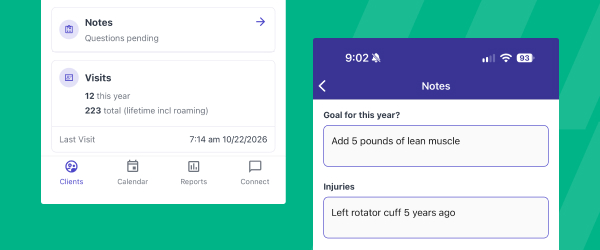
Notes are now available in the Pro App. Until now, notes could only be viewed and added from a member’s profile in the Dashboard, so updates could wait until staff were back at a desk. Staff can now add and edit member notes directly in the Pro App, so important details are captured as they come up and stay within reach.
This keeps member context on the floor, where gym and studio teams need it. Updates are recorded wherever the conversation happens, so the record reflects the conversation as it actually took place.
Deep Links to Member Profiles
Get to the right member in one click, wherever that member belongs. Staff can open any member’s profile straight from the tools they already work in, so they spend more time with members and less time looking for them. If the member is at another location the staff member can access, the Dashboard switches there… <a class="more-link" href="https://abcfitness.com/?post_type=release_update&p=30988">Continue reading <span class="screen-reader-text">Deep Links to Member Profiles</span></a>
Deep Links to Member Profiles
Get to the right member in one click, wherever that member belongs. Staff can open any member’s profile straight from the tools they already work in, so they spend more time with members and less time looking for them. If the member is at another location the staff member can access, the Dashboard switches there first and opens the profile.
Member permissions stay exactly as they are, so staff only see what their role allows. Links open active members only. If a location is blocked or a member ID isn’t valid, staff get a clear message explaining why. For gyms and studios with several locations, this keeps every site on one Dashboard and lets staff help members at any location without switching by hand.
Transfer Paused Members from Another Location
Gym and studio operators with multiple locations can now transfer paused members between locations in their network. Previously, transferring a paused member ended the pause state and updated their billing date. With this release, the pause state, remaining duration, and billing treatment carry over to the new location, so a member’s pause picks up exactly… <a class="more-link" href="https://abcfitness.com/?post_type=release_update&p=30983">Continue reading <span class="screen-reader-text">Transfer Paused Members from Another Location</span></a>
Transfer Paused Members from Another Location
Gym and studio operators with multiple locations can now transfer paused members between locations in their network. Previously, transferring a paused member ended the pause state and updated their billing date. With this release, the pause state, remaining duration, and billing treatment carry over to the new location, so a member’s pause picks up exactly where it left off and no manual work is required.
Custom Lead Sources & Campaigns
Your marketing doesn’t always fit a fixed list of sources, so now studios and gyms can create their own Lead Sources alongside the preset options. Tag each lead with a Lead Campaign, such as Black Friday, so every promotion is tracked separately from the channel behind it. Custom sources appear in the Lead conversion report… <a class="more-link" href="https://abcfitness.com/?post_type=release_update&p=30981">Continue reading <span class="screen-reader-text">Custom Lead Sources & Campaigns</span></a>
Custom Lead Sources & Campaigns
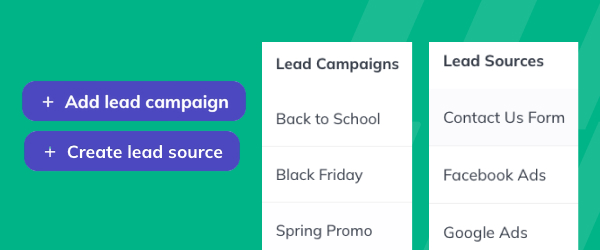
Your marketing doesn’t always fit a fixed list of sources, so now studios and gyms can create their own Lead Sources alongside the preset options. Tag each lead with a Lead Campaign, such as Black Friday, so every promotion is tracked separately from the channel behind it.
Custom sources appear in the Lead conversion report right away, so you can compare conversion across your own channels and put your budget where members actually come from. Sources and campaigns can be archived and restored but not deleted, so your history stays intact on member profiles and in reports.
Developers can also pass lead sources and campaigns through the API when they create a lead, so data from your own forms and ad platforms lands in the same place.
Exercise In-Progress: Keep Workouts Moving, Even When Clients Navigate Away
Clients can now navigate away from an active workout in the mobile app to check nutrition, log a habit, reply to a message or update a setting, then jump right back in without losing their workout progress. This makes it easier to manage everyday tasks while training, creating a smoother and more flexible workout experience.