






Product Updates
Track the evolution of our platform. Filter by release type, product, or timeline to find exactly what you’re looking for.

ABC Insights for Glofox
ABC’s flagship reporting product, ABC Insights, is now available to Glofox customers. Owners running multiple locations can use its centralized dashboards to compare performance across every studio or gym in one place. That makes it easier to spot what’s working and what isn’t, rather than piecing together numbers location by location. For multi-site operators, it… <a class="more-link" href="https://abcfitness.com/?post_type=release_update&p=28797">Continue reading <span class="screen-reader-text">ABC Insights for Glofox</span></a>
ABC Insights for Glofox
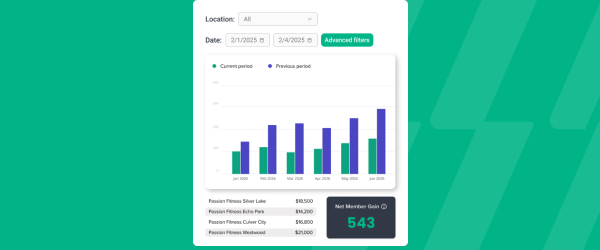
ABC’s flagship reporting product, ABC Insights, is now available to Glofox customers. Owners running multiple locations can use its centralized dashboards to compare performance across every studio or gym in one place. That makes it easier to spot what’s working and what isn’t, rather than piecing together numbers location by location. For multi-site operators, it turns scattered performance data into a single, clear view for making smarter business decisions.

Short Term Passes
Clubs can now sell flexible access passes for 1 to 30 days, capturing revenue from travelers and short-term visitors with no long-term commitment, and opening a path to convert them into long-term members.
Short Term Passes
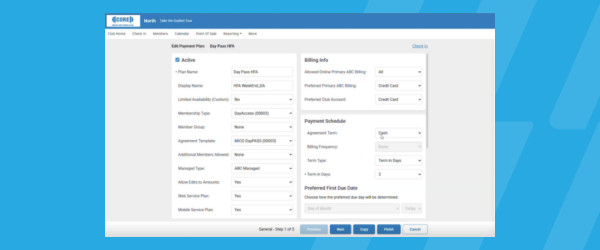
Clubs can now sell flexible access passes for 1 to 30 days, capturing revenue from travelers and short-term visitors with no long-term commitment, and opening a path to convert them into long-term members.

AI Workout Builder (Beta)
Spend more time coaching and less time programming. AI Workout Builder gets you a personalized, ready-to-assign workout in minutes—built from your client’s real goals, history, and progress. Just type a prompt and it’s built right inside Trainerize.
AI Workout Builder (Beta)
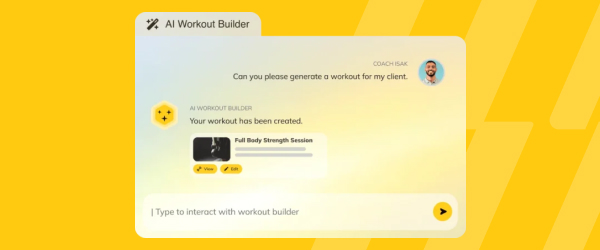
Spend more time coaching and less time programming. AI Workout Builder gets you a personalized, ready-to-assign workout in minutes—built from your client’s real goals, history, and progress. Just type a prompt and it’s built right inside Trainerize.
Insights (FDM): New Credit Card Updater Report
If you’re already using our Commerce billing system and the Financial Data Mart (FDM) reports, the new Credit Card Updater Report gives you visibility of which expired or reissued cards have been automatically updated, which are still pending, and which declined. This report makes it easier for you to keep payments flowing and chase only… <a class="more-link" href="https://abcfitness.com/?post_type=release_update&p=31292">Continue reading <span class="screen-reader-text">Insights (FDM): New Credit Card Updater Report</span></a>
Insights (FDM): New Credit Card Updater Report
If you’re already using our Commerce billing system and the Financial Data Mart (FDM) reports, the new Credit Card Updater Report gives you visibility of which expired or reissued cards have been automatically updated, which are still pending, and which declined.
This report makes it easier for you to keep payments flowing and chase only those that require human intervention.
Sales: People Tab Filters Update
We’re changing how filters work on the People tab to boost performance and speed of loading list results. Previously, Filters were added and queries were run dynamically on each new addition against the entire list of leads for a club/group, which sometimes made the segmentation process slow. Now you’ll apply filters all at once with… <a class="more-link" href="https://abcfitness.com/?post_type=release_update&p=31281">Continue reading <span class="screen-reader-text">Sales: People Tab Filters Update</span></a>
Sales: People Tab Filters Update
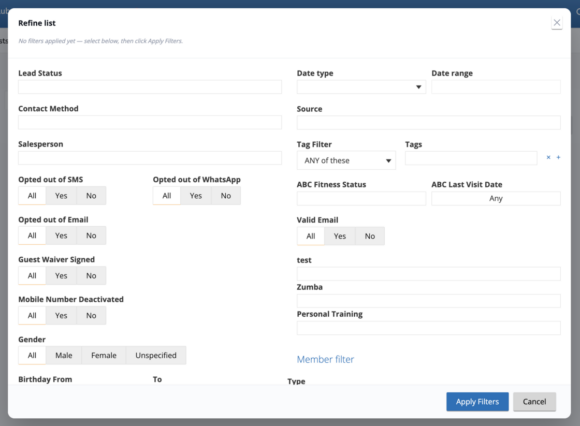
We’re changing how filters work on the People tab to boost performance and speed of loading list results.
Previously, Filters were added and queries were run dynamically on each new addition against the entire list of leads for a club/group, which sometimes made the segmentation process slow.
Now you’ll apply filters all at once with a single query, instead of one by one, which provides you with list results much faster than before, and helps you be more efficient when segmenting Bulk Message Campaigns.
Sales: Guest Waiver App – New Settings to Collect Marketing Permissions
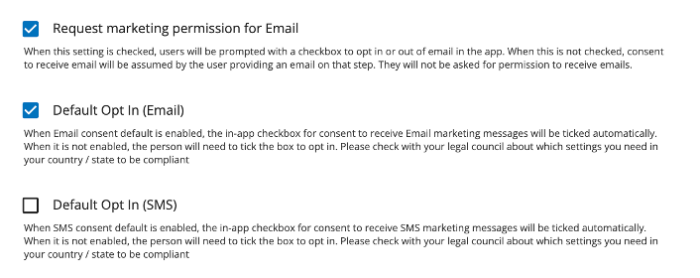
This release supports clubs that wish to treat collection of marketing consent differently for SMS versus Email in the Guest Waiver app. Previously, a single “Request Marketing Permission” setting controlled collection of marketing consent for both channels. This release splits that into independent Email and SMS controls.
Sales: Guest Waiver App – New Settings to Collect Marketing Permissions
This release supports clubs that wish to treat collection of marketing consent differently for SMS versus Email in the Guest Waiver app. Previously, a single “Request Marketing Permission” setting controlled collection of marketing consent for both channels. This release splits that into independent Email and SMS controls.
Insights: One Canonical “Active Member” Count
Active member counts are aligning across the State of the Business, Member Analysis, Daily Snapshot dashboards and the All Members report, by using one single Active Member definition, also aligned with M&O. Prospects, deleted records, and duplicates no longer be included. What you’ll notice: Daily Snapshot: Minor shift to match others State of the Business:… <a class="more-link" href="https://abcfitness.com/?post_type=release_update&p=30708">Continue reading <span class="screen-reader-text">Insights: One Canonical “Active Member” Count</span></a>
Insights: One Canonical “Active Member” Count
Active member counts are aligning across the State of the Business, Member Analysis, Daily Snapshot dashboards and the All Members report, by using one single Active Member definition, also aligned with M&O. Prospects, deleted records, and duplicates no longer be included.
What you’ll notice:
- Daily Snapshot: Minor shift to match others
- State of the Business: Reconciles with Daily Snapshot
- Member Analysis: Biggest change — defaults to Active only (inactive statuses available under Advanced Filters)
- All Members report: Same definition as the dashboards; counts moves closer to M&O
Worth knowing:
- No changes are made to your actual member base, only to how records are counted and filtered
- Historical counts are recalculated, so a one-time shift is expected
- You may continue to use filters to view inactive members and other member statuses as needed
Introducing New Goals to Challenges: Step, Hydration, and Referral Goals
Make challenges more engaging by giving clients more ways to earn points. You can now reward clients for reaching daily step goals, meeting daily water goals and referring a friend. Combine different scoring rules to create challenges that encourage healthy habits, boost participation and keep clients motivated. Client Referral Goals, Available with the Business Add-On*
Introducing New Goals to Challenges: Step, Hydration, and Referral Goals
Make challenges more engaging by giving clients more ways to earn points. You can now reward clients for reaching daily step goals, meeting daily water goals and referring a friend. Combine different scoring rules to create challenges that encourage healthy habits, boost participation and keep clients motivated.
Client Referral Goals, Available with the Business Add-On*
Daily Step Goals: Help Clients Build More Active Habits
Daily Step Goals give clients a clear daily target to work toward and make it easier to build consistent activity habits. Clients can track their progress using synced wearable data or manually enter their steps in the mobile app, helping them stay accountable and motivated to move more every day.
Daily Step Goals: Help Clients Build More Active Habits
Daily Step Goals give clients a clear daily target to work toward and make it easier to build consistent activity habits. Clients can track their progress using synced wearable data or manually enter their steps in the mobile app, helping them stay accountable and motivated to move more every day.
Sales: Booking Link Settings
The Booking Link Settings section in Company Settings lets you control how appointments booked through the Online Scheduler are configured, including the following customization options: How many bookings can be made per timeslot The default length of booked appointments The time intervals on which appointments can be booked Thesesettings are accessible to users with the… <a class="more-link" href="https://abcfitness.com/?post_type=release_update&p=30932">Continue reading <span class="screen-reader-text">Sales: Booking Link Settings</span></a>
Sales: Booking Link Settings
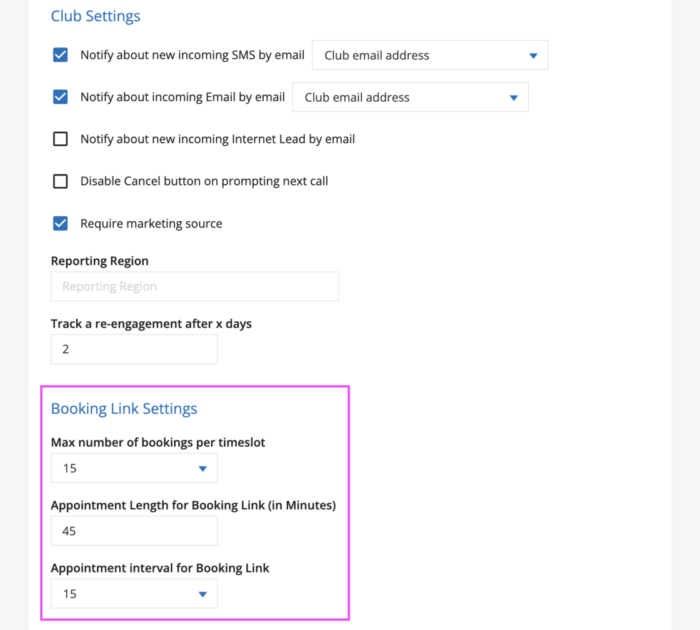
The Booking Link Settings section in Company Settings lets you control how appointments booked through the Online Scheduler are configured, including the following customization options:
- How many bookings can be made per timeslot
- The default length of booked appointments
- The time intervals on which appointments can be booked
Thesesettings are accessible to users with the Club Manager or Regional Manager role. These can be configured within your Ignite Sales Company Settings on the General Settings tab.
Open your Company Settings and on the General Settings tab, look for the section titled Booking Link Settings.
Good to know
The Appointment Length and Appointment Interval settings only affect your Online Scheduler link settings. They don’t change your Ignite Sales Calendar settings (Default appointment length and Time step in minutes), found under Company Settings > General Settings > Working Time.
If you want to change how Appointments behave on your internal GymSales Calendar view, use those settings instead.
Insights: “Mode” on Revenue by Payment Type / Profit Center
The Revenue by Payment Type and Revenue by Profit Center reports now show the billing Mode — so you can see how members pay, not just what they paid, to understand your billing base and chase down accounts that won’t draft The Mode column is populated with: Statement/Manual Billing, Credit Card, Bank Account.
Insights: “Mode” on Revenue by Payment Type / Profit Center
The Revenue by Payment Type and Revenue by Profit Center reports now show the billing Mode — so you can see how members pay, not just what they paid, to understand your billing base and chase down accounts that won’t draft
The Mode column is populated with: Statement/Manual Billing, Credit Card, Bank Account.
Payment Method Notification
Catch unauthorized account activity before it becomes fraud. Members get an automatic email or SMS the moment a new bank account is authorized, with a PDF copy saved to their dashboard. Always on, no extra fee.
Payment Method Notification
Catch unauthorized account activity before it becomes fraud. Members get an automatic email or SMS the moment a new bank account is authorized, with a PDF copy saved to their dashboard. Always on, no extra fee.
Insights (FDM): Historical iSeries data in DRDR
The FDM DRDR (DBX) report now blends historical iSeries data with Commerce data in one continuous view, so you don’t need to use legacy reporting systems for pre-Commerce data. What’s new One continuous revenue history — pre- and post-upgrade in a single report The total-due and reconciliation logic has been reworked so iSeries history follows… <a class="more-link" href="https://abcfitness.com/?post_type=release_update&p=30713">Continue reading <span class="screen-reader-text">Insights (FDM): Historical iSeries data in DRDR</span></a>
Insights (FDM): Historical iSeries data in DRDR
The FDM DRDR (DBX) report now blends historical iSeries data with Commerce data in one continuous view, so you don’t need to use legacy reporting systems for pre-Commerce data.
What’s new
- One continuous revenue history — pre- and post-upgrade in a single report
- The total-due and reconciliation logic has been reworked so iSeries history follows the new FDM logic and ties out cleanly
Insights: Account Reconciliation now for iSeries and Commerce
Account Reconciliation is now available to clubs on iSeries and Commerce — plus a set of filtering fixes following our recent Detail report rollout. This report is the main source of truth for accounts: what accounts you have, how they changed, and the dollar impact of those changes. What’s new Available across both platforms —… <a class="more-link" href="https://abcfitness.com/?post_type=release_update&p=30715">Continue reading <span class="screen-reader-text">Insights: Account Reconciliation now for iSeries and Commerce</span></a>
Insights: Account Reconciliation now for iSeries and Commerce
Account Reconciliation is now available to clubs on iSeries and Commerce — plus a set of filtering fixes following our recent Detail report rollout.
This report is the main source of truth for accounts: what accounts you have, how they changed, and the dollar impact of those changes.
What’s new
- Available across both platforms — iSeries and Commerce clubs now get the same Account Reconciliation view
Insights (FDM): Accounting Journal Entries – Accrual View
The Accounting Journal Entries (AJE) report now includes an Accrual accounting view, giving clubs that use accrual accounting complete reporting support in Commerce.
Insights (FDM): Accounting Journal Entries – Accrual View
The Accounting Journal Entries (AJE) report now includes an Accrual accounting view, giving clubs that use accrual accounting complete reporting support in Commerce.
Insights (FDM): Month-End Collected Actuals Report
A new paginated report (built on the FDM) that supplements the DRDR — anchored on the payment-initiation date (revenue earned), not the bank-posting date (cash collected). It splits every record into Regular vs Drift and headlines the impact in a summary banner: drift member count, drift $, and drift % of the month. A Split… <a class="more-link" href="https://abcfitness.com/?post_type=release_update&p=30765">Continue reading <span class="screen-reader-text">Insights (FDM): Month-End Collected Actuals Report</span></a>
Insights (FDM): Month-End Collected Actuals Report
A new paginated report (built on the FDM) that supplements the DRDR — anchored on the payment-initiation date (revenue earned), not the bank-posting date (cash collected).
- It splits every record into Regular vs Drift and headlines the impact in a summary banner: drift member count, drift $, and drift % of the month.
- A Split by profit center with columns matches what you’re used to seeing in the DRDR.
- It includes a member-level detail report with filters (location, profit center, collected method, processing type).
Insights (FDM): Canadian Tax Statement
The Canadian Tax Statement report is now live on the Financial Data Mart (FDM), providing the same GST/HST/QST tax visibility clubs relied on in CRS, facilitating the transition to Commerce. Canadian clubs can now view taxes incurred on taxable deductions and reimbursements — across both Club Account and ABC Member Billing fees — directly in… <a class="more-link" href="https://abcfitness.com/?post_type=release_update&p=30769">Continue reading <span class="screen-reader-text">Insights (FDM): Canadian Tax Statement</span></a>
Insights (FDM): Canadian Tax Statement
The Canadian Tax Statement report is now live on the Financial Data Mart (FDM), providing the same GST/HST/QST tax visibility clubs relied on in CRS, facilitating the transition to Commerce.
- Canadian clubs can now view taxes incurred on taxable deductions and reimbursements — across both Club Account and ABC Member Billing fees — directly in Ignite Insights
- Taxes are calculated at the province level (GST, HST, and QST where applicable) on ABC fees such as transaction processing, administrative, chargeback, credit-card pass-thru, club account, and Ignite Engagement
- Report breaks out Description → Unit Price → Tax Rate → Tax Amount, with totals that reconcile to the month’s billing deductions — matching how the statement behaved in CRS
- Scheduling is supported, so clubs can have the statement delivered on their cadence
Sales: A stronger foundation
We’ve upgraded the core framework that powers ABC GymSales to its latest supported version. It’s the kind of update that happens behind the scenes, but it brings real, tangible benefits to your day-to-day experience: Enhanced Security: Your data is protected by the latest security improvements available, reducing exposure to known vulnerabilities and helping keep your… <a class="more-link" href="https://abcfitness.com/?post_type=release_update&p=30934">Continue reading <span class="screen-reader-text">Sales: A stronger foundation</span></a>
Sales: A stronger foundation
We’ve upgraded the core framework that powers ABC GymSales to its latest supported version. It’s the kind of update that happens behind the scenes, but it brings real, tangible benefits to your day-to-day experience:
- Enhanced Security: Your data is protected by the latest security improvements available, reducing exposure to known vulnerabilities and helping keep your business information safe.
- Improved Performance: You’ll notice a more responsive platform, with faster loading and smoother performance as you navigate GymSales.
- Long-Term Stability: This update helps ensure GymSales continues to run reliably, with fewer disruptions and a more consistent experience over time.
- Easier Maintenance: With modernized components in place, we’re better equipped to keep the platform running smoothly and address issues quickly if they arise.
Sales: Filter Lead Status Report by Next Action
You can now filter the Lead Status report by Next Action to find leads with no follow-up action scheduled. This will allow you to plan a next step for leads with no follow up action to ensure that no leads are missed. In the Next Action filter, you can select one of the following options:… <a class="more-link" href="https://abcfitness.com/?post_type=release_update&p=30953">Continue reading <span class="screen-reader-text">Sales: Filter Lead Status Report by Next Action</span></a>
Sales: Filter Lead Status Report by Next Action
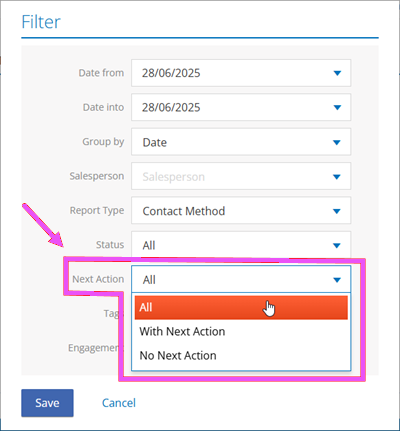
You can now filter the Lead Status report by Next Action to find leads with no follow-up action scheduled. This will allow you to plan a next step for leads with no follow up action to ensure that no leads are missed.
In the Next Action filter, you can select one of the following options:
- With Next Action – Returns a view of the leads with a “Next Action” (follow-up) scheduled.
- No Next Action – Returns a view of the leads without a “Next Action” scheduled.
- All (Default) – Returns a view of all leads—those with a “Next Action” scheduled and those without a “Next Action.”
Sales: Additional Multi-Club Report Improvements
After we rolled out a major upgrade to the Lead Status Multi-Club Report, designed to give you faster insights, more control, and a smoother experience from start to finish, we have extended this upgrade to all other Ignite Sales reports that have a multi-site option: Salespersons Appointments Secondary Sales Bulk Email Bulk SMS User Statistics… <a class="more-link" href="https://abcfitness.com/?post_type=release_update&p=30939">Continue reading <span class="screen-reader-text">Sales: Additional Multi-Club Report Improvements</span></a>
Sales: Additional Multi-Club Report Improvements
After we rolled out a major upgrade to the Lead Status Multi-Club Report, designed to give you faster insights, more control, and a smoother experience from start to finish, we have extended this upgrade to all other Ignite Sales reports that have a multi-site option:
- Salespersons
- Appointments
- Secondary Sales
- Bulk Email
- Bulk SMS
- User Statistics
- Bulk WhatsApp
With this upgrade, multi-site reports no longer auto-run when you open the page. Instead, you’re in control from the beginning. Simply choose your filters, like date range or region, and click “Generate” when you’re ready.
This makes it easier to focus on exactly the data you need without unnecessary load time.
Improved Report Loading
Once you generate a report, it will load within 30 seconds. You’ll see a clear loading indicator so you always know what’s happening behind the scenes.
Report Delivery via Email
If your dataset is larger, we’ll send the reports to your inbox via email. This ensures you always get your data, even for the most complex reports. When a report is delivered via email, you’ll receive:
- A snapshot of your report for quick viewing
- A downloadable CSV for deeper analysis
Download links stay active for 7 days, giving you flexibility to access your data when it suits you. For users managing more than 100 clubs, reports will automatically be delivered via email to keep performance fast and reliable.
Insights: Financial Data Mart (FDM)
A centralized data layer standardizes financial reporting across systems, cutting manual reconciliation and giving finance teams faster, more consistent access to revenue and billing data.

Insights: Financial Data Mart (FDM)
A centralized data layer standardizes financial reporting across systems, cutting manual reconciliation and giving finance teams faster, more consistent access to revenue and billing data.
Progression Spreadsheet Enhancements
Adds past performance stats, in-view exercise swapping, clear labeling for program changes, and inline rest-period editing to the progression view, helping coaches make faster, better-informed decisions from one screen.
Progression Spreadsheet Enhancements
Adds past performance stats, in-view exercise swapping, clear labeling for program changes, and inline rest-period editing to the progression view, helping coaches make faster, better-informed decisions from one screen.
Water Intake Goals
Set a daily hydration goal, track compliance, and celebrate wins with your client, giving you a built-in reason to check in and coach. Water Tracking Goals turns hydration into an intentional, coach-supported habit right inside the app.

Water Intake Goals
Set a daily hydration goal, track compliance, and celebrate wins with your client, giving you a built-in reason to check in and coach. Water Tracking Goals turns hydration into an intentional, coach-supported habit right inside the app.
Flexible Meal Planning
Help clients stick with their nutrition plan instead of abandoning it because it doesn’t fit their life. You choose the level of structure each client needs, calories only, calories and protein, or full macros, then let them swap meals within those targets to match their schedule and preferences. The Flexible Meal Planner blends your guidance… <a class="more-link" href="https://abcfitness.com/?post_type=release_update&p=28841">Continue reading <span class="screen-reader-text">Flexible Meal Planning</span></a>

Flexible Meal Planning
Help clients stick with their nutrition plan instead of abandoning it because it doesn’t fit their life. You choose the level of structure each client needs, calories only, calories and protein, or full macros, then let them swap meals within those targets to match their schedule and preferences. The Flexible Meal Planner blends your guidance with their flexibility, so the plan bends without breaking
Exercise Notes
Coach with precision instead of guessing what happened between sessions. Clients can capture quick, exercise-level details, seat height, machine settings, form cues, band color, or how a movement felt, so you see exactly what changed and where adjustments are needed. Notes stay linked to the specific exercise, up to 200 characters, built for fast reminders… <a class="more-link" href="https://abcfitness.com/?post_type=release_update&p=28836">Continue reading <span class="screen-reader-text">Exercise Notes</span></a>

Exercise Notes
Coach with precision instead of guessing what happened between sessions. Clients can capture quick, exercise-level details, seat height, machine settings, form cues, band color, or how a movement felt, so you see exactly what changed and where adjustments are needed. Notes stay linked to the specific exercise, up to 200 characters, built for fast reminders rather than a long history log
Sales: Lead Status Multi Club Report Loading Improvements
We have rolled out a major upgrade to the Lead Status Multi Club Report, designed to give you faster insights, more control, and a smoother experience from start to finish. Reports no longer auto-run when you open the page. Instead, you’re in control from the beginning. Simply choose your filters, like date range or region,… <a class="more-link" href="https://abcfitness.com/?post_type=release_update&p=30941">Continue reading <span class="screen-reader-text">Sales: Lead Status Multi Club Report Loading Improvements</span></a>
Sales: Lead Status Multi Club Report Loading Improvements
We have rolled out a major upgrade to the Lead Status Multi Club Report, designed to give you faster insights, more control, and a smoother experience from start to finish.
Reports no longer auto-run when you open the page. Instead, you’re in control from the beginning. Simply choose your filters, like date range or region, and click “Generate” when you’re ready. This makes it easier to focus on exactly the data you need without unnecessary load time.
Improved Report Loading
Once you generate a report, it will load within 30 seconds. You’ll see a clear loading indicator so you always know what’s happening behind the scenes.
Report Delivery via Email
If your dataset is larger, we’ll send the reports to your inbox via email. This ensures you always get your data, even for the most complex reports. When a report is delivered via email, you’ll receive:
- A snapshot of your report for quick viewing
- A downloadable CSV for deeper analysis
Download links stay active for 7 days, giving you flexibility to access your data when it suits you. For users managing more than 100 clubs, reports will automatically be delivered via email to keep performance fast and reliable.
Exercise Substitutions Enhancements
Keep sessions moving and progress on track, even when equipment isn’t available or an exercise just isn’t a fit. Coaches and clients can now swap movements mid-workout on their own, with no back-and-forth needed. Tap Substitute next to any exercise to filter by muscle group, equipment, or movement, then swap it in with one tap.

Exercise Substitutions Enhancements
Keep sessions moving and progress on track, even when equipment isn’t available or an exercise just isn’t a fit. Coaches and clients can now swap movements mid-workout on their own, with no back-and-forth needed. Tap Substitute next to any exercise to filter by muscle group, equipment, or movement, then swap it in with one tap.