






Product Updates
Track the evolution of our platform. Filter by release type, product, or timeline to find exactly what you’re looking for.

ABC Insights for Glofox
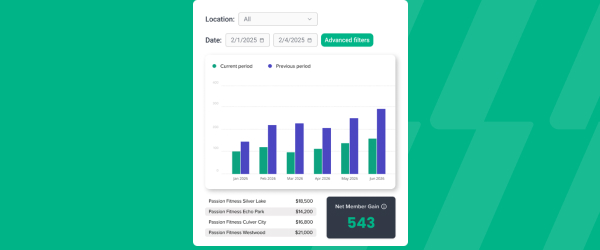
ABC’s flagship reporting product, ABC Insights, is now available to Glofox customers. Owners running multiple locations can use its centralized dashboards to compare performance across every studio or gym in one place. That makes it easier to spot what’s working and what isn’t, rather than piecing together numbers location by location. For multi-site operators, it… <a class="more-link" href="https://abcfitness.com/?post_type=release_update&p=28797">Continue reading <span class="screen-reader-text">ABC Insights for Glofox</span></a>
ABC Insights for Glofox
ABC’s flagship reporting product, ABC Insights, is now available to Glofox customers. Owners running multiple locations can use its centralized dashboards to compare performance across every studio or gym in one place. That makes it easier to spot what’s working and what isn’t, rather than piecing together numbers location by location. For multi-site operators, it turns scattered performance data into a single, clear view for making smarter business decisions.

Short Term Passes
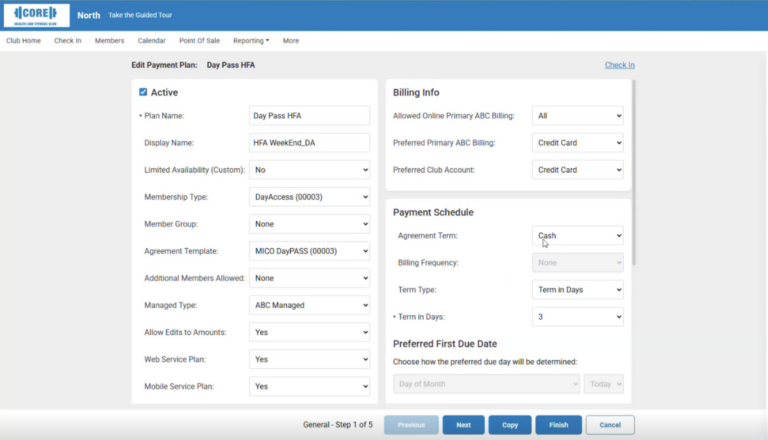
Clubs can now sell flexible access passes for 1 to 30 days, capturing revenue from travelers and short-term visitors with no long-term commitment, and opening a path to convert them into long-term members.
Short Term Passes
Clubs can now sell flexible access passes for 1 to 30 days, capturing revenue from travelers and short-term visitors with no long-term commitment, and opening a path to convert them into long-term members.

AI Workout Builder (Beta)
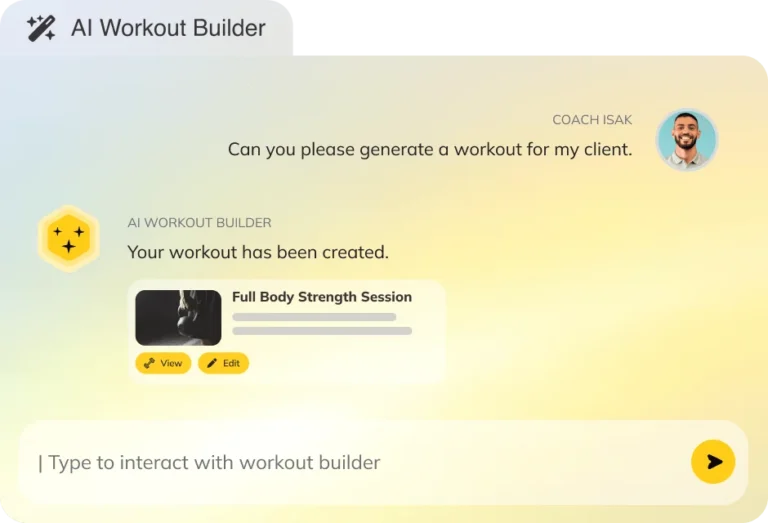
Spend more time coaching and less time programming. AI Workout Builder gets you a personalized, ready-to-assign workout in minutes—built from your client’s real goals, history, and progress. Just type a prompt and it’s built right inside Trainerize.
AI Workout Builder (Beta)
Spend more time coaching and less time programming. AI Workout Builder gets you a personalized, ready-to-assign workout in minutes—built from your client’s real goals, history, and progress. Just type a prompt and it’s built right inside Trainerize.
Task Outcomes
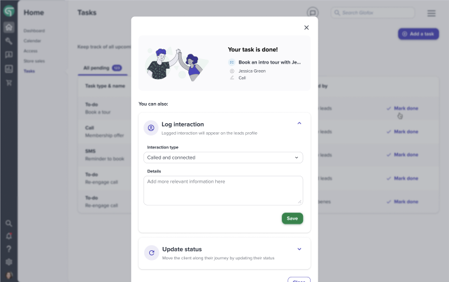
Task Outcomes builds on the Tasks feature by letting staff close the loop on a task without leaving the same screen. From the Home, Tasks overview page, when a task tied to a lead or client is marked complete, staff can update that lead’s status, log details of the interaction, or create a follow-up task… <a class="more-link" href="https://abcfitness.com/?post_type=release_update&p=29204">Continue reading <span class="screen-reader-text">Task Outcomes</span></a>
Task Outcomes
Task Outcomes builds on the Tasks feature by letting staff close the loop on a task without leaving the same screen. From the Home, Tasks overview page, when a task tied to a lead or client is marked complete, staff can update that lead’s status, log details of the interaction, or create a follow-up task all in one place. This keeps lead and client management moving at the pace of a single conversation instead of forcing staff to jump between the task list, the client profile, and a separate messaging tool. Because every task can be assigned to a specific staff member with its own due date and notes, completing an outcome also keeps the team’s accountability record accurate and up to date. For gyms and studios juggling a high volume of leads, this turns task completion into a natural trigger for the next best action rather than a dead end.
Lead Source Reporting
Lead Source Reporting lets staff capture exactly how a new lead or client found the studio and how they first made contact, right at the moment they are added under Manage, Leads or Manage, Clients. When adding a new lead or client, two fields appear, one asking how the client heard about the business to… <a class="more-link" href="https://abcfitness.com/?post_type=release_update&p=29227">Continue reading <span class="screen-reader-text">Lead Source Reporting</span></a>
Lead Source Reporting
Lead Source Reporting lets staff capture exactly how a new lead or client found the studio and how they first made contact, right at the moment they are added under Manage, Leads or Manage, Clients. When adding a new lead or client, two fields appear, one asking how the client heard about the business to record the lead source, and one asking how the client got in touch to record the lead entry point. Both fields are saved to the client’s profile under the Details tab, so staff can reference them at any time. With this data captured consistently across your team, you can see which channels are actually bringing in leads and which entry points convert best. That visibility lets studios and gyms direct marketing spend and messaging toward the channels proven to work, rather than guessing at what’s driving growth.
Differentiate Expired vs Cancelled Members
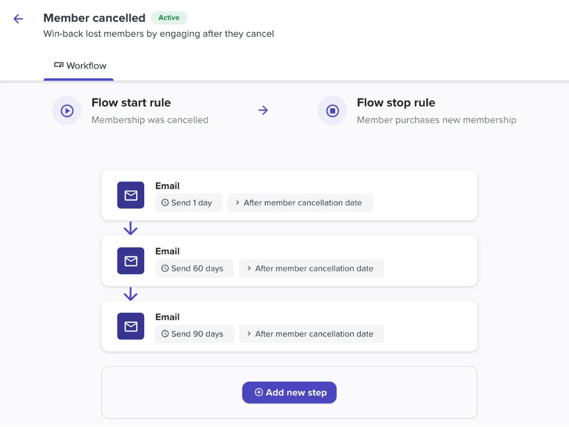
Differentiate Expired vs Cancelled Members separates these two member journeys into distinct workflows, rather than treating every lapsed member the same way. An expired member is someone whose plan simply reached its natural end date, while a cancelled member is someone who actively chose to end their membership before that date, and the reasons behind… <a class="more-link" href="https://abcfitness.com/?post_type=release_update&p=29229">Continue reading <span class="screen-reader-text">Differentiate Expired vs Cancelled Members</span></a>
Differentiate Expired vs Cancelled Members
Differentiate Expired vs Cancelled Members separates these two member journeys into distinct workflows, rather than treating every lapsed member the same way. An expired member is someone whose plan simply reached its natural end date, while a cancelled member is someone who actively chose to end their membership before that date, and the reasons behind each are usually very different. By keeping these groups separate, studios and gyms can build win back messaging that actually matches the situation, for example re-engaging an expired member with a renewal offer versus addressing a cancelled member’s specific reason for leaving. This distinction gives your marketing and retention teams more accurate audiences to target, rather than lumping everyone who is no longer active into a single list. Over time, it also gives you a clearer picture of how members are leaving, so staff training and retention strategy can be shaped around real patterns rather than guesswork.
Credit Packs – New Checkout Flow
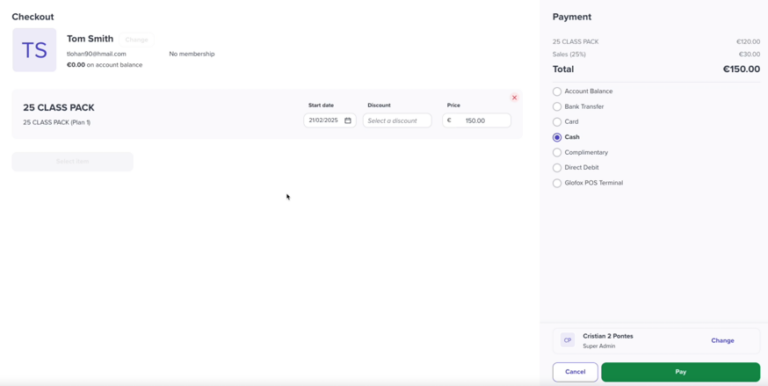
Credit Packs now run through the new Dashboard checkout, giving front desk staff a clearer purchase layout, a summary page before confirming the sale, and support for POS terminal, contactless, and digital wallet payments at the point of sale. Service Credit Packs themselves are set up under Manage, Memberships, where staff define whether the pack… <a class="more-link" href="https://abcfitness.com/?post_type=release_update&p=29191">Continue reading <span class="screen-reader-text">Credit Packs – New Checkout Flow</span></a>
Credit Packs – New Checkout Flow
Credit Packs now run through the new Dashboard checkout, giving front desk staff a clearer purchase layout, a summary page before confirming the sale, and support for POS terminal, contactless, and digital wallet payments at the point of sale. Service Credit Packs themselves are set up under Manage, Memberships, where staff define whether the pack covers Classes, Appointments, or Facilities, how many credits it includes, and whether those credits expire, with one credit used per booking. With the new checkout, selling a credit pack in person feels consistent with the rest of Glofox’s payment experience rather than a separate, older process. The summary page gives staff a clear final check of what’s being charged before completing the sale, reducing errors at checkout. For studios that rely heavily on credit packs for classes, appointments, or facility bookings, this makes an already common transaction faster and more accurate for the team processing it.
New Merge Tags for Communication
New Merge Tags for Communications let staff insert dynamic, personalized details into the SMS, email, and push notification messages that make up XLerate’s automated workflows, such as the Leads, Cold Leads, and Trials sequences. Instead of sending the same generic message to everyone, staff can customize each message in a workflow, for example the Day… <a class="more-link" href="https://abcfitness.com/?post_type=release_update&p=29199">Continue reading <span class="screen-reader-text">New Merge Tags for Communication</span></a>
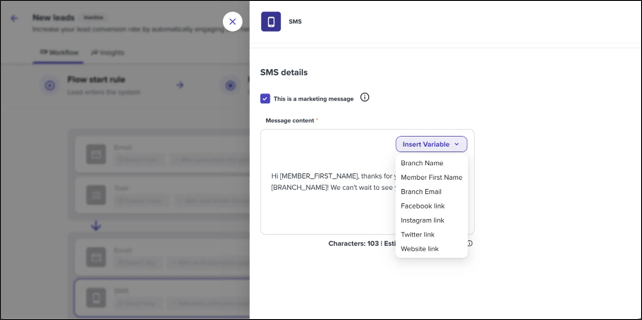
New Merge Tags for Communication
New Merge Tags for Communications let staff insert dynamic, personalized details into the SMS, email, and push notification messages that make up XLerate’s automated workflows, such as the Leads, Cold Leads, and Trials sequences. Instead of sending the same generic message to everyone, staff can customize each message in a workflow, for example the Day 1, Day 3, or Day 30 email in the Leads workflow, so it reflects details specific to the audience, location, or stage a lead is currently in. This matters because these workflows already target very different moments in the customer journey, from a brand new lead just registered to a cold lead re-engaged after 30 days of inactivity to someone actively on a trial, and one message rarely fits all of them. With merge tags, the same workflow structure can still feel personal and relevant at every stage, without staff having to write entirely separate campaigns for each audience or location. The result is more consistent, higher quality communication across the full lead lifecycle with less manual editing required.
Show Message Details
Show Message Details gives staff a full Insights report for every one-off email campaign, accessible from Connect, Messages, One-off emails by clicking into any sent campaign. The report breaks down exactly who the message reached, with key metric cards for Sent, Delivered, Opens, Clicks, and Delivery Failed, plus a time series graph tracking Opens and… <a class="more-link" href="https://abcfitness.com/?post_type=release_update&p=29206">Continue reading <span class="screen-reader-text">Show Message Details</span></a>
Show Message Details
Show Message Details gives staff a full Insights report for every one-off email campaign, accessible from Connect, Messages, One-off emails by clicking into any sent campaign. The report breaks down exactly who the message reached, with key metric cards for Sent, Delivered, Opens, Clicks, and Delivery Failed, plus a time series graph tracking Opens and Clicks over the period you select. Clicking View More on any metric opens the underlying list of clients tied to it, so staff can see specifically who opened or clicked a message, and every list can be downloaded as a CSV or XLSX file for further review. This level of detail makes it easy to verify what was actually sent and to whom, settle disputes over whether a member received a message, and pull past content forward to reuse in future campaigns. It also helps explain gaps in delivery, since clients who did not consent to or have unsubscribed from marketing messages are excluded from a campaign automatically.
Self Serve Consecutive Membership Purchases
Consecutive Membership Purchases let members renew or buy their next membership before their current one ends, and now that purchase can happen entirely through the Member App or Web Portal instead of requiring staff to process it at the front desk. A consecutive membership automatically begins the moment the client’s existing plan expires, so there… <a class="more-link" href="https://abcfitness.com/?post_type=release_update&p=29233">Continue reading <span class="screen-reader-text">Self Serve Consecutive Membership Purchases</span></a>
Self Serve Consecutive Membership Purchases
Consecutive Membership Purchases let members renew or buy their next membership before their current one ends, and now that purchase can happen entirely through the Member App or Web Portal instead of requiring staff to process it at the front desk. A consecutive membership automatically begins the moment the client’s existing plan expires, so there is no gap in access and no manual scheduling required from your team. This is especially useful for moving clients from a free trial into a recurring membership, switching between fixed term plans, or locking in a new commitment ahead of a renewal date. Members can even stack multiple consecutive memberships in a row, giving studios visibility into secured revenue further out. For studios, every self serve renewal processed this way is guaranteed future revenue captured automatically, lifting customer lifetime value without adding to staff workload.
ProApp Pricing Controls
ProApp Pricing Controls extend the Glofox Pro admin app so instructors and sales staff can edit membership prices, joining fees, discounts, and other fees directly from a tablet or smartphone, rather than needing a desktop terminal at a front desk. Glofox Pro already lets staff view and edit the schedule, manage clients, and check revenue… <a class="more-link" href="https://abcfitness.com/?post_type=release_update&p=29197">Continue reading <span class="screen-reader-text">ProApp Pricing Controls</span></a>
ProApp Pricing Controls
ProApp Pricing Controls extend the Glofox Pro admin app so instructors and sales staff can edit membership prices, joining fees, discounts, and other fees directly from a tablet or smartphone, rather than needing a desktop terminal at a front desk. Glofox Pro already lets staff view and edit the schedule, manage clients, and check revenue reports from anywhere in the facility, and pricing control brings sale closing power into that same mobile workflow. This means a sales conversation happening on the gym floor, in a studio class, or during a walk-in tour no longer needs to end with a trip back to the desk. Staff can adjust the price on the spot, apply a relevant discount, and complete the transaction in the same interaction. For gyms and studios without a dedicated reception setup, this keeps the sales process fast and removes friction that could otherwise cost a conversion.