







Product Updates
Track the evolution of our platform. Filter by release type, product, or timeline to find exactly what you’re looking for.

ABC Insights for Glofox
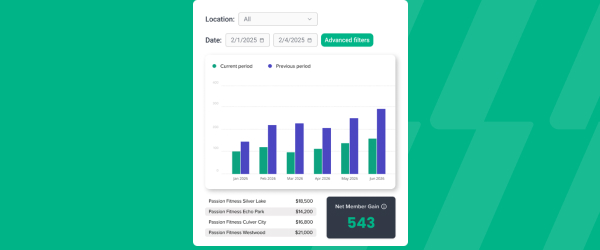
ABC’s flagship reporting product, ABC Insights, is now available to Glofox customers. Owners running multiple locations can use its centralized dashboards to compare performance across every studio or gym in one place. That makes it easier to spot what’s working and what isn’t, rather than piecing together numbers location by location. For multi-site operators, it… <a class="more-link" href="https://abcfitness.com/?post_type=release_update&p=28797">Continue reading <span class="screen-reader-text">ABC Insights for Glofox</span></a>
ABC Insights for Glofox
ABC’s flagship reporting product, ABC Insights, is now available to Glofox customers. Owners running multiple locations can use its centralized dashboards to compare performance across every studio or gym in one place. That makes it easier to spot what’s working and what isn’t, rather than piecing together numbers location by location. For multi-site operators, it turns scattered performance data into a single, clear view for making smarter business decisions.

Short Term Passes
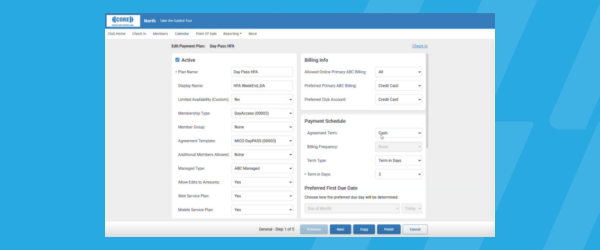
Clubs can now sell flexible access passes for 1 to 30 days, capturing revenue from travelers and short-term visitors with no long-term commitment, and opening a path to convert them into long-term members.
Short Term Passes
Clubs can now sell flexible access passes for 1 to 30 days, capturing revenue from travelers and short-term visitors with no long-term commitment, and opening a path to convert them into long-term members.

AI Workout Builder (Beta)
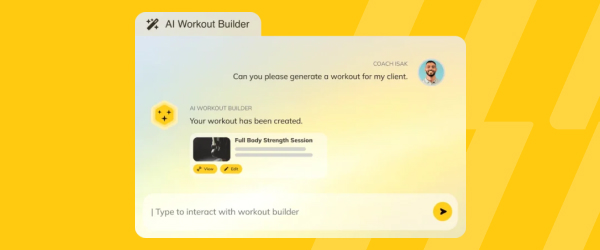
Spend more time coaching and less time programming. AI Workout Builder gets you a personalized, ready-to-assign workout in minutes—built from your client’s real goals, history, and progress. Just type a prompt and it’s built right inside Trainerize.
AI Workout Builder (Beta)
Spend more time coaching and less time programming. AI Workout Builder gets you a personalized, ready-to-assign workout in minutes—built from your client’s real goals, history, and progress. Just type a prompt and it’s built right inside Trainerize.
Schedule Cancellations in the Pro App
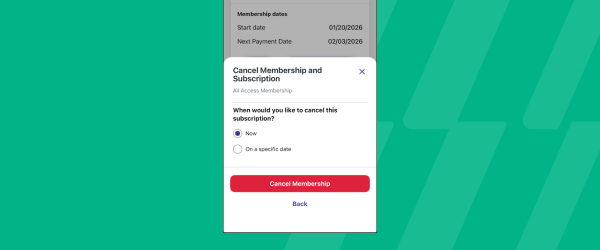
Admins and receptionists can schedule future membership cancellations for any date right in the Pro App, capturing cancellation reasons on the spot and cutting down on front desk trips.
Schedule Cancellations in the Pro App
Glofox now lets admins and receptionists schedule a future membership cancellation directly from the Pro App, matching a capability that already existed on the dashboard.
Staff can open a client’s membership from their phone or tablet, select Cancel Membership, and choose the date the membership should actually end, which is useful for studios that enforce a notice period, like thirty or sixty days, before a cancellation takes effect. As part of the process, staff capture a cancellation reason on the spot, chosen from a fixed list such as price, moved away, medical, customer service, class schedule, membership upgrade or downgrade, and lack of use, so studios build a consistent, structured record of why members leave.
Because this can be done from the Pro App, staff do not need to walk a client to a front desk computer or ask them to wait while someone logs into the dashboard, cutting down on unnecessary trips and delays. The membership stays active and the member continues to be billed on their normal schedule until the scheduled end date arrives, so studios do not lose revenue during the notice period.
This keeps cancellation handling consistent across dashboard and mobile, while giving owners cleaner data on why members are leaving.
E-Agreement History
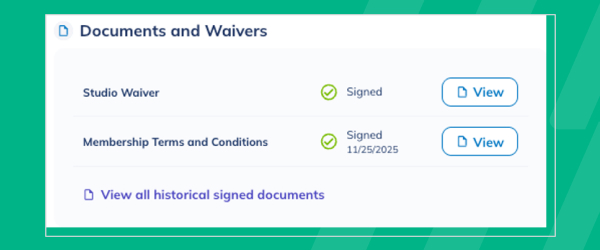
Admins and receptionists can schedule future membership cancellations for any date right in the Pro App, capturing cancellation reasons on the spot and cutting down on front desk trips.
E-Agreement History
Glofox now lets admins and receptionists schedule a future membership cancellation directly from the Pro App, matching a capability that already existed on the dashboard.
Staff can open a client’s membership from their phone or tablet, select Cancel Membership, and choose the date the membership should actually end, which is useful for studios that enforce a notice period, like thirty or sixty days, before a cancellation takes effect. As part of the process, staff capture a cancellation reason on the spot, chosen from a fixed list such as price, moved away, medical, customer service, class schedule, membership upgrade or downgrade, and lack of use, so studios build a consistent, structured record of why members leave.
Because this can be done from the Pro App, staff do not need to walk a client to a front desk computer or ask them to wait while someone logs into the dashboard, cutting down on unnecessary trips and delays. The membership stays active and the member continues to be billed on their normal schedule until the scheduled end date arrives, so studios do not lose revenue during the notice period.
This keeps cancellation handling consistent across dashboard and mobile, while giving owners cleaner data on why members are leaving.
Embed Web Content in the Glofox App
Studios can surface third-party tools and content right within community posts in the Glofox App, keeping members engaged in one place.

Embed Web Content in the Glofox App
Studios can now surface third-party tools and content directly within community posts in the Glofox App.
That means members don’t have to leave the app to access external resources their studio wants to share. Keeping everything in one place helps owners and staff keep members engaged with the app itself, rather than sending them elsewhere.
It’s a way to bring more of the member experience under one roof without adding extra steps for the people using it.
Support for Purchasing Credit Packs with Digital Wallets
Members can now buy credit packs with Google Pay or Apple Pay, completing the rollout of digital wallet support across every purchase type in the Glofox App.
Support for Purchasing Credit Packs with Digital Wallets
Members can now buy credit packs using Google Pay or Apple Pay, completing digital wallet support across every purchase type in the Glofox App.That means whether a member is buying a membership, a class, or a credit pack, they can check out the same fast way every time.
For owners, consistent payment options across every purchase type mean less confusion and fewer abandoned transactions. It’s the final piece in giving members a uniformly quick, familiar checkout no matter what they’re purchasing.
Total Usage on Discount Codes
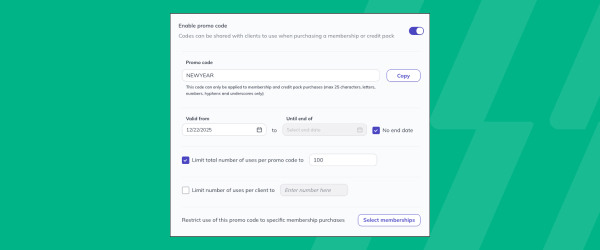
Set a total usage limit on discount codes so promotions expire automatically after a set number of redemptions, giving you built-in scarcity and revenue control during flash sales.
Total Usage on Discount Codes
Discount codes in Glofox can now be capped with a total usage limit, so a promotion automatically stops working once it has been redeemed a set number of times, on top of the existing option to limit how many times any one member can use a code.
This is built for studios running flash sales or limited time offers, where the goal is to create genuine urgency and control cost rather than let a code circulate indefinitely. Because the limit is enforced automatically, staff do not need to manually track redemptions or remember to deactivate a code once a promotion has run its course. It also protects revenue during high traffic promotions, since a studio can offer a meaningful discount to drive signups without the risk of unlimited redemptions eating into margin.
For studios that run seasonal or event based promotions, this turns a manual, easy to forget process into a set and forget control built into the discount code itself.
Bookings and Attendance Audience Filters
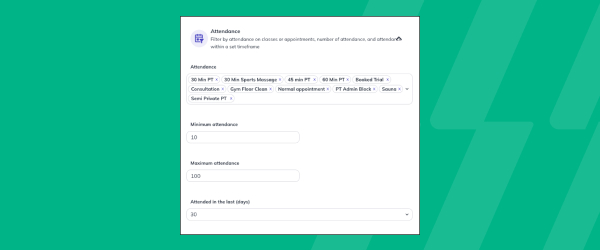
Build smarter member audiences from real class bookings and attendance, with flexible frequency and time-range controls for more precise targeting.
Bookings and Attendance Audience Filters
Client Filters on the Glofox dashboard let studios build precise member lists based on real booking and attendance data, accessible from the Manage icon and the Client tab using the Add Filters dropdown.
Bookings filters can surface members who have not booked in a set number of days, helping staff spot people at risk of churning before they disappear entirely, while attendance filters can identify members hitting milestones, like their 100th class, or those who have attended a high number of classes in a recent window.
Filters can also be combined with membership status, such as active, paused, or no membership, along with credits remaining and home studio for multi location businesses with roaming enabled. Once a filtered list is built, staff can download it as a CSV or send an SMS directly to that group, turning a filter into an action without extra steps.
This gives studios a way to target outreach with real behavioral data rather than guessing who needs a check in call or who deserves recognition for their consistency. For retention and engagement efforts, that precision means messages reach the right members at the right moment instead of going out to everyone.
Edit Appointments in Pro App
Instructors and staff can edit or reschedule appointments right in the Pro App, managing their day and making quick updates from anywhere, no desk required.

Edit Appointments in Pro App
Instructors and staff can now edit or reschedule appointments directly in the Pro App, without needing to be at a front desk computer.
That means schedule changes can happen from anywhere, whether they’re on the gym floor, between sessions, or off site. Managing a busy day gets easier when quick updates don’t require stepping away to find a desk.
It’s a small shift that gives staff more flexibility and members faster responses when appointment changes come up.
Pro App Translations
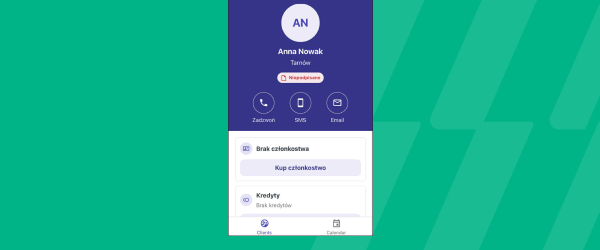
The Pro App now supports the same 17+ languages available on the Dashboard and Member App.
Pro App Translations
The Pro App now supports the same 17+ languages already available on the Dashboard and Member App.
That means instructors and staff can work in the Pro App in whichever language they’re most comfortable with, rather than being limited to one option. Consistent language support across the Dashboard, Member App, and Pro App makes the whole platform more accessible for multilingual teams.
It’s a straightforward way to make sure every staff member can use Glofox with confidence, wherever they’re based.
View and Bulk Update Tags
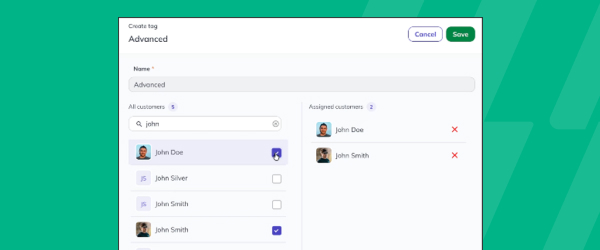
See every client or lead assigned to a specific tag, and add or remove multiple clients in bulk right from the Tags page.
View and Bulk Update Tags
Staff can now see every client or lead assigned to a specific tag in one place, right from the Tags page. From there, they can add or remove multiple clients in bulk, instead of updating tags one profile at a time. That saves time for teams managing large client lists or running targeted campaigns based on tags.
It’s a more efficient way to keep client segmentation accurate and up to date without manual, one by one edits.
Offer Free Classes
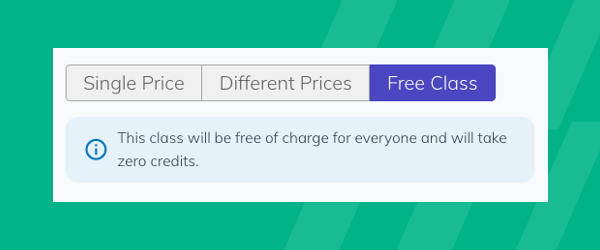
A new Free Class toggle lets you offer $0 community or trial sessions with no manual adjustments, so you fill spots, generate leads, and grow engagement.
Offer Free Classes
Glofox now includes a Free Class toggle that lets studios make any class in the schedule free to book, for members, leads, and pay as you go clients alike.
It is built for studios running community sessions, open houses, or trial classes, where the goal is to fill the room rather than collect payment, without staff having to manually zero out the price or adjust checkout every time. Because the toggle is set at the class level, staff can turn a specific session free without changing pricing anywhere else in the schedule or membership plans. This makes it easier to run recurring trial classes or community events as a standing part of the schedule rather than a one off manual workaround.
For studios focused on lead generation, offering a genuinely free class removes friction for new leads to walk through the door, while still tracking that booking like any other class attendance. It is a straightforward way to turn open capacity into engagement and new leads without extra administrative steps.
XLerate Workflow – Total Visits Milestone
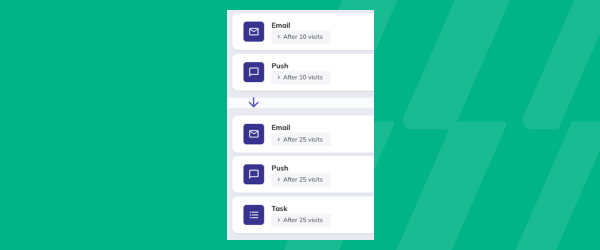
Celebrate member milestones from their 5th to 500th session with automated, personalized messages and staff reminders to reward or shout them out.
XLerate Workflow – Total Visits Milestone
XLerate, Glofox’s library of automated workflows, includes a Total Visits Milestone workflow that recognizes members automatically as they hit key session counts, from an early 5th visit through long term milestones like a 500th session.
It is built for studios that want to celebrate member consistency without staff having to manually track who is coming up on a milestone, since the workflow triggers on its own once a member crosses the threshold. Members get a personalized automated message marking the occasion, while staff receive a reminder so they can add a personal touch, like a shoutout in class or a small reward, on top of the automated message.
This sits alongside other XLerate workflows covering things like membership renewals, cart abandonment, and member expiration, giving studios a consistent way to automate retention touchpoints across the member lifecycle.
For owners focused on retention, recognizing visit milestones is a simple way to reinforce habits and make long term members feel seen, without adding another task to staff’s daily list.
View Tags on Booking Lists
Tags from a member's profile, like injuries, goals, or preferences, now appear right in booking lists on the Glofox Dashboard, giving instructors clearer context.

View Tags on Booking Lists
Tags in Glofox are custom labels studios create to flag important client information, such as an injury, a goal, a belt level in martial arts, or VIP status, and they now appear directly on booking lists on the Glofox dashboard as well as in the Pro App.
Tags can be created and applied either from the dedicated Tags page under Connect, or right on a client’s profile if the tag does not already exist, making it easy to build a tagging system that matches how a specific studio operates. When staff open a booked class, course, appointment, or facility slot, they can now see the tags applied to everyone booked in, without clicking into each individual profile first.
This gives instructors and front desk staff useful context before a session starts, like knowing a client is recovering from an injury or is new to a particular class format. It turns information that used to live only on a client’s profile into something visible at the point staff actually need it, right before they interact with that member.
The result is a more personalized interaction without extra lookup steps for staff.
Filter Appointment Types in Member App
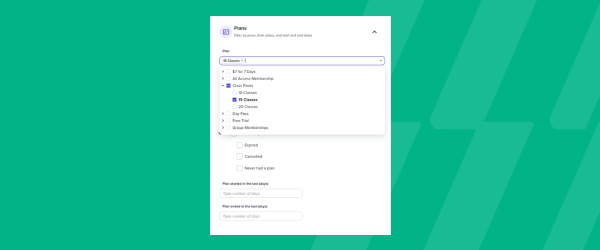
Members can filter appointments by type or name in the Glofox Member App, making it faster to find and book personal training sessions and other offerings.
Filter Appointment Types in Member App
The Glofox Member App lets members browse and book classes, courses, and appointments, and it now includes filters that let them narrow appointments by type or by name before booking.
This is aimed at studios offering multiple kinds of one on one sessions, such as personal training alongside other appointment based services, where a long unfiltered list makes it harder for members to find what they are looking for. Filters can also take trainer and time of day into account, so a member looking for a specific type of session with a specific trainer can get there faster.
Because the appointments shown are tied to the trainer availability set up on the dashboard, members only see slots that are actually bookable, avoiding the frustration of picking a time that is not really open.
For studios running a busy personal training or appointment based business, this cuts down on back and forth with front desk staff just to find the right session to book. It is a small addition to the Member App experience that removes friction right at the point of booking.
Upgrade or Downgrade Memberships
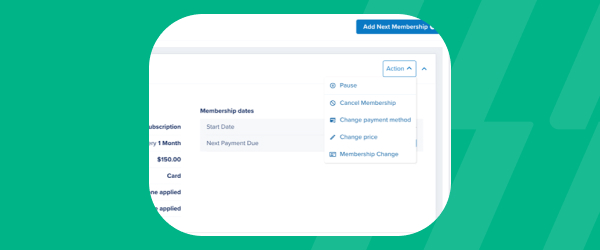
Change a client's membership without canceling and re-enrolling them, saving staff time, improving reporting accuracy, and auto-capturing prorated upgrade revenue.
Upgrade or Downgrade Memberships
Glofox’s membership management tools, covered in the Resources for Managing Memberships section of the help center, now support changing a client’s membership plan without cancelling and re-enrolling them from scratch.
This is built for staff who handle plan changes at the front desk or over the phone, letting them move a member from one membership to another directly on their profile in a single action. Because the change happens within the same membership record rather than through a cancellation and a new signup, reporting stays accurate rather than showing a churn event followed by a new member. It also saves staff the manual work of tracking down and applying prorated charges by hand, since any upgrade revenue is captured automatically at the time of the change.
For studios managing dozens of membership plan changes a month, this turns a multi step manual process into a quicker, cleaner transaction that keeps both the client record and the studio’s revenue reporting in sync.
Apple and Google Pay
Clients can now buy memberships with Apple Pay or Google Pay in Glofox and Stripe apps for a faster checkout.
Apple and Google Pay
Members can now buy memberships using Apple Pay or Google Pay, right in the Glofox and Stripe apps. That means fewer taps and less manual card entry at the point of purchase, for a faster checkout experience. For owners and front desk staff, offering the payment methods members already use day to day can reduce friction and abandoned signups.
It’s a straightforward way to modernize checkout without changing anything else about how memberships are sold.
BLIK
Members in Poland can now pay in the Glofox App using BLIK, for a faster, local checkout experience.
BLIK
Members in Poland can now pay in the Glofox App using BLIK, a payment method already familiar to local consumers. That gives studios and gyms in the region a faster, more localized checkout experience, matching how members already prefer to pay. Owners benefit from reduced friction at the point of sale, since members aren’t forced into a payment method that feels unfamiliar.
Supporting BLIK helps Glofox meet members where they already are when it comes to paying for memberships.
NICE Payments
Glofox now integrates with NICE Payments, South Korea's leading payment processor, so you get compliant local transactions at a lower cost and a higher success rate.

NICE Payments
Glofox now integrates with NICE Payments, South Korea’s leading payment processor, giving owners in the region a trusted local option for handling transactions. That integration supports compliant payment processing, so studios and gyms can operate with confidence in the local regulatory environment. It also brings a lower cost and a higher success rate to transactions, meaning fewer failed payments and better margins on every sale.
For South Korean businesses, it’s a payment setup built around local expectations rather than a one size fits all approach.
Zapier Integration
Available on the Elite plan, this lets you auto-create Glofox leads from outside sources like Facebook Lead Ads or HubSpot.

Zapier Integration
The Glofox Zapier App connects Glofox to thousands of other apps such as CRMs, marketing platforms, and spreadsheets, without requiring any code, and it is available to studios on the Elite plan.
Once connected with a Glofox API key, it lets you automatically create leads in Glofox from tools like Facebook Lead Ads, Typeform, HubSpot, or Google Sheets, so a form submission or ad click becomes a lead in your CRM without manual data entry. It also includes a polling trigger that syncs new or updated Glofox users into other platforms roughly every thirty minutes, plus a real time webhook trigger for new or updated invoices, useful for triggering accounting entries or follow ups the moment an invoice is created or its status changes. A dedicated action can pull a full list of users for a specific location, supporting one off or scheduled syncs into other systems.
For studios already running lead capture through outside tools, this closes the gap between where a lead is generated and where it needs to end up, cutting down on manual entry and leads that get lost in between. Setup happens directly in Zapier, with Glofox providing the API credentials needed to connect.
Fine-Tune the ABC XLerate Lead Workflow
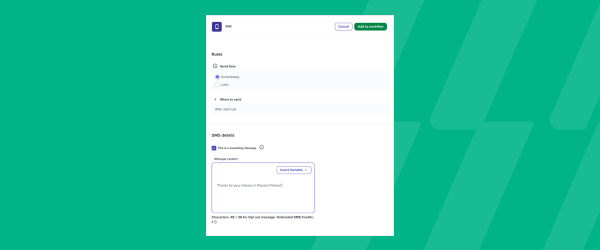
Take precise control over your lead nurture strategy by adjusting workflow triggers down to the minute, so follow-ups happen at exactly the right time.
Fine-Tune the ABC XLerate Lead Workflow
Sales and marketing staff can now adjust XLerate lead workflow triggers down to the minute, giving them precise control over lead nurture strategy. That level of detail means follow-ups happen at exactly the right time, rather than on a rough schedule that might miss the moment a lead is most engaged.
Timing plays a big role in converting interest into signups, so this update helps studios and gyms make the most of every lead that comes through. It’s a way to fine-tune outreach without adding extra manual work for the team.
Direct SMS Replies in Conversations
Reply to messages right in context to keep conversations moving, with everything tracked in Glofox for smooth handoffs and secure member data.

Direct SMS Replies in Conversations
Glofox’s Conversations tools let studios message members directly from the dashboard, and staff can now reply to those messages right where the original conversation lives instead of jumping into a separate inbox or phone.
This is designed for front desk and management staff who handle day to day member questions, whether that is confirming a booking, answering a billing question, or following up on a missed class. Because replies happen in context, staff do not need to search back through previous messages to understand what a member is asking about, which speeds up response time. Every message sent and received through Conversations stays logged inside Glofox, so studios keep a complete, secure record of member communication rather than having it scattered across personal phones or inboxes. That matters for handoffs between shifts or staff members, since anyone picking up the conversation can see the full thread before responding.
For studios that lean on messaging to stay close to members, this keeps that channel fast without sacrificing the record keeping owners need.
Send Emails to Individual Clients from the Pro App
Staff can now email members right from their profiles in the Pro App, saving time and keeping every communication logged inside Glofox.

Send Emails to Individual Clients from the Pro App
Front desk and gym floor staff can now send a one-off email straight to an individual client’s profile from the Clients tab in the Glofox Pro app, the same admin app they already use to manage schedules, clients, and revenue reports from a phone or tablet.
Instead of stepping away to a desktop or falling back on a personal inbox, staff open the client’s profile, log the interaction, and send the message on the spot. Every email sent this way is recorded against the client’s record in Glofox, so any teammate can see what was communicated and when, keeping handoffs clean.
This brings email in line with the SMS and push notification options already available in the Pro App, giving reception and floor teams one consistent way to reach members wherever they’re working.
Pro App Roaming Restrictions
Dashboard roaming restrictions now extend to the Pro App, giving front desk and gym floor staff a consistent experience.

Pro App Roaming Restrictions
Roaming restrictions already available on the Dashboard now extend to the Pro App as well.
That gives front desk and gym floor staff a consistent experience no matter which device or interface they’re working from. Owners can apply the same access rules across their team without worrying about gaps between the Dashboard and the Pro App.
Consistency across tools means fewer surprises for staff and tighter control for operators over who can access what, and from where.
Updated Cancellation Flow
Members can cancel memberships and add-ons directly in the app, without picking up the phone or sending an email. For front desk and admin staff, that means fewer manual cancellation requests to process and fewer back and forth exchanges. It also helps studios and gyms stay aligned with consumer protection regulations that require self-service cancellation… <a class="more-link" href="https://abcfitness.com/?post_type=release_update&p=29174">Continue reading <span class="screen-reader-text">Updated Cancellation Flow</span></a>

Updated Cancellation Flow
Members can cancel memberships and add-ons directly in the app, without picking up the phone or sending an email. For front desk and admin staff, that means fewer manual cancellation requests to process and fewer back and forth exchanges. It also helps studios and gyms stay aligned with consumer protection regulations that require self-service cancellation options. The result is a smoother, more transparent experience for members and less administrative overhead for your team.
New XLerate Workflows
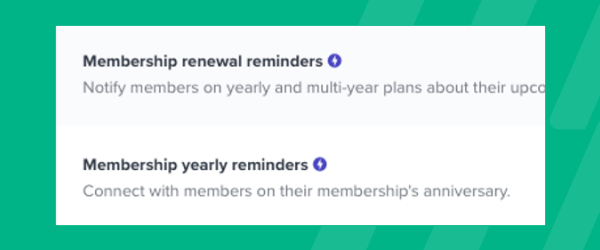
Add new steps, like messages or task reminders, to the XLerate "Leads" workflow that trigger instantly, so you respond faster to newly registered leads without disturbing existing steps.
New XLerate Workflows
Sales and front desk teams can now add new steps, like messages or task reminders, to the XLerate Leads workflow that trigger instantly.
That means a newly registered lead gets a faster response the moment they enter the pipeline, instead of waiting on delayed follow up. Existing workflow steps stay untouched, so teams can layer in instant triggers without rebuilding what’s already working.
Faster first contact with leads helps studios and gyms convert more interest into signups before it goes cold.