







Product Updates
Track the evolution of our platform. Filter by release type, product, or timeline to find exactly what you’re looking for.

ABC Insights for Glofox
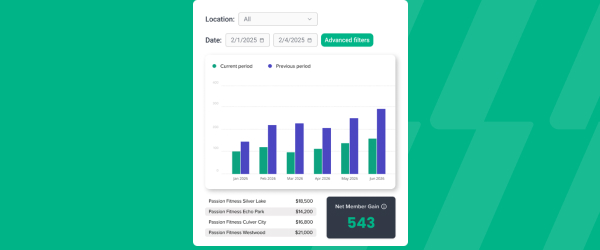
ABC’s flagship reporting product, ABC Insights, is now available to Glofox customers. Owners running multiple locations can use its centralized dashboards to compare performance across every studio or gym in one place. That makes it easier to spot what’s working and what isn’t, rather than piecing together numbers location by location. For multi-site operators, it… <a class="more-link" href="https://abcfitness.com/?post_type=release_update&p=28797">Continue reading <span class="screen-reader-text">ABC Insights for Glofox</span></a>
ABC Insights for Glofox
ABC’s flagship reporting product, ABC Insights, is now available to Glofox customers. Owners running multiple locations can use its centralized dashboards to compare performance across every studio or gym in one place. That makes it easier to spot what’s working and what isn’t, rather than piecing together numbers location by location. For multi-site operators, it turns scattered performance data into a single, clear view for making smarter business decisions.

Short Term Passes
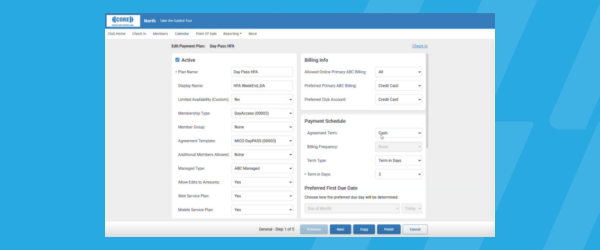
Clubs can now sell flexible access passes for 1 to 30 days, capturing revenue from travelers and short-term visitors with no long-term commitment, and opening a path to convert them into long-term members.
Short Term Passes
Clubs can now sell flexible access passes for 1 to 30 days, capturing revenue from travelers and short-term visitors with no long-term commitment, and opening a path to convert them into long-term members.

AI Workout Builder (Beta)
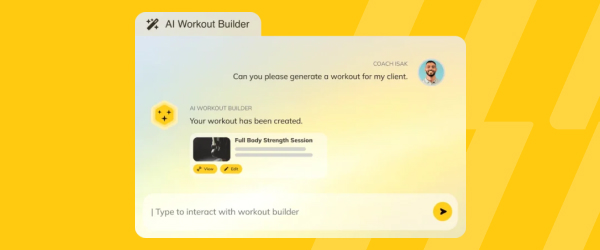
Spend more time coaching and less time programming. AI Workout Builder gets you a personalized, ready-to-assign workout in minutes—built from your client’s real goals, history, and progress. Just type a prompt and it’s built right inside Trainerize.
AI Workout Builder (Beta)
Spend more time coaching and less time programming. AI Workout Builder gets you a personalized, ready-to-assign workout in minutes—built from your client’s real goals, history, and progress. Just type a prompt and it’s built right inside Trainerize.
ABC Insights: All Customers Report
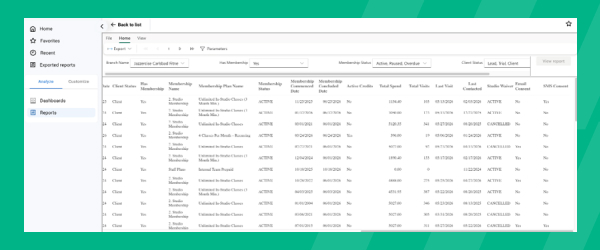
Multi-location operators can now download a single report covering their entire customer base, with 30+ fields spanning membership status, spend, visits, and marketing consent, across every location at once.
ABC Insights: All Customers Report
ABC Insights: All Customers Report gives multi-location operators one downloadable export of their entire customer base, combining more than 30 fields including membership status, total spend, visit activity, lead source, and marketing consent into a single report. Instead of exporting data location by location, operators get full network visibility in one download, covering every studio or gym in their network at once. That combined view makes it easier to spot high-value members, identify lapsed customers, and understand marketing consent status at scale across the whole business rather than one site at a time. It’s available to all ABC Insights customers, with a Location KPI Report coming next.
ABC Insights for Glofox
ABC’s flagship reporting product, ABC Insights, is now available to Glofox customers. Owners running multiple locations can use its centralized dashboards to compare performance across every studio or gym in one place. That makes it easier to spot what’s working and what isn’t, rather than piecing together numbers location by location. For multi-site operators, it… <a class="more-link" href="https://abcfitness.com/?post_type=release_update&p=28797">Continue reading <span class="screen-reader-text">ABC Insights for Glofox</span></a>
ABC Insights for Glofox
ABC’s flagship reporting product, ABC Insights, is now available to Glofox customers. Owners running multiple locations can use its centralized dashboards to compare performance across every studio or gym in one place. That makes it easier to spot what’s working and what isn’t, rather than piecing together numbers location by location. For multi-site operators, it turns scattered performance data into a single, clear view for making smarter business decisions.
Membership Self Pause
Membership Self Pause lets members pause their own recurring membership or recurring credit pack directly from the Member App or web portal, without needing to call or email the studio. Members simply select a pause duration from their membership settings, and the system automatically extends their next payment date by the number of days they’re… <a class="more-link" href="https://abcfitness.com/?post_type=release_update&p=28793">Continue reading <span class="screen-reader-text">Membership Self Pause</span></a>
Membership Self Pause
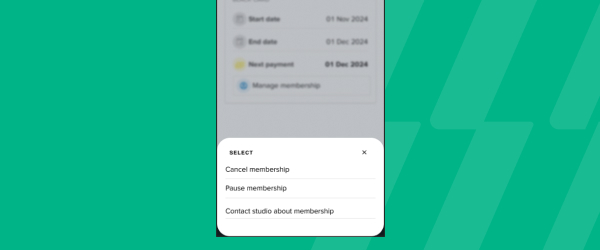
Membership Self Pause lets members pause their own recurring membership or recurring credit pack directly from the Member App or web portal, without needing to call or email the studio. Members simply select a pause duration from their membership settings, and the system automatically extends their next payment date by the number of days they’re paused, so a client who pauses for two days simply has their next charge pushed out two days rather than losing time they’ve already paid for. This applies to recurring memberships and credit packs set to recur, and staff can still adjust or unpause a membership from the Dashboard if a client’s plans change. By giving members that flexibility to handle a pause on their own, gyms and studios cut down on inbound admin requests for holidays or injuries, reduce the temptation to cancel outright when life gets in the way, and give members one more reason to stay rather than churn. It’s a small self-service option that removes friction for members while easing the workload on staff.
Flexible Trainer Availability
Flexible Trainer Availability lets trainers set a recurring weekly schedule and then layer in date-specific changes, like blocking a day off or adjusting hours, without overwriting or recreating the whole calendar. Both recurring and date-specific availability can now be set at the same time, and when they overlap, the date-specific entry takes priority for that… <a class="more-link" href="https://abcfitness.com/?post_type=release_update&p=28812">Continue reading <span class="screen-reader-text">Flexible Trainer Availability</span></a>
Flexible Trainer Availability
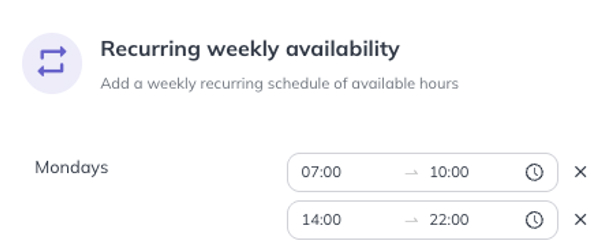
Flexible Trainer Availability lets trainers set a recurring weekly schedule and then layer in date-specific changes, like blocking a day off or adjusting hours, without overwriting or recreating the whole calendar. Both recurring and date-specific availability can now be set at the same time, and when they overlap, the date-specific entry takes priority for that day while the recurring schedule continues to apply everywhere else. Staff manage this directly from the Dashboard Calendar’s Appointment Availability screen, and changes save automatically, no more manual save clicks, with a multi-day picker available to copy a schedule across several dates at once. Because clients self-book appointments in the Member App and Web Portal based on this availability, keeping it accurate matters directly to booking quality: conflicts are automatically hidden from clients, and the calendar updates dynamically as bookings come in. For gyms and studios juggling variable trainer schedules, this keeps the calendar clean, reporting accurate, and prevents the old workaround of creating dummy bookings just to block time.
Task Page Filters
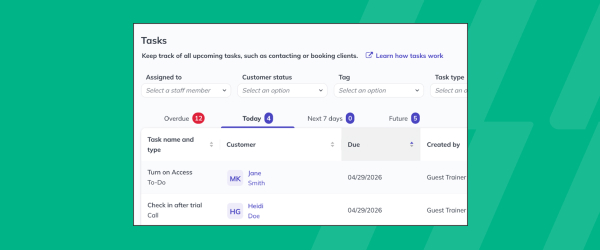
Staff can now filter large task lists by staff member, customer status, tag, or task type. That makes it easier to cut through task overload and quickly find the specific tasks relevant to a given person or situation. For teams juggling a high volume of follow-ups and to-dos, these filters help them focus on what… <a class="more-link" href="https://abcfitness.com/?post_type=release_update&p=28810">Continue reading <span class="screen-reader-text">Task Page Filters</span></a>
Task Page Filters
Staff can now filter large task lists by staff member, customer status, tag, or task type. That makes it easier to cut through task overload and quickly find the specific tasks relevant to a given person or situation. For teams juggling a high volume of follow-ups and to-dos, these filters help them focus on what matters most instead of scrolling through an unsorted list. It’s a practical way to keep task management usable as your client base and task volume grow.
Pro App: Two Way SMS Conversations
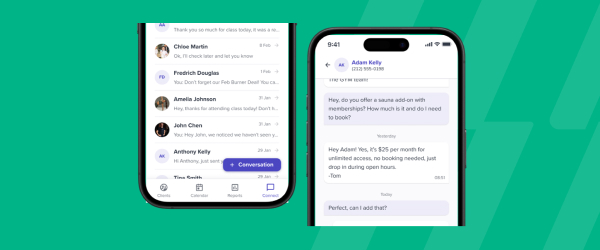
Pro App: Two Way SMS Conversations brings real-time, two-way SMS messaging into the Glofox Pro App, so staff can text with leads and members while on the go instead of being tied to the Dashboard. Every conversation is centralized in Glofox, meaning a message sent or received from the Pro App shows up in the… <a class="more-link" href="https://abcfitness.com/?post_type=release_update&p=28808">Continue reading <span class="screen-reader-text">Pro App: Two Way SMS Conversations</span></a>
Pro App: Two Way SMS Conversations
Pro App: Two Way SMS Conversations brings real-time, two-way SMS messaging into the Glofox Pro App, so staff can text with leads and members while on the go instead of being tied to the Dashboard. Every conversation is centralized in Glofox, meaning a message sent or received from the Pro App shows up in the same thread staff would see from the main dashboard, giving the whole team visibility into a client’s communication history regardless of which device handled it. That consolidation matters for gyms and studios where trainers and front desk staff split their time between the floor and the front office, since no conversation gets lost between devices or team members. Staff can answer a question, confirm a booking, or follow up with a lead the moment it comes in, rather than waiting until they’re back at a desk. It extends the same conversational SMS workflow already available on the Dashboard to wherever staff happen to be working.
Scheduled Revenue Report Updates
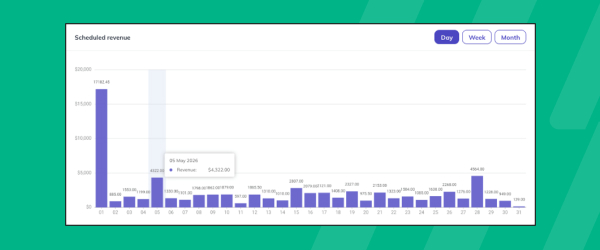
Revenue reporting windows now extend up to a full year, giving owners and finance staff a much longer view for forecasting than before. Row-level drill-down behind projections lets them see exactly what’s driving the numbers, rather than working from a summary figure alone. Improved accuracy across discounts, memberships, and pauses means those projections better reflect… <a class="more-link" href="https://abcfitness.com/?post_type=release_update&p=28805">Continue reading <span class="screen-reader-text">Scheduled Revenue Report Updates</span></a>
Scheduled Revenue Report Updates
Revenue reporting windows now extend up to a full year, giving owners and finance staff a much longer view for forecasting than before. Row-level drill-down behind projections lets them see exactly what’s driving the numbers, rather than working from a summary figure alone. Improved accuracy across discounts, memberships, and pauses means those projections better reflect what’s actually happening in the business. Together, these updates give operators clearer, more dependable forecasting to plan around.
Paystack Integration (South Africa)
South African clubs now have a new payment provider option through Paystack, built for the local market. That gives owners more reliable processing and collections, reducing the friction and failed transactions that come with less localized payment setups. Stronger support behind the integration also means fewer headaches when payment issues do come up. It’s a… <a class="more-link" href="https://abcfitness.com/?post_type=release_update&p=28803">Continue reading <span class="screen-reader-text">Paystack Integration (South Africa)</span></a>

Paystack Integration (South Africa)
South African clubs now have a new payment provider option through Paystack, built for the local market. That gives owners more reliable processing and collections, reducing the friction and failed transactions that come with less localized payment setups. Stronger support behind the integration also means fewer headaches when payment issues do come up. It’s a payment option shaped around what South African businesses actually need, rather than a generic global default.
Create and Complete Tasks from Profiles
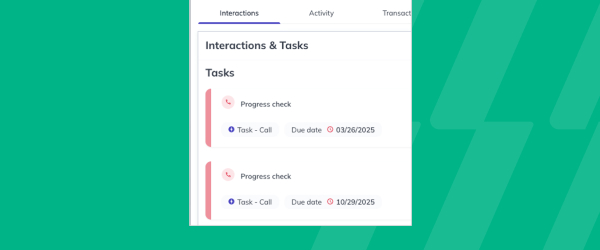
Staff can now create and complete tasks directly within a member’s profile, instead of switching over to the separate Tasks tab. That keeps follow-ups, logged interactions, and to-dos attached to the exact member they concern, so nothing gets lost in a general task list. It saves time for front desk and client-facing staff who are… <a class="more-link" href="https://abcfitness.com/?post_type=release_update&p=28829">Continue reading <span class="screen-reader-text">Create and Complete Tasks from Profiles</span></a>
Create and Complete Tasks from Profiles
Staff can now create and complete tasks directly within a member’s profile, instead of switching over to the separate Tasks tab. That keeps follow-ups, logged interactions, and to-dos attached to the exact member they concern, so nothing gets lost in a general task list. It saves time for front desk and client-facing staff who are already in a profile handling a request or conversation. Staying organized becomes easier when the tools you need are right where the work is happening.
Pro App: Tags
View Tags in the Pro App brings the tags created on the Glofox Dashboard, like injury notes, belt levels, VIP status, or studio-defined personas, directly onto member profiles and class booking lists inside the Pro App. Tags are manually created labels that studios use to segment and flag important client information, and until now that… <a class="more-link" href="https://abcfitness.com/?post_type=release_update&p=28827">Continue reading <span class="screen-reader-text">Pro App: Tags</span></a>

Pro App: Tags
View Tags in the Pro App brings the tags created on the Glofox Dashboard, like injury notes, belt levels, VIP status, or studio-defined personas, directly onto member profiles and class booking lists inside the Pro App. Tags are manually created labels that studios use to segment and flag important client information, and until now that context lived only on the Dashboard. With tags now visible on the floor, trainers and front-of-house staff can glance at a class list or a member’s profile and immediately see relevant details before an interaction starts. That means fewer awkward moments asking a client to repeat information they’ve already shared, and more personalized conversations, whether that’s checking in on an injury or acknowledging a milestone. Tag creation itself still happens on the Dashboard, but having that information at hand in the Pro App puts it directly in front of the staff running day-to-day sessions.
2-Way SMS Conversations for Australia
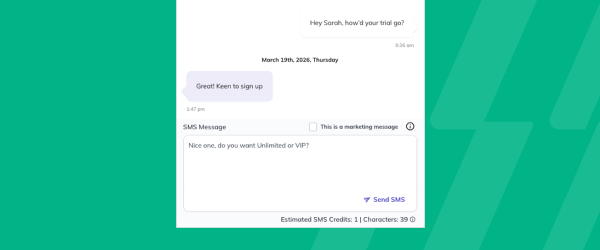
2-Way SMS Conversations for Australia extends full functionality of the Conversations tab to studios and gyms operating there, so teams can hold real-time, two-way SMS threads with leads and members rather than sending one-directional texts. All messages live in a single, unified thread inside Glofox, giving staff one place to see the full back-and-forth with… <a class="more-link" href="https://abcfitness.com/?post_type=release_update&p=28825">Continue reading <span class="screen-reader-text">2-Way SMS Conversations for Australia</span></a>
2-Way SMS Conversations for Australia
2-Way SMS Conversations for Australia extends full functionality of the Conversations tab to studios and gyms operating there, so teams can hold real-time, two-way SMS threads with leads and members rather than sending one-directional texts. All messages live in a single, unified thread inside Glofox, giving staff one place to see the full back-and-forth with a client instead of piecing together separate texts and emails. This makes it easier to answer questions, confirm bookings, or follow up with leads over SMS, the channel many members already prefer, without switching to a personal phone or a separate messaging tool. For Australian studios and gyms, it closes a gap that previously limited them from using the same conversational messaging workflow already available elsewhere. The result is faster, more natural member engagement handled entirely within Glofox.
Discounts on Joining Fees
Joining Fee Discounts let gyms and studios create fixed-amount or percentage discounts that apply specifically to a membership’s joining fee, separate from the regular membership price. This gives operators a way to run a targeted promotion, such as waiving or reducing a signup fee during a seasonal push, without discounting the recurring price a member… <a class="more-link" href="https://abcfitness.com/?post_type=release_update&p=28823">Continue reading <span class="screen-reader-text">Discounts on Joining Fees</span></a>

Discounts on Joining Fees
Joining Fee Discounts let gyms and studios create fixed-amount or percentage discounts that apply specifically to a membership’s joining fee, separate from the regular membership price. This gives operators a way to run a targeted promotion, such as waiving or reducing a signup fee during a seasonal push, without discounting the recurring price a member pays going forward. Because the discount applies only to the joining fee, staff can attract new signups with a lower barrier to entry while keeping standard membership pricing and revenue intact. It fits alongside Glofox’s existing discount tools, giving sales and front desk teams another lever to close a sale without over-discounting the membership itself. For gyms running frequent promotions, it means the joining fee can flex to match a campaign while the core pricing structure stays consistent.
Store CTA After a Member Books
After a member books their first class, they now see a button prompting them to purchase any required equipment from the Glofox store. That timing puts the offer in front of members exactly when it’s most relevant, right after they’ve committed to attending. For owners, it’s a built-in way to drive additional store revenue without… <a class="more-link" href="https://abcfitness.com/?post_type=release_update&p=28821">Continue reading <span class="screen-reader-text">Store CTA After a Member Books</span></a>
Store CTA After a Member Books
After a member books their first class, they now see a button prompting them to purchase any required equipment from the Glofox store. That timing puts the offer in front of members exactly when it’s most relevant, right after they’ve committed to attending. For owners, it’s a built-in way to drive additional store revenue without staff having to manually follow up on equipment needs. Members get a convenient nudge to make sure they show up prepared for their first class.
Members Report Attrition Percentage
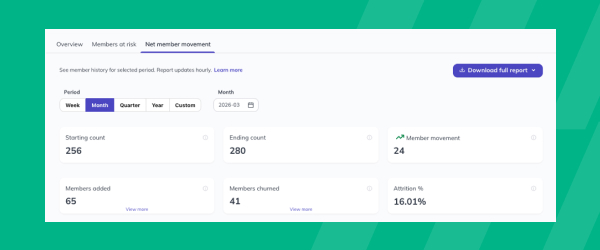
The Members Report now displays an attrition percentage for whatever period a gym or studio selects, showing member loss as a share of the total member base rather than just a raw count. This sits within the existing Members tab of the Reports section, where operators already track new members, demographics, and membership trends. By… <a class="more-link" href="https://abcfitness.com/?post_type=release_update&p=28819">Continue reading <span class="screen-reader-text">Members Report Attrition Percentage</span></a>
Members Report Attrition Percentage
The Members Report now displays an attrition percentage for whatever period a gym or studio selects, showing member loss as a share of the total member base rather than just a raw count. This sits within the existing Members tab of the Reports section, where operators already track new members, demographics, and membership trends. By calculating attrition as a percentage, staff can compare loss rates across different time periods or locations on equal footing, rather than trying to judge whether a raw drop-off number is good or bad relative to a bigger or smaller member base. That makes it easier to spot a retention problem early and react before it compounds, particularly for multi-location operators comparing performance across sites. It turns a number that used to require manual calculation into something staff can read directly off the report.
Sales Report Improvements
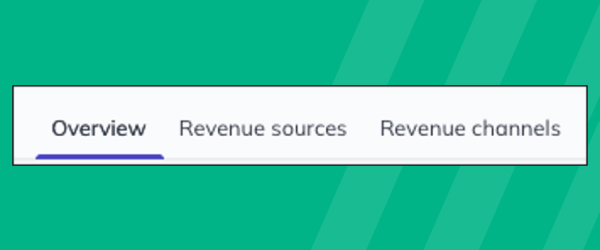
The Sales Report has been reorganized with new Revenue Sources and Channels views that replace the previous Breakdown tab, giving gyms and studios clearer insight into where their revenue is coming from and how it’s being processed. The report still opens with an Overview showing gross sales, failed payments, pending payments, forgiven payments, refunds, and… <a class="more-link" href="https://abcfitness.com/?post_type=release_update&p=28817">Continue reading <span class="screen-reader-text">Sales Report Improvements</span></a>
Sales Report Improvements
The Sales Report has been reorganized with new Revenue Sources and Channels views that replace the previous Breakdown tab, giving gyms and studios clearer insight into where their revenue is coming from and how it’s being processed. The report still opens with an Overview showing gross sales, failed payments, pending payments, forgiven payments, refunds, and net sales for a selected period, visualized over time. Revenue Sources shows what members are actually spending on, memberships, credit packs and add-ons, classes and appointments, products, custom charges, and upfront fees, while Channels shows how those payments are processed, including by payment method and by recurring versus non-recurring status. That separation makes it easier for operators to answer two different questions at once: what is generating revenue, and how it’s flowing through the business. For teams reviewing performance regularly, since the report refreshes hourly, it turns a single dense breakdown into two focused views that are faster to scan and act on.
Class Performance Report Update
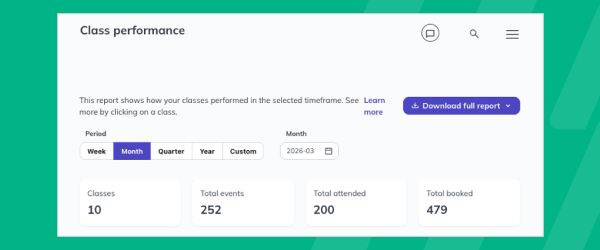
Class Performance Report Improvements let gyms and studios download full class-level data, giving staff a way to work with the numbers outside the dashboard for deeper trend spotting and comparison. The report already shows which classes generate the most bookings and the highest turnout, letting staff sort high to low by whichever metric matters most,… <a class="more-link" href="https://abcfitness.com/?post_type=release_update&p=28815">Continue reading <span class="screen-reader-text">Class Performance Report Update</span></a>
Class Performance Report Update
Class Performance Report Improvements let gyms and studios download full class-level data, giving staff a way to work with the numbers outside the dashboard for deeper trend spotting and comparison. The report already shows which classes generate the most bookings and the highest turnout, letting staff sort high to low by whichever metric matters most, and drill into individual class times to see attendance patterns and who trained each session. With exportable data, operators can now line up classes side by side over a chosen time period, spot which sessions are consistently full or underbooked, and build a case for adjusting the schedule or shifting capacity. It’s found in the Reports section under Class Performance, and it turns scheduling decisions that used to rely on gut feel into ones backed by exportable, class-level detail. That makes it easier to justify adding, cutting, or rescheduling classes based on real demand.
Pro App: Transaction Visibility
Staff can view a member's full transaction history right on their profile in the Pro App, so they answer billing questions faster and avoid unnecessary handoffs between team members.

Pro App: Transaction Visibility
Transaction Visibility in Pro App brings the member profile Transactions tab to the Glofox Pro App, so staff can see a client’s complete payment history, including past payments and transaction attempts, without leaving the floor.
The tab timestamps every transaction, labels its status, and lets staff take direct action, retrying a failed payment, writing off a failed charge, issuing a refund, or resending and downloading a receipt. Because this now lives in the Pro App rather than only the Dashboard, front-of-house and training staff can resolve billing questions on the spot instead of routing members to an admin desk. That immediacy cuts down on handoffs between team members and shortens the time it takes to close out a payment issue.
For gyms and studios where staff are often away from a desk, it turns a common friction point, who do I ask about my last charge, into something any team member can answer directly.
Schedule Email Campaigns
Choose the exact date and time your campaign emails go out, whether that's the moment a promotion launches or during peak evening hours. Available on the Boost or Elite plan.

Schedule Email Campaigns
Schedule Email Campaigns lets studios and gyms on the Boost or Elite plan set a specific date and time for a campaign email to go out, rather than sending it the moment it’s created.
From Connect > Campaigns, staff create the campaign, choose their target audience, and can optionally schedule it for later instead of sending immediately, with the option to preview a test email first. This means a promotion can be queued to launch the instant it goes live, or a newsletter can be timed for when members are most likely to open it, such as peak evening hours.
Campaigns already support promotional pushes, recurring newsletters, and mandatory alerts like closure notices, and scheduling adds control over timing without adding extra steps to the send process.
For marketing-minded operators, this turns campaign sends from a reactive task into something that can be planned and set in advance.
Visit Milestone Badges
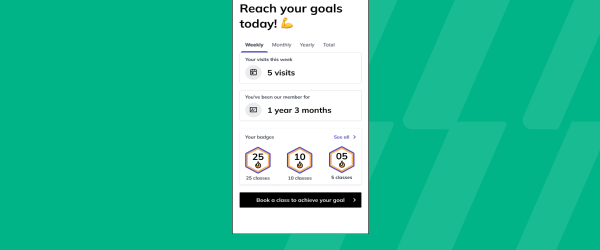
New profile badges celebrate member loyalty across 14 visit milestones, from a member’s first visit all the way up to 1,000 visits. For members, that recognition reinforces the healthy habit of showing up consistently, turning attendance into something worth celebrating. For instructors and front desk staff, it offers an easy way to acknowledge long-term engagement… <a class="more-link" href="https://abcfitness.com/?post_type=release_update&p=28893">Continue reading <span class="screen-reader-text">Visit Milestone Badges</span></a>
Visit Milestone Badges
New profile badges celebrate member loyalty across 14 visit milestones, from a member’s first visit all the way up to 1,000 visits. For members, that recognition reinforces the healthy habit of showing up consistently, turning attendance into something worth celebrating. For instructors and front desk staff, it offers an easy way to acknowledge long-term engagement without extra manual effort. Recognizing loyalty at every stage helps keep members motivated well beyond their first few weeks.
Lead Conversion Report Updates
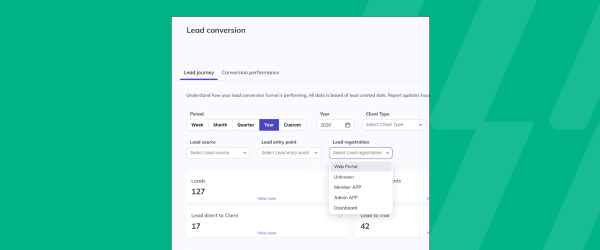
The updated Lead Conversion Report gives gyms and studios a clearer, more filterable view of how leads move from first contact to paying member. Staff can now filter results by tags, lead source, entry point, and registration, on top of the report’s existing stages: leads acquired, trial signups, active trials, and conversions. A new Registration… <a class="more-link" href="https://abcfitness.com/?post_type=release_update&p=28890">Continue reading <span class="screen-reader-text">Lead Conversion Report Updates</span></a>
Lead Conversion Report Updates
The updated Lead Conversion Report gives gyms and studios a clearer, more filterable view of how leads move from first contact to paying member. Staff can now filter results by tags, lead source, entry point, and registration, on top of the report’s existing stages: leads acquired, trial signups, active trials, and conversions. A new Registration Performance table adds visibility into conversion rates by signup point, so teams can see exactly which entry points are producing members and which are leaking leads along the way. Because the report is found under Reports, in the Memberships section, sales and marketing staff can quickly diagnose where a lead is dropping off, whether that’s a weak trial offer or a signup form that isn’t converting, and adjust their outreach accordingly. The added filters make it easier to segment performance by campaign or channel instead of reviewing the funnel as one undifferentiated pool of leads.
Late Cancel & No Show Fee
Automated late cancellation and no-show fees help protect class capacity, enforce attendance policies consistently, and recover lost revenue from missed classes.
Late Cancel & No Show Fee
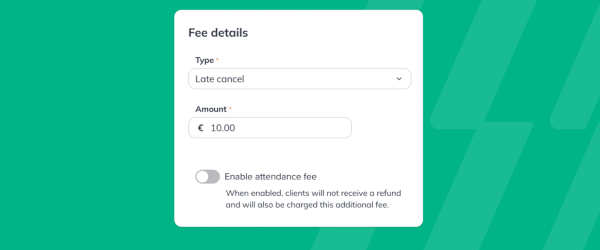
ABC Glofox now lets studios set up No Show and Late Cancel Fees directly from the dashboard, automating one of the most requested fee types among studios and gyms.
Owners define their own cancellation window and no show rules, and once those are set, fees are applied automatically whenever a member cancels late or fails to show, without staff needing to track attendance manually or have an awkward conversation about it. A 24 hour review window lets staff waive a fee when it makes sense, such as for a first time offender or a longtime member, so automation does not remove the ability to use judgment.
Every empty seat in a class represents lost revenue and a missed opportunity for someone on a waitlist, so studios typically set these fees in the ten to fifteen dollar range, turning missed attendance into predictable, recovered revenue.
The result for studios is fuller classes, faster moving waitlists, and consistent enforcement of policies across all staff and locations, without adding to the front desk’s workload.
Nonsufficient Funds Fee
NSF fees now charge automatically whenever a subscription payment fails, helping you recover lost revenue and reinforce payment accountability.
Nonsufficient Funds Fee
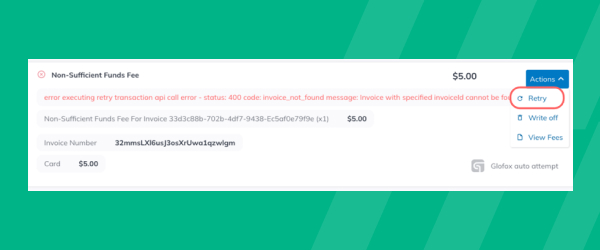
ABC Glofox now supports an automated Non-Sufficient Funds fee that charges whenever a recurring membership payment fails due to insufficient funds, removing a manual step that used to fall on studio staff.
Once a studio sets its NSF fee based on its own policy, the fee is generated automatically as a separate invoice linked to the failed payment, and it works alongside Glofox’s existing payment retry logic rather than replacing it. This means staff no longer need to track failed payments one by one, follow up with members individually, or decide case by case whether to charge a fee, since the policy is enforced consistently for every member and every location. Studios typically set this fee around twenty dollars, which helps recover revenue lost to failed payments while giving members a clear incentive to keep their payment details up to date.
For studios managing recurring memberships at scale, this closes a real gap between a payment failing and a studio actually recovering that lost revenue or the cost of chasing it down.
Maintenance Fees
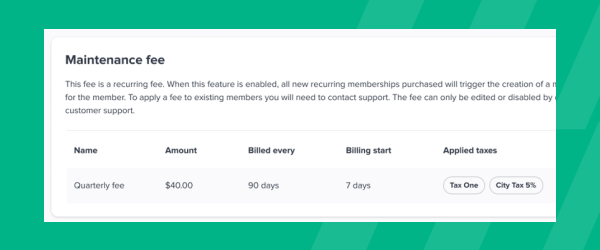
Studios can now collect maintenance fees separately from regular membership charges, supporting long-term studio upkeep and equipment costs without raising membership prices.
Maintenance Fees
Maintenance Fees in Glofox let studios and gyms charge a separate fee to cover facility upkeep and equipment costs, without folding that cost into the base membership price.
Configured from Settings and Fees on the dashboard, studios can set up a recurring maintenance fee and choose when it first applies after a new membership begins, anywhere from day one out to a full year later, in increments of days, weeks, or months, so new members get time to settle in before the fee kicks in. The fee amount is fixed across all customers and shows up clearly at checkout in both the mobile app and web portal, so members see it before they commit rather than being surprised by it later.
Because it applies automatically to new recurring memberships once enabled, studios get steady, predictable revenue for long term costs without staff having to invoice for it manually or track due dates by hand. This gives studios a cleaner way to fund equipment and facility investment over time while keeping core membership pricing simple and easy to communicate to prospective members.
Payment Links
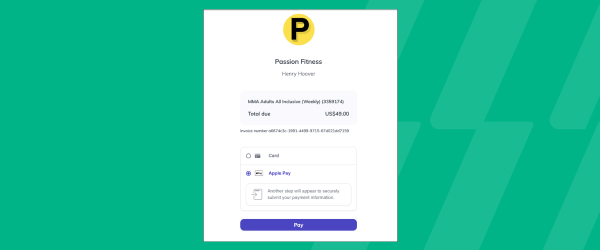
Secure, self-serve payment links let members pay overdue balances directly. Staff can generate links manually from member profiles, or trigger them automatically through the new Failed Subscription Payment workflow.
Payment Links
Payment Links in Glofox give members a secure, self serve way to pay off an overdue balance directly, without a staff member needing to process the payment manually or chase the member down by phone.
Staff can generate a payment link from a member’s profile whenever manual follow up is needed, or the link can go out automatically through the Failed Subscription Payment workflow as soon as a recurring payment fails. This means a studio does not have to choose between manual collections work and losing revenue to a payment that quietly fails and gets forgotten, since the system can prompt for repayment the moment it happens.
For members, it turns settling a balance into a quick self serve action instead of an awkward conversation with front desk staff.
For studios, it reduces the time staff spend on collections while helping recover revenue from failed or overdue payments faster.