






Product Updates
Track the evolution of our platform. Filter by release type, product, or timeline to find exactly what you’re looking for.

ABC Insights for Glofox
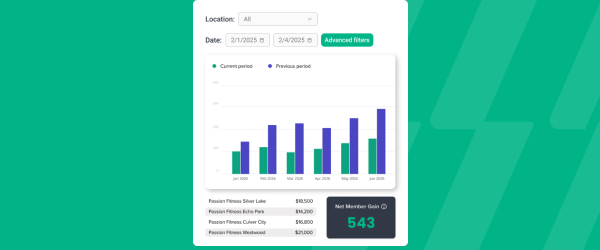
ABC’s flagship reporting product, ABC Insights, is now available to Glofox customers. Owners running multiple locations can use its centralized dashboards to compare performance across every studio or gym in one place. That makes it easier to spot what’s working and what isn’t, rather than piecing together numbers location by location. For multi-site operators, it… <a class="more-link" href="https://abcfitness.com/?post_type=release_update&p=28797">Continue reading <span class="screen-reader-text">ABC Insights for Glofox</span></a>
ABC Insights for Glofox
ABC’s flagship reporting product, ABC Insights, is now available to Glofox customers. Owners running multiple locations can use its centralized dashboards to compare performance across every studio or gym in one place. That makes it easier to spot what’s working and what isn’t, rather than piecing together numbers location by location. For multi-site operators, it turns scattered performance data into a single, clear view for making smarter business decisions.

Short Term Passes
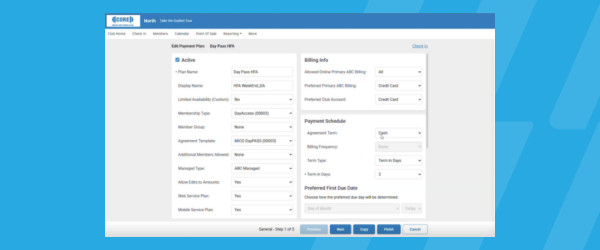
Clubs can now sell flexible access passes for 1 to 30 days, capturing revenue from travelers and short-term visitors with no long-term commitment, and opening a path to convert them into long-term members.
Short Term Passes
Clubs can now sell flexible access passes for 1 to 30 days, capturing revenue from travelers and short-term visitors with no long-term commitment, and opening a path to convert them into long-term members.

AI Workout Builder (Beta)
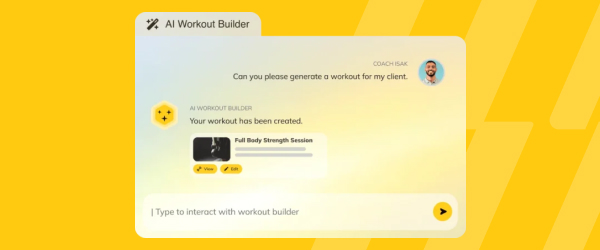
Spend more time coaching and less time programming. AI Workout Builder gets you a personalized, ready-to-assign workout in minutes—built from your client’s real goals, history, and progress. Just type a prompt and it’s built right inside Trainerize.
AI Workout Builder (Beta)
Spend more time coaching and less time programming. AI Workout Builder gets you a personalized, ready-to-assign workout in minutes—built from your client’s real goals, history, and progress. Just type a prompt and it’s built right inside Trainerize.
Insights: One Canonical “Active Member” Count
Active member counts are aligning across the State of the Business, Member Analysis, Daily Snapshot dashboards and the All Members report, by using one single Active Member definition, also aligned with M&O. Prospects, deleted records, and duplicates no longer be included. What you’ll notice: Daily Snapshot: Minor shift to match others State of the Business:… <a class="more-link" href="https://abcfitness.com/?post_type=release_update&p=30708">Continue reading <span class="screen-reader-text">Insights: One Canonical “Active Member” Count</span></a>
Insights: One Canonical “Active Member” Count
Active member counts are aligning across the State of the Business, Member Analysis, Daily Snapshot dashboards and the All Members report, by using one single Active Member definition, also aligned with M&O. Prospects, deleted records, and duplicates no longer be included.
What you’ll notice:
- Daily Snapshot: Minor shift to match others
- State of the Business: Reconciles with Daily Snapshot
- Member Analysis: Biggest change — defaults to Active only (inactive statuses available under Advanced Filters)
- All Members report: Same definition as the dashboards; counts moves closer to M&O
Worth knowing:
- No changes are made to your actual member base, only to how records are counted and filtered
- Historical counts are recalculated, so a one-time shift is expected
- You may continue to use filters to view inactive members and other member statuses as needed
Introducing New Goals to Challenges: Step, Hydration, and Referral Goals
Make challenges more engaging by giving clients more ways to earn points. You can now reward clients for reaching daily step goals, meeting daily water goals and referring a friend. Combine different scoring rules to create challenges that encourage healthy habits, boost participation and keep clients motivated. Client Referral Goals, Available with the Business Add-On*
Introducing New Goals to Challenges: Step, Hydration, and Referral Goals
Make challenges more engaging by giving clients more ways to earn points. You can now reward clients for reaching daily step goals, meeting daily water goals and referring a friend. Combine different scoring rules to create challenges that encourage healthy habits, boost participation and keep clients motivated.
Client Referral Goals, Available with the Business Add-On*
Daily Step Goals: Help Clients Build More Active Habits
Daily Step Goals give clients a clear daily target to work toward and make it easier to build consistent activity habits. Clients can track their progress using synced wearable data or manually enter their steps in the mobile app, helping them stay accountable and motivated to move more every day.
Daily Step Goals: Help Clients Build More Active Habits
Daily Step Goals give clients a clear daily target to work toward and make it easier to build consistent activity habits. Clients can track their progress using synced wearable data or manually enter their steps in the mobile app, helping them stay accountable and motivated to move more every day.
Sales: Booking Link Settings
The Booking Link Settings section in Company Settings lets you control how appointments booked through the Online Scheduler are configured, including the following customization options: How many bookings can be made per timeslot The default length of booked appointments The time intervals on which appointments can be booked Thesesettings are accessible to users with the… <a class="more-link" href="https://abcfitness.com/?post_type=release_update&p=30932">Continue reading <span class="screen-reader-text">Sales: Booking Link Settings</span></a>
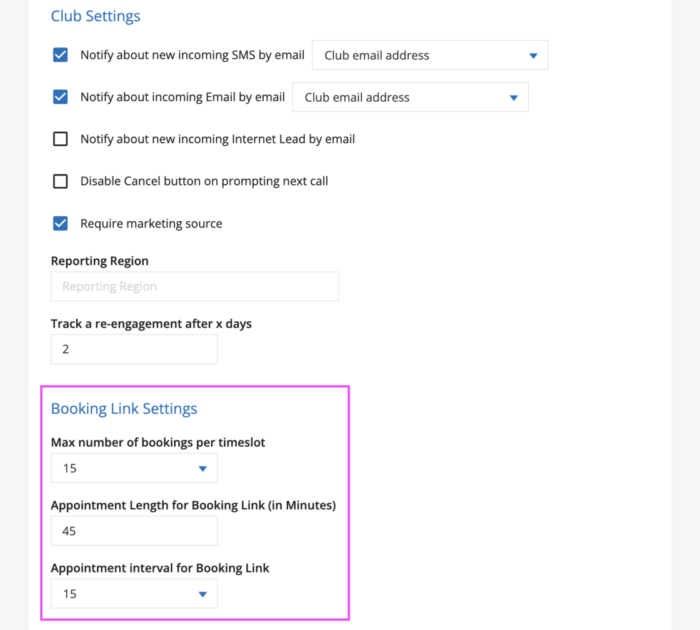
Sales: Booking Link Settings
The Booking Link Settings section in Company Settings lets you control how appointments booked through the Online Scheduler are configured, including the following customization options:
- How many bookings can be made per timeslot
- The default length of booked appointments
- The time intervals on which appointments can be booked
Thesesettings are accessible to users with the Club Manager or Regional Manager role. These can be configured within your Ignite Sales Company Settings on the General Settings tab.
Open your Company Settings and on the General Settings tab, look for the section titled Booking Link Settings.
Good to know
The Appointment Length and Appointment Interval settings only affect your Online Scheduler link settings. They don’t change your Ignite Sales Calendar settings (Default appointment length and Time step in minutes), found under Company Settings > General Settings > Working Time.
If you want to change how Appointments behave on your internal GymSales Calendar view, use those settings instead.