








Product Updates
Track the evolution of our platform. Filter by release type, product, or timeline to find exactly what you’re looking for.

ABC Insights for Glofox
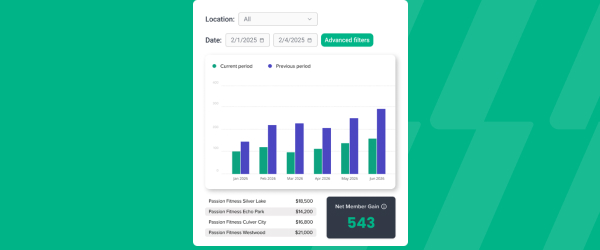
ABC’s flagship reporting product, ABC Insights, is now available to Glofox customers. Owners running multiple locations can use its centralized dashboards to compare performance across every studio or gym in one place. That makes it easier to spot what’s working and what isn’t, rather than piecing together numbers location by location. For multi-site operators, it… <a class="more-link" href="https://abcfitness.com/?post_type=release_update&p=28797">Continue reading <span class="screen-reader-text">ABC Insights for Glofox</span></a>
ABC Insights for Glofox
ABC’s flagship reporting product, ABC Insights, is now available to Glofox customers. Owners running multiple locations can use its centralized dashboards to compare performance across every studio or gym in one place. That makes it easier to spot what’s working and what isn’t, rather than piecing together numbers location by location. For multi-site operators, it turns scattered performance data into a single, clear view for making smarter business decisions.

Short Term Passes
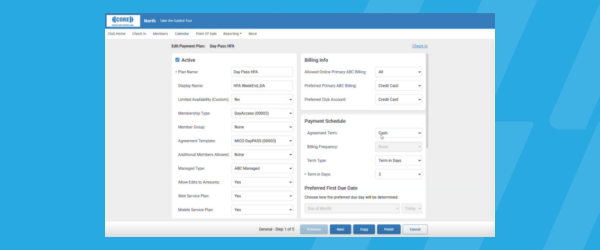
Clubs can now sell flexible access passes for 1 to 30 days, capturing revenue from travelers and short-term visitors with no long-term commitment, and opening a path to convert them into long-term members.
Short Term Passes
Clubs can now sell flexible access passes for 1 to 30 days, capturing revenue from travelers and short-term visitors with no long-term commitment, and opening a path to convert them into long-term members.

AI Workout Builder (Beta)
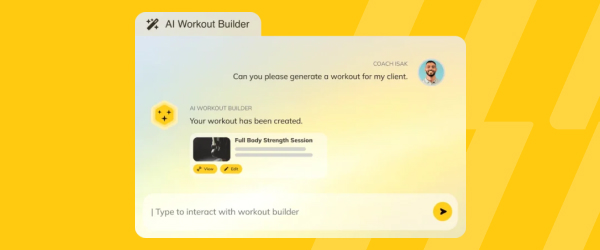
Spend more time coaching and less time programming. AI Workout Builder gets you a personalized, ready-to-assign workout in minutes—built from your client’s real goals, history, and progress. Just type a prompt and it’s built right inside Trainerize.
AI Workout Builder (Beta)
Spend more time coaching and less time programming. AI Workout Builder gets you a personalized, ready-to-assign workout in minutes—built from your client’s real goals, history, and progress. Just type a prompt and it’s built right inside Trainerize.
New Filter for Custom Audiences
Audiences in Glofox let you segment your leads and members into groups you can message directly, and this update adds account creation date as a filter you can build around. That means you can isolate leads who signed up last week for a fresh lead follow up, or members whose accounts go back a year… <a class="more-link" href="https://abcfitness.com/?post_type=release_update&p=29149">Continue reading <span class="screen-reader-text">New Filter for Custom Audiences</span></a>
New Filter for Custom Audiences
Audiences in Glofox let you segment your leads and members into groups you can message directly, and this update adds account creation date as a filter you can build around. That means you can isolate leads who signed up last week for a fresh lead follow up, or members whose accounts go back a year or more for a loyalty push, without manually cross-referencing lists. Audiences already includes presets like active memberships, expired trials, and low attendance clients, and this new filter slots in alongside those to sharpen who ends up in each group. Click into any audience from the Connect tab to see exactly which filters built it and how many people currently qualify. From there, you can use that audience directly in a one-off email campaign to reach the right people with the right message. It is a small addition that makes every campaign you send more targeted and less of a blast to everyone at once.
1:1 Emails on Customer Profile
Staff can now send a one-off email directly from an individual member’s profile, the same way they’ve long been able to fire off a quick SMS or push notification during a check-in. Instead of building a full campaign through Connect > Messages and selecting an audience, you can open the profile of the person in… <a class="more-link" href="https://abcfitness.com/?post_type=release_update&p=29136">Continue reading <span class="screen-reader-text">1:1 Emails on Customer Profile</span></a>
1:1 Emails on Customer Profile
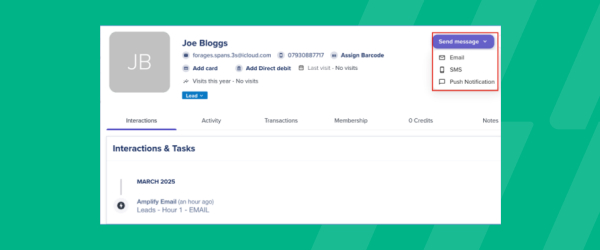
Staff can now send a one-off email directly from an individual member’s profile, the same way they’ve long been able to fire off a quick SMS or push notification during a check-in. Instead of building a full campaign through Connect > Messages and selecting an audience, you can open the profile of the person in front of you and send a personal note in a couple of clicks. This is built on the same one-off email tool used for broader sends like promotions, newsletters, or studio closure alerts, so the message looks and feels consistent with everything else you send. As with any one-off email, members who haven’t consented to marketing messages or who have unsubscribed won’t receive it, keeping your outreach compliant. For front desk and coaching staff, it closes the gap between a quick word at check-in and a proper follow up in someone’s inbox. It’s a simple way to make one-to-one communication feel personal without leaving the member’s profile.
Preview Emails
Marketing and front desk staff can preview 1:1 emails, campaigns, or workflow messages before hitting send, catching errors ahead of time. Test versions can be shared with anyone, even people outside Glofox, so teammates or stakeholders can weigh in before a message goes out. That extra review step helps studios and gyms send more polished,… <a class="more-link" href="https://abcfitness.com/?post_type=release_update&p=29132">Continue reading <span class="screen-reader-text">Preview Emails</span></a>
Preview Emails
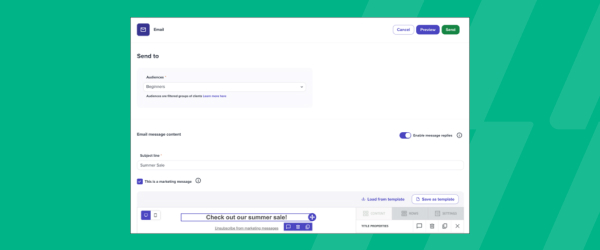
Marketing and front desk staff can preview 1:1 emails, campaigns, or workflow messages before hitting send, catching errors ahead of time. Test versions can be shared with anyone, even people outside Glofox, so teammates or stakeholders can weigh in before a message goes out. That extra review step helps studios and gyms send more polished, professional communications to members. It’s a simple way to build confidence into every email that goes out to your client list.
Social Media Merge Tags
Each location’s social media links now populate automatically wherever they’re needed in emails, campaigns, and workflow messages. That means staff no longer have to manually track down and paste the right links into every template, saving time on communications. For multi-location businesses, it also keeps branding consistent, so every message reflects the correct social presence… <a class="more-link" href="https://abcfitness.com/?post_type=release_update&p=29130">Continue reading <span class="screen-reader-text">Social Media Merge Tags</span></a>

Social Media Merge Tags
Each location’s social media links now populate automatically wherever they’re needed in emails, campaigns, and workflow messages. That means staff no longer have to manually track down and paste the right links into every template, saving time on communications. For multi-location businesses, it also keeps branding consistent, so every message reflects the correct social presence for that specific studio or gym. Members get accurate links to follow and engage with their local location, no matter which message they receive.
Recurring Bookings
Recurring Bookings let staff set up a client’s regular session once instead of booking it week after week, and the tool now supports scheduling up to two years in advance. From the calendar, staff select a slot, choose one or more days the booking should repeat on, and set how far into the future the… <a class="more-link" href="https://abcfitness.com/?post_type=release_update&p=29126">Continue reading <span class="screen-reader-text">Recurring Bookings</span></a>
Recurring Bookings
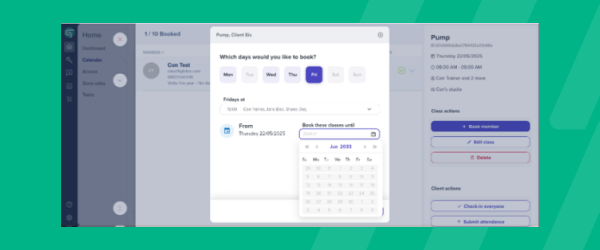
Recurring Bookings let staff set up a client’s regular session once instead of booking it week after week, and the tool now supports scheduling up to two years in advance. From the calendar, staff select a slot, choose one or more days the booking should repeat on, and set how far into the future the series should run, all in a single setup flow. The calendar layout has been cleared up too, so it’s easier to see which slots are part of a recurring series and spot conflicts before they become a problem for a member or a trainer. The bookings work regardless of membership type, whether a client is on a credit pack, an unlimited plan, or pay as you go, and payment can be taken at any point after the booking is created. If a client wants to change their schedule or cancels their membership, staff can bulk delete the entire series from that point forward in one click rather than removing each booking individually. For studios that run loyal, regular attendees, it cuts a repetitive admin task down to a single booking action.
Restricted Memberships Renewal Improvements
Restricted Services Memberships give members access to a defined set of credits, whether that’s a capped number of classes per month, one type of class, or access to specific facilities like a spin or yoga studio. This update focuses on what happens at renewal: when a payment on one of these memberships is written off,… <a class="more-link" href="https://abcfitness.com/?post_type=release_update&p=29124">Continue reading <span class="screen-reader-text">Restricted Memberships Renewal Improvements</span></a>
Restricted Memberships Renewal Improvements
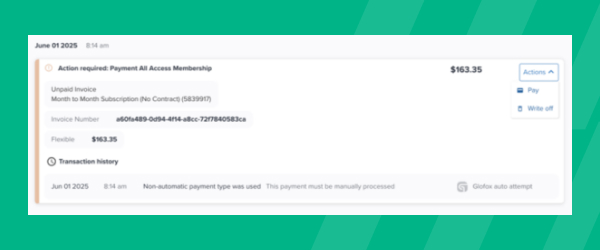
Restricted Services Memberships give members access to a defined set of credits, whether that’s a capped number of classes per month, one type of class, or access to specific facilities like a spin or yoga studio. This update focuses on what happens at renewal: when a payment on one of these memberships is written off, the associated credits now reassign automatically instead of requiring a staff member to step in and adjust the account by hand. That removes a common source of renewal-day friction, where a failed or written-off payment left a member’s credit balance out of sync with what they’d actually paid for. Because Restricted Memberships can combine multiple credit categories, such as class credits and facility credits on the same plan, keeping those balances accurate matters for both billing accuracy and the member experience. For staff, it means fewer manual corrections chasing down credit mismatches after a payment issue. For members, it means their access reflects their membership status without a support ticket.
Updated Next Payment Date
Owners and billing staff can now adjust next payment dates for restricted memberships, not just Unlimited plans. That closes a gap that previously limited flexibility for a common membership type, giving operators more control over billing cycles. It also brings restricted memberships closer in line with how Unlimited plans already work, simplifying how your team… <a class="more-link" href="https://abcfitness.com/?post_type=release_update&p=29122">Continue reading <span class="screen-reader-text">Updated Next Payment Date</span></a>
Updated Next Payment Date
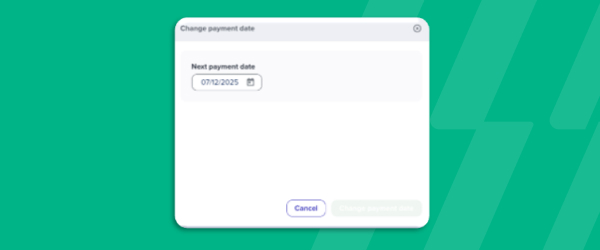
Owners and billing staff can now adjust next payment dates for restricted memberships, not just Unlimited plans. That closes a gap that previously limited flexibility for a common membership type, giving operators more control over billing cycles. It also brings restricted memberships closer in line with how Unlimited plans already work, simplifying how your team manages payment schedules across different membership types. The result is fewer workarounds and more consistent billing management overall.
Door Access Details
Door Access Details give gym and studio owners real-time visibility into who is entering their facility, built on Glofox’s integration with access control provider Kisi. Once a physical controller and reader are installed at your entrance, the system checks each member’s status in Glofox the moment they tap a keyfob, keycard, or their phone at… <a class="more-link" href="https://abcfitness.com/?post_type=release_update&p=29075">Continue reading <span class="screen-reader-text">Door Access Details</span></a>

Door Access Details
Door Access Details give gym and studio owners real-time visibility into who is entering their facility, built on Glofox’s integration with access control provider Kisi. Once a physical controller and reader are installed at your entrance, the system checks each member’s status in Glofox the moment they tap a keyfob, keycard, or their phone at the door, and only grants access if their membership or credit pack is valid. Every access event is recorded automatically as attendance, so you can review who came in and when from your Access reports at any time, without relying on front desk sign-ins. Staff can also grant access manually from a member’s profile by clicking Access, and can manage capacity and access schedules across multiple locations from one place. You can differentiate access by schedule or membership type, such as 24/7 access versus limited hours, and issue temporary passes for guests or short-term visitors. For operators, it turns door access into a data source you can trust for attendance, capacity, and accountability, rather than a manual checkpoint.
Consumer Protections Updates
Transaction reporting now includes new filters, Excel export, customizable views, and a refreshed design, giving owners and finance staff more control over how they review payment activity. A new Summary tab pulls key numbers together for a faster, at a glance overview of transactions. Together, these updates make it easier to find the specific records… <a class="more-link" href="https://abcfitness.com/?post_type=release_update&p=29071">Continue reading <span class="screen-reader-text">Consumer Protections Updates</span></a>
Consumer Protections Updates
Transaction reporting now includes new filters, Excel export, customizable views, and a refreshed design, giving owners and finance staff more control over how they review payment activity. A new Summary tab pulls key numbers together for a faster, at a glance overview of transactions. Together, these updates make it easier to find the specific records you need and export them for further analysis. The improvements are especially valuable for staff who rely on transaction data to support consumer protection compliance and financial reporting.
Updated Transaction Reports
The Transactions Report gives studios a full record of every charge, refund, and failed payment that runs through Glofox, and it’s easy to export as a CSV for whatever spreadsheet tool your business runs on. Each row captures the details you need for bookkeeping, including the date and time, the client and staff member involved,… <a class="more-link" href="https://abcfitness.com/?post_type=release_update&p=29069">Continue reading <span class="screen-reader-text">Updated Transaction Reports</span></a>
Updated Transaction Reports
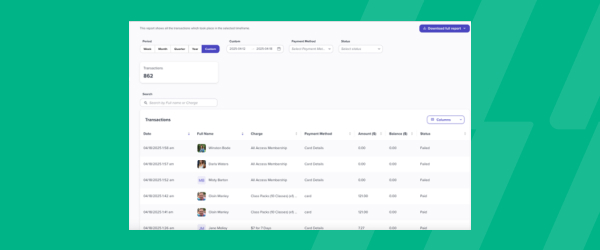
The Transactions Report gives studios a full record of every charge, refund, and failed payment that runs through Glofox, and it’s easy to export as a CSV for whatever spreadsheet tool your business runs on. Each row captures the details you need for bookkeeping, including the date and time, the client and staff member involved, what was purchased, the payment method, and the amount charged, with refunds shown as negative values so you can sum the amount column for a clean revenue total. If your studio uses Glofox Payments, the report goes further, adding fees, net payout amount, and the payout date and ID for each transaction, so you can match what’s in the report to what actually lands in your bank account. You can filter the report to any custom date range, which makes it useful for anything from a quick daily check to a full month end close. Tax is broken out by column as well, covering both a total tax figure and any additional regional taxes you’ve configured. For owners and bookkeepers, it turns reconciliation from a guessing game into a straightforward line by line match.