







Product Updates
Track the evolution of our platform. Filter by release type, product, or timeline to find exactly what you’re looking for.

ABC Insights for Glofox
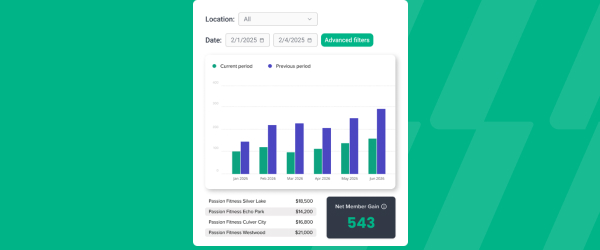
ABC’s flagship reporting product, ABC Insights, is now available to Glofox customers. Owners running multiple locations can use its centralized dashboards to compare performance across every studio or gym in one place. That makes it easier to spot what’s working and what isn’t, rather than piecing together numbers location by location. For multi-site operators, it… <a class="more-link" href="https://abcfitness.com/?post_type=release_update&p=28797">Continue reading <span class="screen-reader-text">ABC Insights for Glofox</span></a>
ABC Insights for Glofox
ABC’s flagship reporting product, ABC Insights, is now available to Glofox customers. Owners running multiple locations can use its centralized dashboards to compare performance across every studio or gym in one place. That makes it easier to spot what’s working and what isn’t, rather than piecing together numbers location by location. For multi-site operators, it turns scattered performance data into a single, clear view for making smarter business decisions.

Short Term Passes
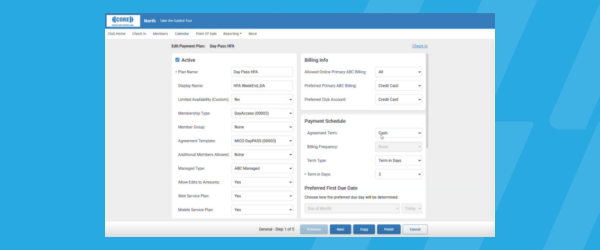
Clubs can now sell flexible access passes for 1 to 30 days, capturing revenue from travelers and short-term visitors with no long-term commitment, and opening a path to convert them into long-term members.
Short Term Passes
Clubs can now sell flexible access passes for 1 to 30 days, capturing revenue from travelers and short-term visitors with no long-term commitment, and opening a path to convert them into long-term members.

AI Workout Builder (Beta)
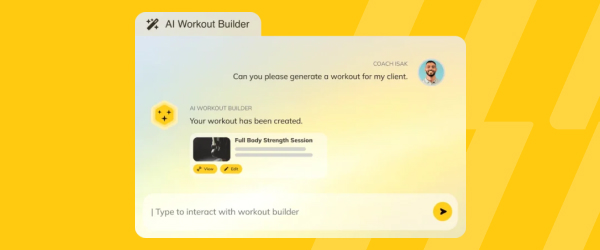
Spend more time coaching and less time programming. AI Workout Builder gets you a personalized, ready-to-assign workout in minutes—built from your client’s real goals, history, and progress. Just type a prompt and it’s built right inside Trainerize.
AI Workout Builder (Beta)
Spend more time coaching and less time programming. AI Workout Builder gets you a personalized, ready-to-assign workout in minutes—built from your client’s real goals, history, and progress. Just type a prompt and it’s built right inside Trainerize.
Create and Complete Tasks from Profiles
Staff can now create and complete tasks directly within a member’s profile, instead of switching over to the separate Tasks tab. That keeps follow-ups, logged interactions, and to-dos attached to the exact member they concern, so nothing gets lost in a general task list. It saves time for front desk and client-facing staff who are… <a class="more-link" href="https://abcfitness.com/?post_type=release_update&p=28829">Continue reading <span class="screen-reader-text">Create and Complete Tasks from Profiles</span></a>
Create and Complete Tasks from Profiles
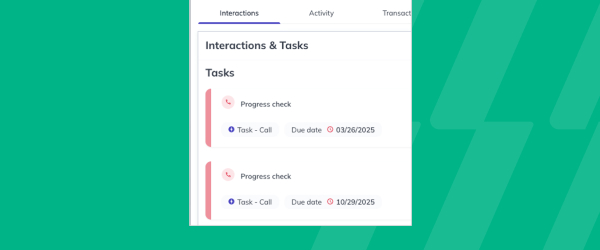
Staff can now create and complete tasks directly within a member’s profile, instead of switching over to the separate Tasks tab. That keeps follow-ups, logged interactions, and to-dos attached to the exact member they concern, so nothing gets lost in a general task list. It saves time for front desk and client-facing staff who are already in a profile handling a request or conversation. Staying organized becomes easier when the tools you need are right where the work is happening.
Pro App: Tags
View Tags in the Pro App brings the tags created on the Glofox Dashboard, like injury notes, belt levels, VIP status, or studio-defined personas, directly onto member profiles and class booking lists inside the Pro App. Tags are manually created labels that studios use to segment and flag important client information, and until now that… <a class="more-link" href="https://abcfitness.com/?post_type=release_update&p=28827">Continue reading <span class="screen-reader-text">Pro App: Tags</span></a>

Pro App: Tags
View Tags in the Pro App brings the tags created on the Glofox Dashboard, like injury notes, belt levels, VIP status, or studio-defined personas, directly onto member profiles and class booking lists inside the Pro App. Tags are manually created labels that studios use to segment and flag important client information, and until now that context lived only on the Dashboard. With tags now visible on the floor, trainers and front-of-house staff can glance at a class list or a member’s profile and immediately see relevant details before an interaction starts. That means fewer awkward moments asking a client to repeat information they’ve already shared, and more personalized conversations, whether that’s checking in on an injury or acknowledging a milestone. Tag creation itself still happens on the Dashboard, but having that information at hand in the Pro App puts it directly in front of the staff running day-to-day sessions.
2-Way SMS Conversations for Australia
2-Way SMS Conversations for Australia extends full functionality of the Conversations tab to studios and gyms operating there, so teams can hold real-time, two-way SMS threads with leads and members rather than sending one-directional texts. All messages live in a single, unified thread inside Glofox, giving staff one place to see the full back-and-forth with… <a class="more-link" href="https://abcfitness.com/?post_type=release_update&p=28825">Continue reading <span class="screen-reader-text">2-Way SMS Conversations for Australia</span></a>
2-Way SMS Conversations for Australia
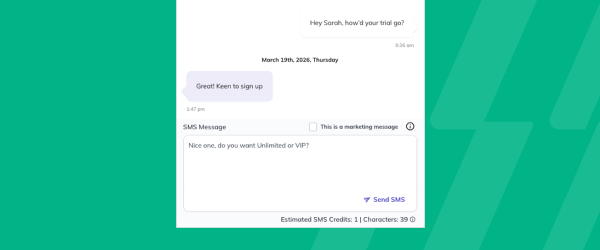
2-Way SMS Conversations for Australia extends full functionality of the Conversations tab to studios and gyms operating there, so teams can hold real-time, two-way SMS threads with leads and members rather than sending one-directional texts. All messages live in a single, unified thread inside Glofox, giving staff one place to see the full back-and-forth with a client instead of piecing together separate texts and emails. This makes it easier to answer questions, confirm bookings, or follow up with leads over SMS, the channel many members already prefer, without switching to a personal phone or a separate messaging tool. For Australian studios and gyms, it closes a gap that previously limited them from using the same conversational messaging workflow already available elsewhere. The result is faster, more natural member engagement handled entirely within Glofox.
Discounts on Joining Fees
Joining Fee Discounts let gyms and studios create fixed-amount or percentage discounts that apply specifically to a membership’s joining fee, separate from the regular membership price. This gives operators a way to run a targeted promotion, such as waiving or reducing a signup fee during a seasonal push, without discounting the recurring price a member… <a class="more-link" href="https://abcfitness.com/?post_type=release_update&p=28823">Continue reading <span class="screen-reader-text">Discounts on Joining Fees</span></a>

Discounts on Joining Fees
Joining Fee Discounts let gyms and studios create fixed-amount or percentage discounts that apply specifically to a membership’s joining fee, separate from the regular membership price. This gives operators a way to run a targeted promotion, such as waiving or reducing a signup fee during a seasonal push, without discounting the recurring price a member pays going forward. Because the discount applies only to the joining fee, staff can attract new signups with a lower barrier to entry while keeping standard membership pricing and revenue intact. It fits alongside Glofox’s existing discount tools, giving sales and front desk teams another lever to close a sale without over-discounting the membership itself. For gyms running frequent promotions, it means the joining fee can flex to match a campaign while the core pricing structure stays consistent.
Store CTA After a Member Books
After a member books their first class, they now see a button prompting them to purchase any required equipment from the Glofox store. That timing puts the offer in front of members exactly when it’s most relevant, right after they’ve committed to attending. For owners, it’s a built-in way to drive additional store revenue without… <a class="more-link" href="https://abcfitness.com/?post_type=release_update&p=28821">Continue reading <span class="screen-reader-text">Store CTA After a Member Books</span></a>
Store CTA After a Member Books
After a member books their first class, they now see a button prompting them to purchase any required equipment from the Glofox store. That timing puts the offer in front of members exactly when it’s most relevant, right after they’ve committed to attending. For owners, it’s a built-in way to drive additional store revenue without staff having to manually follow up on equipment needs. Members get a convenient nudge to make sure they show up prepared for their first class.
Members Report Attrition Percentage
The Members Report now displays an attrition percentage for whatever period a gym or studio selects, showing member loss as a share of the total member base rather than just a raw count. This sits within the existing Members tab of the Reports section, where operators already track new members, demographics, and membership trends. By… <a class="more-link" href="https://abcfitness.com/?post_type=release_update&p=28819">Continue reading <span class="screen-reader-text">Members Report Attrition Percentage</span></a>
Members Report Attrition Percentage
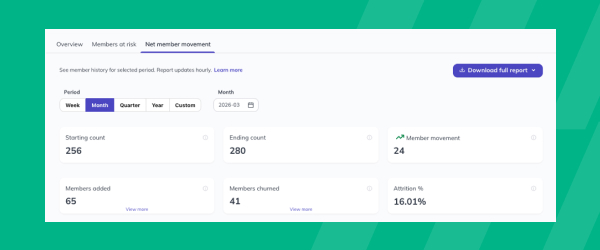
The Members Report now displays an attrition percentage for whatever period a gym or studio selects, showing member loss as a share of the total member base rather than just a raw count. This sits within the existing Members tab of the Reports section, where operators already track new members, demographics, and membership trends. By calculating attrition as a percentage, staff can compare loss rates across different time periods or locations on equal footing, rather than trying to judge whether a raw drop-off number is good or bad relative to a bigger or smaller member base. That makes it easier to spot a retention problem early and react before it compounds, particularly for multi-location operators comparing performance across sites. It turns a number that used to require manual calculation into something staff can read directly off the report.
Sales Report Improvements
The Sales Report has been reorganized with new Revenue Sources and Channels views that replace the previous Breakdown tab, giving gyms and studios clearer insight into where their revenue is coming from and how it’s being processed. The report still opens with an Overview showing gross sales, failed payments, pending payments, forgiven payments, refunds, and… <a class="more-link" href="https://abcfitness.com/?post_type=release_update&p=28817">Continue reading <span class="screen-reader-text">Sales Report Improvements</span></a>
Sales Report Improvements
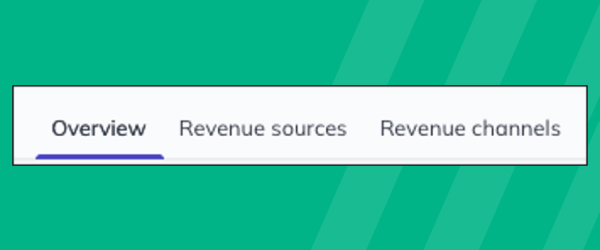
The Sales Report has been reorganized with new Revenue Sources and Channels views that replace the previous Breakdown tab, giving gyms and studios clearer insight into where their revenue is coming from and how it’s being processed. The report still opens with an Overview showing gross sales, failed payments, pending payments, forgiven payments, refunds, and net sales for a selected period, visualized over time. Revenue Sources shows what members are actually spending on, memberships, credit packs and add-ons, classes and appointments, products, custom charges, and upfront fees, while Channels shows how those payments are processed, including by payment method and by recurring versus non-recurring status. That separation makes it easier for operators to answer two different questions at once: what is generating revenue, and how it’s flowing through the business. For teams reviewing performance regularly, since the report refreshes hourly, it turns a single dense breakdown into two focused views that are faster to scan and act on.
Class Performance Report Update
Class Performance Report Improvements let gyms and studios download full class-level data, giving staff a way to work with the numbers outside the dashboard for deeper trend spotting and comparison. The report already shows which classes generate the most bookings and the highest turnout, letting staff sort high to low by whichever metric matters most,… <a class="more-link" href="https://abcfitness.com/?post_type=release_update&p=28815">Continue reading <span class="screen-reader-text">Class Performance Report Update</span></a>
Class Performance Report Update
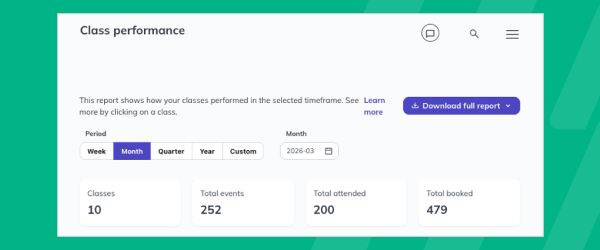
Class Performance Report Improvements let gyms and studios download full class-level data, giving staff a way to work with the numbers outside the dashboard for deeper trend spotting and comparison. The report already shows which classes generate the most bookings and the highest turnout, letting staff sort high to low by whichever metric matters most, and drill into individual class times to see attendance patterns and who trained each session. With exportable data, operators can now line up classes side by side over a chosen time period, spot which sessions are consistently full or underbooked, and build a case for adjusting the schedule or shifting capacity. It’s found in the Reports section under Class Performance, and it turns scheduling decisions that used to rely on gut feel into ones backed by exportable, class-level detail. That makes it easier to justify adding, cutting, or rescheduling classes based on real demand.