







Product Updates
Track the evolution of our platform. Filter by release type, product, or timeline to find exactly what you’re looking for.

ABC Insights for Glofox
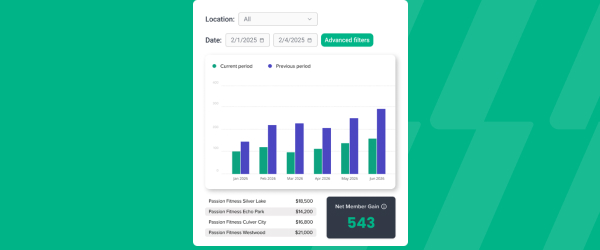
ABC’s flagship reporting product, ABC Insights, is now available to Glofox customers. Owners running multiple locations can use its centralized dashboards to compare performance across every studio or gym in one place. That makes it easier to spot what’s working and what isn’t, rather than piecing together numbers location by location. For multi-site operators, it… <a class="more-link" href="https://abcfitness.com/?post_type=release_update&p=28797">Continue reading <span class="screen-reader-text">ABC Insights for Glofox</span></a>
ABC Insights for Glofox
ABC’s flagship reporting product, ABC Insights, is now available to Glofox customers. Owners running multiple locations can use its centralized dashboards to compare performance across every studio or gym in one place. That makes it easier to spot what’s working and what isn’t, rather than piecing together numbers location by location. For multi-site operators, it turns scattered performance data into a single, clear view for making smarter business decisions.

Short Term Passes
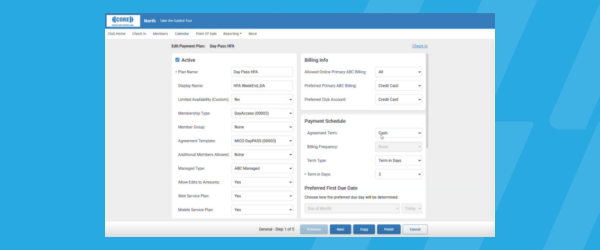
Clubs can now sell flexible access passes for 1 to 30 days, capturing revenue from travelers and short-term visitors with no long-term commitment, and opening a path to convert them into long-term members.
Short Term Passes
Clubs can now sell flexible access passes for 1 to 30 days, capturing revenue from travelers and short-term visitors with no long-term commitment, and opening a path to convert them into long-term members.

AI Workout Builder (Beta)
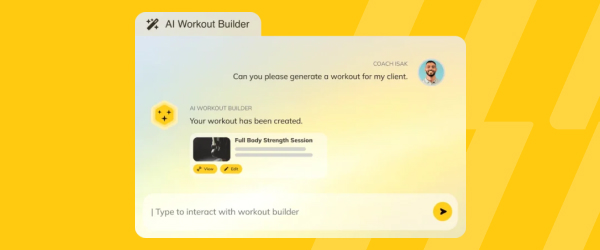
Spend more time coaching and less time programming. AI Workout Builder gets you a personalized, ready-to-assign workout in minutes—built from your client’s real goals, history, and progress. Just type a prompt and it’s built right inside Trainerize.
AI Workout Builder (Beta)
Spend more time coaching and less time programming. AI Workout Builder gets you a personalized, ready-to-assign workout in minutes—built from your client’s real goals, history, and progress. Just type a prompt and it’s built right inside Trainerize.
Tags
Tags let you create and apply custom labels to any member or lead, covering whatever attribute matters to your business, from skill level and belt rank to injuries, VIP status, or GLP-1 use. You can build and manage the full list of tags from Connect > Tags, or create a new one on the spot… <a class="more-link" href="https://abcfitness.com/?post_type=release_update&p=29067">Continue reading <span class="screen-reader-text">Tags</span></a>

Tags
Tags let you create and apply custom labels to any member or lead, covering whatever attribute matters to your business, from skill level and belt rank to injuries, VIP status, or GLP-1 use. You can build and manage the full list of tags from Connect > Tags, or create a new one on the spot directly from a customer’s profile, where it’s applied automatically as soon as you create it. Because tags are manually applied and static, they pair well with Glofox’s existing dynamic filters, like visit count or membership type, so you can build highly specific segments by combining both. Tags also show up on booking lists for classes, appointments, courses, and facilities, so staff can see relevant details about who’s booked in before the session starts. Trainers get the same visibility in the Glofox Pro app, where tags appear on the class list and in the member profile, useful for flagging things like an injury or pregnancy at a glance. It’s a simple way to keep important context about your members visible to the right staff at the right moment.
New Audiences Filter – Membership Plan
Custom Audiences now let you segment members by the specific membership plan they’re on, not just whether they have an active or expired membership. From the Audience tab, click Create Audience and filter by plan alongside the other criteria already available, like lead type, lead source, visit count, or tags. That opens up messaging you… <a class="more-link" href="https://abcfitness.com/?post_type=release_update&p=29065">Continue reading <span class="screen-reader-text">New Audiences Filter – Membership Plan</span></a>
New Audiences Filter – Membership Plan
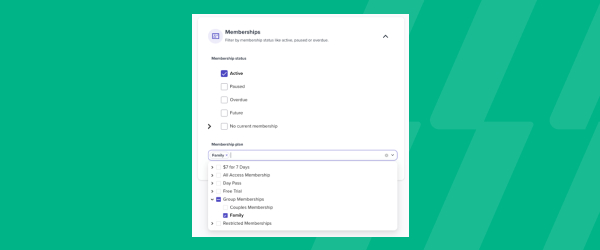
Custom Audiences now let you segment members by the specific membership plan they’re on, not just whether they have an active or expired membership. From the Audience tab, click Create Audience and filter by plan alongside the other criteria already available, like lead type, lead source, visit count, or tags. That opens up messaging you couldn’t easily target before, such as a VIP communication for your premium plan holders, an upsell campaign aimed at members on a lower tier, or a plan-specific update that only applies to one group. Once built, the audience previews how many customers currently qualify, so you know your reach before you send anything. From there, you can use it directly in Connect > Campaigns to send a one-off email to exactly that group. For studios running multiple membership tiers, it means every campaign can speak to the plan a member is actually on instead of a one-size-fits-all message.
Glofox x ABC Trainerize Integration
Combines Glofox’s studio management tools with ABC Trainerize’s digital coaching capabilities. A live, one-way sync transfers client data from Glofox to ABC Trainerize, plus automated membership and appointment syncing.
Glofox x ABC Trainerize Integration
Combines Glofox’s studio management tools with ABC Trainerize’s digital coaching capabilities. A live, one-way sync transfers client data from Glofox to ABC Trainerize, plus automated membership and appointment syncing.
New Payment Experience
Give members the fast, frictionless checkout they expect from any modern retail brand, so they purchase more, more often, while your team spends less time untangling transactions. The payments experience is now a single-page checkout with a clean, responsive interface, built on a 98% collection rate, so it holds up whether members are paying at… <a class="more-link" href="https://abcfitness.com/?post_type=release_update&p=29073">Continue reading <span class="screen-reader-text">New Payment Experience</span></a>
New Payment Experience
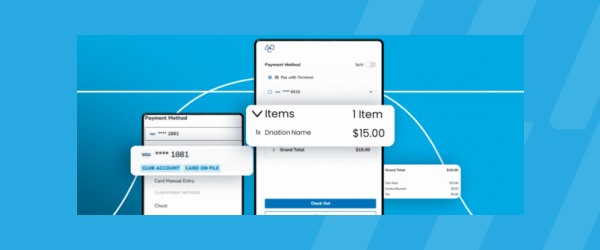
Give members the fast, frictionless checkout they expect from any modern retail brand, so they purchase more, more often, while your team spends less time untangling transactions. The payments experience is now a single-page checkout with a clean, responsive interface, built on a 98% collection rate, so it holds up whether members are paying at the desk or on the go. A split toggle lets them divide payments across services or process returns without extra admin work
Book a Service Right from the Confirmation Page
Turn a single booking into a bigger sale, and a smoother member experience, without adding a single extra step for your team. Right from the confirmation screen, members can book another service on the spot instead of navigating back through menus, making it easier to complete a purchase and easier for you to upsell recurring… <a class="more-link" href="https://abcfitness.com/?post_type=release_update&p=29059">Continue reading <span class="screen-reader-text">Book a Service Right from the Confirmation Page</span></a>
Book a Service Right from the Confirmation Page
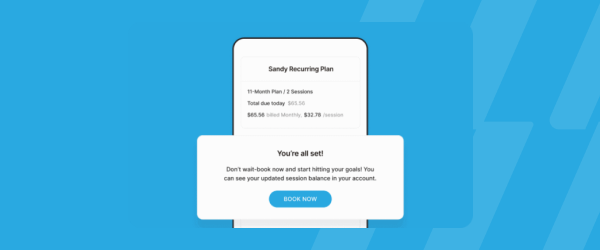
Turn a single booking into a bigger sale, and a smoother member experience, without adding a single extra step for your team. Right from the confirmation screen, members can book another service on the spot instead of navigating back through menus, making it easier to complete a purchase and easier for you to upsell recurring services or credit packs.
DXFactor Click2Save Partnership
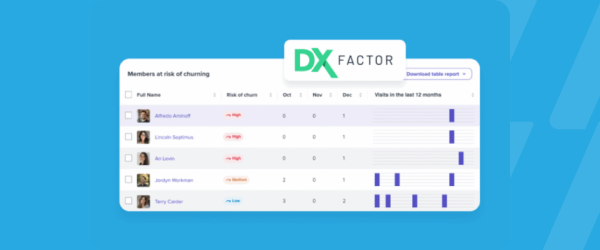
Protect recurring revenue and stay ahead of Click-to-Cancel regulations, without adding manual work to your team’s plate. Click2Save integrates directly into the cancellation flow to proactively re-engage at-risk members with tailored offers, a billing hold, a promotional discount, or a flexible membership transfer, before they walk out the door. Built on DXFactor’s Outcomes Micro Agents… <a class="more-link" href="https://abcfitness.com/?post_type=release_update&p=29049">Continue reading <span class="screen-reader-text">DXFactor Click2Save Partnership</span></a>
DXFactor Click2Save Partnership
Protect recurring revenue and stay ahead of Click-to-Cancel regulations, without adding manual work to your team’s plate. Click2Save integrates directly into the cancellation flow to proactively re-engage at-risk members with tailored offers, a billing hold, a promotional discount, or a flexible membership transfer, before they walk out the door. Built on DXFactor’s Outcomes Micro Agents Platform, it’s a fully automated, compliant retention layer inside your existing workflow
Report Upgrades – Failed Payments, Late Cancellations, and Strikes
These three reports now load faster and read more clearly, with customizable tables as part of our ongoing report improvements.
Report Upgrades – Failed Payments, Late Cancellations, and Strikes
The Failed Payments, Late Cancellations, and Strikes reports have all been upgraded as part of Glofox’s ongoing work to modernize reporting across the dashboard.
Each report now loads faster, which matters when you’re checking in on overdue accounts or no-show patterns during a busy shift rather than waiting on a slow page. The tables are also easier to read at a glance, with a cleaner layout that surfaces the information you actually need without extra digging. On top of that, all three reports now support customizable tables, so you can adjust the columns shown to match how your team tracks failed payments, late cancellations, or strikes against your policies.
These updates sit alongside similar improvements Glofox has been rolling out across its reporting suite. For front desk and management teams, it means less time waiting on reports and more time acting on what they show.
Improved Integration with Trainerize
PT studios get a smoother hybrid coaching experience: sell a membership in Glofox and Trainerize handles the syncing and program delivery.
Improved Integration with Trainerize
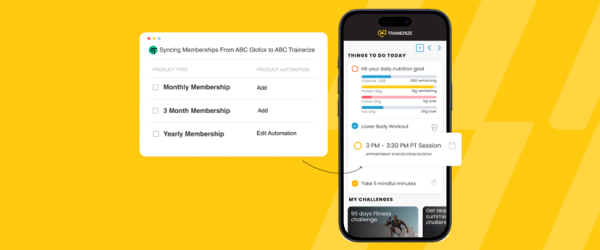
The Glofox and Trainerize integration has come out of beta with automatic member data synchronization built in, giving personal training studios a smoother way to run hybrid coaching.
Sell a membership in Glofox and, once you’ve selected which membership types or plans should sync, Trainerize picks up the client automatically instead of requiring a manual export and import. New clients get an email prompting them to set up their Trainerize account and download the app, so they can start receiving workout and nutrition programs without extra setup work from your team.
Studios that don’t yet have a Trainerize account can request the integration, get set up with login details, and upgrade to the Studio plan using a provided coupon code, while existing Trainerize customers get an automatically generated API token instead of a manual request process. A bulk import feature also validates and syncs client details in one pass, reducing the manual entry errors that used to come with onboarding a roster of clients.
For studios offering personal training alongside group classes, it means selling in Glofox and coaching in Trainerize finally works as one connected experience rather than two separate systems to manage.
Member Activity in the Pro App
View a member's full activity timeline, visits, bookings, and attendance, right in their profile, so on-floor staff can personalize conversations and recommendations.
Member Activity in the Pro App
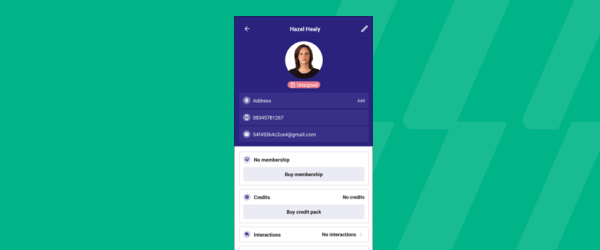
Staff using the Glofox Pro app can now open any member’s profile and see their full activity timeline, covering visits, bookings, and attendance, all in one place.
It sits within the Clients tab of Glofox Pro, alongside the rest of what staff can already do from a member’s profile, like adding payment methods, buying credit packs, or logging an interaction. You can filter that activity list by event date, newest or oldest first, or by when it was last created, so you can quickly spot patterns like a member who’s been coming in consistently or one who’s recently gone quiet. For on-floor and mobile-first staff without a reception desk to lean on, that timeline turns a quick glance at a profile into real context for a conversation, whether that’s recommending a class based on what they usually book or checking in on someone who hasn’t been in for a while.
It’s part of what makes Glofox Pro function as a full front desk replacement rather than just a schedule viewer. The result is a more personal member experience, driven by staff who can see the same history a manager would from the dashboard.
Edit Appointments
Staff can edit appointments right from the calendar on the Glofox Dashboard, changing the date, time, or trainer without deleting and recreating the booking.
Edit Appointments
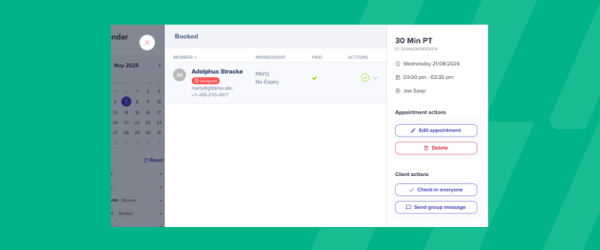
Staff can now edit an existing appointment directly from the calendar on the Glofox Dashboard, changing the date, time, or assigned trainer without cancelling the booking and starting over.
Select the appointment on the calendar, open the slide out panel, click Edit Appointment, make the change, and save it, all without leaving the calendar view. This is especially useful when a trainer’s availability shifts or a client needs to move their session, since the alternative was always deleting the original booking and rebuilding it from scratch, credits and all. The edited appointment replaces the previous record in the client’s Activity tab, so their history stays accurate and doesn’t show a cancelled booking alongside a new one.
Note that this functionality currently lives on the Dashboard rather than the Pro app, and it’s possible to edit an appointment to a date that falls outside a client’s membership eligibility, so it’s worth double checking access before confirming a change.
For front desk and admin staff, it turns what used to be a two-step fix into a single edit.
ABC Trainerize Business
A new all-in-one growth add-on bundling prospect booking, payments-on-booking, and referral tracking — built for coaches juggling too many separate business tools.
ABC Trainerize Business
A new all-in-one growth add-on bundling prospect booking, payments-on-booking, and referral tracking — built for coaches juggling too many separate business tools.
Daily Production Report
A new Insights report combines agreement and revenue data into a single view, letting owners assess daily sales performance, audit activity like freezes and returns, and spot top performers in one dashboard.
Daily Production Report
A new Insights report combines agreement and revenue data into a single view, letting owners assess daily sales performance, audit activity like freezes and returns, and spot top performers in one dashboard.
Simplified Purchase of Recurring Services
When a member tries to book a service with no session credits left, they’re now prompted to purchase one directly, simplifying the path to checkout and easing the buying process.
Simplified Purchase of Recurring Services
When a member tries to book a service with no session credits left, they’re now prompted to purchase one directly, simplifying the path to checkout and easing the buying process.
Updated Cancellation Wording in Member App
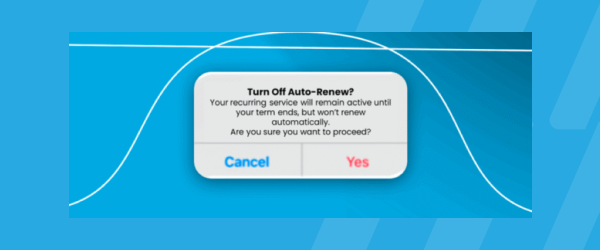
Give members the transparency and control they expect, and reduce compliance risk in the process. Clearer, refined auto-renew policy language means members know exactly what they’re agreeing to and what payments remain before they cancel, so there’s less confusion and fewer disputes down the line.
Updated Cancellation Wording in Member App
Give members the transparency and control they expect, and reduce compliance risk in the process. Clearer, refined auto-renew policy language means members know exactly what they’re agreeing to and what payments remain before they cancel, so there’s less confusion and fewer disputes down the line.